

 The 2026 Drupal Business Survey is open. Your response will help shape the future of the Drupal business ecosystem.
Hey.
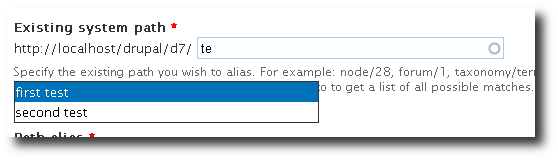
While working on a module I noticed that the autocomplete popup isn't positioned correctly always.
If the text field isn't placed at the left side of a container the popup won't be displayed attached to it.
I could reproduce this in Firefox, Safari and Chrome but not IE6 (all Windows XP). This affects Drupal 6 also.
If I change function populatePopup in autocomplete.js it works in all browsers noted above but not in IE6:
  $(this.popup).css({
    left: this.input.offsetLeft + 'px',
    top: this.input.offsetTop + 'px',
    marginTop: this.input.offsetHeight + 'px',
    width: (this.input.offsetWidth - 4) + 'px',
    display: 'none'
  });
| Comment | File | Size | Author |
|---|---|---|---|
| #36 | autocomplete-popup-625170-36-D6.patch | 1016 bytes | jwilson3 |


Comments
Comment #1
ckidowThis works only if the autocomplete field is not positioned directly at the left bottom...
Comment #2
stborchertThis code will fix it and make it work in all browsers I can test here (WinXP: IE6, Firefox 3.5, Safari, Chrome):
I will create a patch later today based on the code above.
Comment #3
stborchertCreated a patch based on the code above (with minor modification).
Attached are screenshot of the current and the patched behavior.
Comment #4
roborn commentedI detected this bug also in IE8, so I changed the patch a little.
I tested the patch on IE6, IE7, IE8, Chrome 3 and FF 3.5 and it is working fine.
Comment #5
stborchertIf the problem exists in IE8 this should be
<= 8.Comment #6
roborn commentedthe if condition excludes the browsers that do not have this issue, so the value can not be equal to 8.
Comment #7
MichaelCole commented#4: 625170_autocomplete-popup-position_4.patch queued for re-testing.
Comment #8
NiklasBr commentedThe patch solves the trouble I had with the positioning. Thanks!
Comment #9
roborn commented@NiklasBr: care to mark as RTBC? Thanks.
Comment #10
NiklasBr commentedSure. But I am not a core contributor… Hope that is ok.
Comment #11
casey commentedCan't you do it without browser detection?
Comment #12
roborn commentedYes, but we need to set input.form-autocomplete position to relative, so IE6/7 get the offsetTop and offsetLeft right.
Comment #13
stborchertHey.
Thanks for pushing this.
Unfortunately the popup isn't correctly positioned in IE7 (screen captures taken from IE7 on vista in a virtual machine).
Firefox, Safari, Chrome, IE6 and IE8 are behaving as expected (as far as I can tell).
You can retest the behavior by using the module MPAC.
Comment #14
roborn commentedI believe this is the issue with IE7: http://bit.ly/9ZsqJl
Forcing the hasLayout on div#page resolves this issue for Seven theme, but it's better to rely only on autocomplete.js to get the position right.
Since the popup is always within the same containing DOM element as the autocomplete input, we can use jQuery's position().
Comment #15
casey commentedLooking good. Also added correct width.
Comment #16
drupalina commentedFor what it's worth, I've implemented the patch in #15 on my live 6.17 installation. (I ignored the line that says
this.popup = $('<div id="autocomplete"></div>')[0];because I'm assuming that's D7)The result: it works! Tested in FF3, Safari and Chrome and IE6 (all Win XP). (All I wanted is to display the forms inline with their labels and that created problems with autocomple positioning.) But there's a small hickup in IE6: if you have another form underneath the autompleting one that is a select form, then the list of autocomplete suggestions appears underneath that other select form. I don't know if I should add a z-index or overflow css somewhere of not.
Other than that, just letting you know that the patch in #15 seems to work for D6.17 . I didn't test any other patches here.
It would be nice to have a solution to this included in the future D6.x releases too, cause I think many people will stick with D6 for another 2 years.
Comment #17
stborchert#15 is RTBC
Comment #18
sunBadly needed.
The variable name should be $input, if it is a jQuery object.
So, position is correct, but input is not.
So does #autocomplete already receive position:absolute and it's parent container position:relative ?
Powered by Dreditor.
Comment #19
vlad.k commentedI applied the patch in #15 manually to Drupal 6.19 and it works.
The code inside
Drupal.jsAC.prototype.populatePopup = function () {is sligthtly different in Drupal 6.19 so I had to make the changes from the patch manually, but it works so this should also be commited to Drupal 6.Comment #20
sunAlso, whenever you use parseInt(), you have to specify the data value format.
Comment #21
stborchertpatch looks good and works. Thanks, sun.
Comment #22
amateescu commentedThis needs to be fixed in D6 also, so here is a patch :)
Comment #23
dries commentedCommitted to CVS HEAD. Thanks.
Comment #24
xmacinfoNow to D6. See #22.
Comment #25
amateescu commentedProper patch this time.
Comment #26
petr.gorodechnyj commentedLast patch didn't help me. I have Locations module installed and I'm collecting user's city information using autocomplete field. List of cities displays right under label for input field. After applying this patch autocomplete div started to appear somewhere right from input if FF3.5 and nothing changed in Chrome 7.
So the following js code became an answer for me:
I just wrote it in my helper module js and load it in footer of page. Could be usefull for someone.
Comment #27
roborn commented#25 patch works for Firefox 3, 3.5 and 3.6 + Chrome 7 & 8 + Internet Explorer 6 to 9 on Windows.
@petr.gorodechnyj I test it with the autocomplete from Location module, and everything looks ok. Did you test it with Garland or other theme distributed with Drupal?
Comment #28
petr.gorodechnyj commented@roborn: Yeah, that was with Fusion Starter.
Comment #29
roborn commentedMmm... I test it again using Fusion Starter, and everything is working as expected.
Comment #30
dom. commentedHi!
Will this be integrated in core ?
How to correct it from a module without patching? I can only see using a js file to change #autocomplete css property (as what the patch does). Would it be a nice way to do it?
I am the new maintainer of Search Autocomplete module and so porting it to D6 and D7. I want to correct this in the D6 version. (haven't try in D7: has the issue been corrected ?)
Thx,
Miroslav
Comment #31
hutch commentedI tried the code in #26, works for me, with a few minor adjustments.
You could add that js to this project, I reckon it would solve at least some of the positioning problems.
Comment #32
xmacinfoComment #33
kadimi commentedThis worked for me (CSS: .form-item{position:relative;})
http://drupal.org/node/1218684
Comment #34
McChen commented#25 works for me.
Comment #35
lumbric commentedAs mentioned in #33, there is a seperate bug report.
I solved the issue using the patch in #11 in http://drupal.org/node/1218684
Comment #36
jwilson3D6 patch in 25 needed a re-roll.