

 Come together with the global Drupal community in Rotterdam, 28 Sept – 1 Oct 2026. Sessions, contribution, connection, and Early Bird savings until 8 June.
[I saw a similar ticket already closed as "fixed" but just created this error - it's easily recreated.]
If I'm logged into Drupal.org, I can't post a comment to a group forum, etc. It requires me to log in. The log in page gives me the appropriate (albeit annoying) access denied message because I'm already logged in. But, I get the error as seen in the attached image. It simply won't let me log in or use the session I've already got in Drupal.org to post in a group.Drupal.org.
This appears badly broken to me.
| Comment | File | Size | Author |
|---|---|---|---|
| #8 | drupal_groups.jpg | 49.69 KB | 5dayapp |
| drupal_groups_login_problem.jpg | 125.79 KB | 5dayapp |

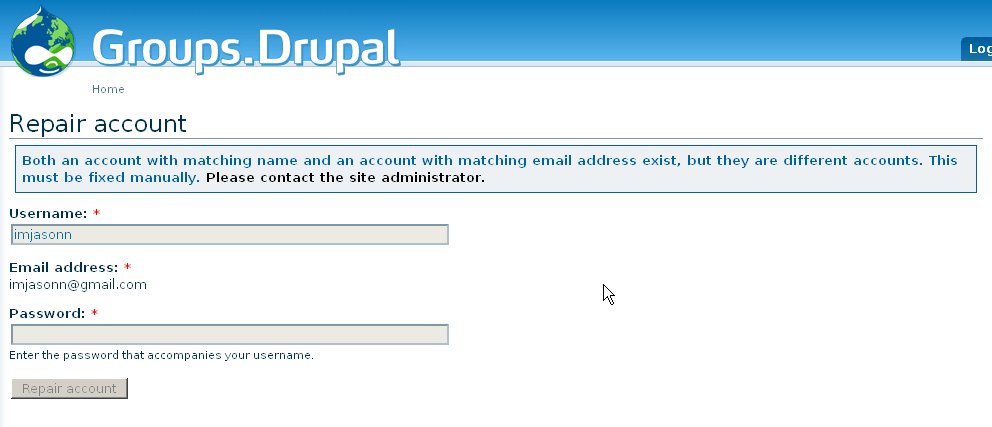

Comments
Comment #1
avpadernoI am moving the report to the correct queue, as this issue is an infrastructure issue.
Comment #2
5dayapp commentedThanks. Seemed like a webmaster thing to me... I'll keep this in mind next time I report something (I tend to keep my mouth shut).
Comment #3
avpadernoIn http://groups.drupal.org/node/26125 it is reported to be an infrastructure problem.
Comment #4
maheshsonline commentedI'm also facing the same problem with my i.d - maheshsonline . I can log in to drupal.org. But when ever i try to log in to groups.drupal.org i get the same error message on top of the page as given by imjasonn above. Hope this will be fixed soon.
Comment #5
5dayapp commentedDoesn't appear fixed yet. Still getting same error.
Comment #6
gregglesSorry for the delay on fixing these issues. Please see the new post about how you can resolve this directly yourself: http://groups.drupal.org/node/36120
If that system doesn't work for you please post back here with details on the problem.
Comment #8
5dayapp commentedGreggles, I still can't resolve my account conflict for Drupal groups. And, I've recreated the problem w/ a new account on drupal.org.
Issue 1: I don't know what my drupal groups ID is, and can't find it via going to the typical /user local because I can't log in. Vicious circle.
Issue 2: A new Drupal.org user gets the same error, since he has yet to create a Drupal Groups account, the self-help also fails.
Oddly, I still receive updates from my Drupal Groups preferences. So, I still have a Drupal Groups account.
BTW, my username is imjasonn and you're also welcome to just fix me :)
Comment #9
greggleshttp://www.google.com/search?q=site%3Adrupal.org%20imjasonn found http://drupal.org/user/11520/track and http://groups.drupal.org/user/1249
Are those the accounts you want synched?
Comment #10
bdragon commentedThe conflict that is being detected is between
http://groups.drupal.org/user/1249 (imjasonn) -- username match
and
http://groups.drupal.org/user/333 (tekany) -- email match
Additional related account found while checking for conflicts:
http://groups.drupal.org/user/31786 (remote login?)
http://drupal.org/user/161029 (spurious user)
I note that you also recently recreated the tekany account on drupal.org, which made things worse.
I went through and manually set both imajasonn and tekany to the respective drupal.org emails.
PLEASE log in and out of BOTH accounts on the http://groups.drupal.org/ login form to allow the autorepair routine to finish fixing the synchronization BEFORE you make any additional changes to email addresses on any of your accounts.
Comment #11
5dayapp commentedSorry for my unresponsiveness. I'm just like you guys - working :)
Thanks! I appreciate that. I didn't realize I'd jacked up the email (thought it would test that field -- maybe should in the future). I was trying to create a fresh account and didn't realize I'd added yet another broken element to the problem.
I'll add that to my local documentation and try to avoid making more messes in the future. I'll also note this chink in the Drupal armor for my Drupal projects.
Comment #12
bdragon commentedImjasonn looks like it got repaired successfully. Please log into tekany as well.
Yeah, bakery gets really fiddly with email addresses because the email address basically takes the place of the password when logging in via the cookie. (There's more going on behind the scenes, but this is why the logins fail.)
Also, only one account on each site can have a certain email address. So, if another account on the subsite has the email address you used on the main site, the repair won't be able to fix it as now THREE accounts are involved (the third account is blocking the second account from changing its email to match the first account), and at that point it's a good idea to get an admin to look at it anyway, so it bails out with an error.
Comment #13
avpaderno@bdragon: So, basically, to synchronize the accounts is enough to put the same email in both the d.o, and g.d.o accounts. Did I understand well?
Comment #14
greggles@kiamlaluno - somewhat. We also need to run a database update. If you manually fix accounts please be sure to ping me or josh_k (or maybe bdragon, if he feels up to it) to run the database synch scripts.
Also, this issue appears to be fixed.
Comment #15
avpadernoThanks, greggles. I will remember that when I do the next fix (hoping there are not more accounts to fix :-)).
Comment #17
avpaderno