Today i updated to the new version and now #navigation ul from root-candys style.css has circles instead of 'none' for list-style-type. it seems that this is a fall-back scenario to system.css (as i can see in firebug, but i don't know to much about css hierarchies).
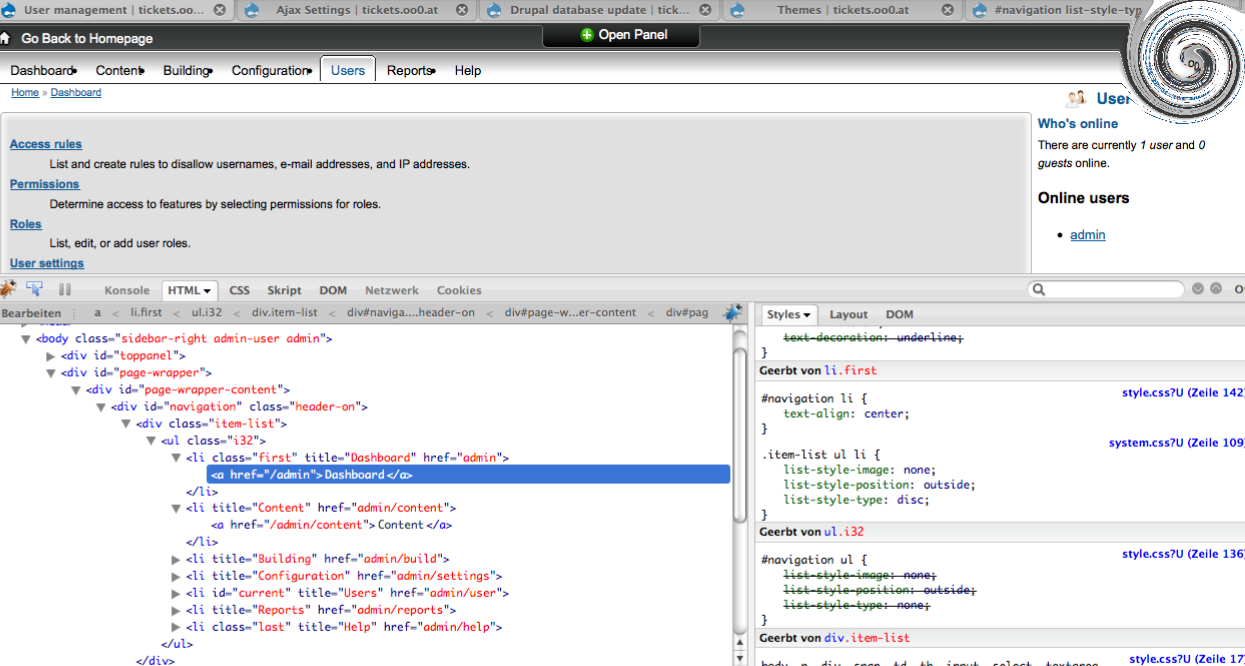
in firebug i see this:
.item-list ul li {
list-style-image:none;
list-style-position:outside;
list-style-type:disc;
}
...
#navigation ul {
<del>list-style-image:none;
list-style-position:outside;
list-style-type:none;</del>
}
but if i open the file modules/system/system.css i can't find this part. i only get this:
.item-list ul li {
  margin: 0 0 0.25em 1.5em; /* LTR */
  padding: 0;
  list-style: disc;
}
also if i try to change the relevant parts in root-candys style.css there is no effect. for example:
#navigation .item-list {
  font-size: 94%;
  line-height: normal;
  list-style-type:none;
}
are there any better stylists or themers out there ? muchas gracias!


Comments
Comment #1
sign commentedhave you tried to do a hard refresh in your browser? ctrl+f5, as there were some changes in css
Comment #2
carligraph commentedyes i tried it also in another browser an drupal cache is disabled. but style.css seems to be overwritten by system.css
maybe its only aproblem of my multisite environment. anyway, i dont find any other system.css
Comment #3
sign commentedcan I see it somewhere?
Comment #4
carligraph commentedsorry, this is only used for the admin-section ;)
but maybe a screenshot can give you some impressions..
ok the url is out now (but must not read by everything), see firefox tabs and go to the url/admin for example
Comment #5
sign commentedI see you have a modified version of rootcandy rigth? or are you using colour module?
btw can you login here http://sotak.co.uk/rootcandy/demo
with user: demo and pass: demo
and visit http://sotak.co.uk/rootcandy/demo/admin
and see if you can spot the problem there? I can't replicate it
Comment #6
sign commentedok I see you are using a modified version of rootcandy through color wheel, try to rebuild that theme via visiting the theme settings, set it to defaul color, save and then create your theme again, it will use the new styles
Comment #7
carligraph commentedi also cant figure it out. maybe it depends on the multisite setup..
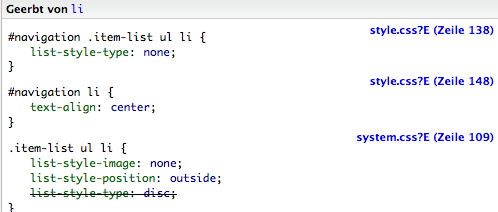
the difference at your site is visible in the attachment. if i debug my site i dont have the "#navigation .item-list ul li {" - element.
thanks for that much replys. however, its not that much important i only wanted to archive it, if someone has the same issue.
Comment #8
carligraph commentedit was only a quiz:you gained 3 million ;)
with your solution it works now, thanks!
Comment #9
sign commentedok great,
thanks for pointing that out tho
btw its a good practice to keep issues open, they will be automaticaly closed after 14 days inactivity when status is fixed. also others can find it in issues while its marked as fixed...
Comment #10
carligraph commentedah, ok thanks one more - that was my intention too!