@zoo33.
using ffmpeg_converter.module, i have to use flvtool2 to inject metadata into my flv files. i'd created an issue the other time regarding the problem with the custom command in ffmpeg_wrapper.module. http://drupal.org/node/598776
thanks to arthur, he removed the pipe and semicolon restrictions in the custom command field at ffmpeg_wrapper, but i'm still having problem when none of my upload files get converted whenever i create the content with flvtool2 command.
so, arthur helped me troubleshoot and traced down the problem.
after lots of trying, he suggested inserting this command at line 927 of ffmpeg_converter.module file.
drupal_set_message(print_r($command, true));
and this is what i got on my browser screen as soon as i run cron after creating video content:
/usr/local/bin/ffmpeg -formats/usr/local/bin/ffmpeg -i "sites/default/files/justdoit_0.mov"/usr/local/bin/ffmpeg -formats/usr/local/bin/ffmpeg -i "sites/default/files/justdoit_0.mov"/usr/local/bin/ffmpeg -i sites/default/files/justdoit_0.mov -ab 64 -ar 44100 -b 1000 -r 29 -nr 1000 -g 500 -s 704:576 -qmax 2 /tmp/justdoit_0.flv; /usr/bin/flvtool2 -U /tmp/justdoit_0.flv
so it is clearly that ffmpeg_converter.module is giving problem?




Comments
Comment #1
zoo33 commentedHi!
The output seems like the commands you'd typically send to FFmpeg when converting a file: checks of file size, file type etc, and then the actual conversion. The strange thing is that only the actual converting command (/usr/local/bin/ffmpeg -i sites/default/files/justdoit_0.mov -ab 64 -ar 44100 -b 1000 -r 29 -nr 1000 -g 500 -s 704:576 -qmax 2 /tmp/justdoit_0.flv; /usr/bin/flvtool2 -U /tmp/justdoit_0.flv) should show up in that location. What's also strange is that the commands are glued together without whitespace/blank lines separating them. Or is that just a copy-paste problem?
Printing out the $command variable should give you exactly the same information that you'd get from the debug/logging feature. Please check there too and report back about what commands run and if they are properly separated.
Comment #2
sadist commentedi'd sent you an email. thanks!
Comment #3
zoo33 commentedTo clarify, when I was talking about "printing out $command" I was referring to the line of code you got from Arthur. There is a debug setting which will let you see the contents of that very same variable in the watchdog. So my question was, does it show the same values there?
You write in your email that the commands above are output exactly like that, glued together. This is a mystery to me.
I think in order to debug this we need to look at your configuration. You can help by adding yet another line of code to the one you got from Arthur:
These two lines should come after the line with
$command = implode(" ", $options);.And to be clear: We want the $command variable to contain only this part:
-i sites/default/files/justdoit_0.mov -ab 64 -ar 44100 -b 1000 -r 29 -nr 1000 -g 500 -s 704:576 -qmax 2 /tmp/justdoit_0.flv; /usr/bin/flvtool2 -U /tmp/justdoit_0.flvNote: the following part should *not* be included in your custom command setting:
/usr/local/bin/ffmpegThat's about as much as I can do right now. Please report back and I'll check on your progress as soon as I can.
Comment #4
sadist commentedok. so i placed the 2 lines after implode command:
then i created a new video content and run cron. here is what i got after that.
drupal msg:
ffmpeg message at log entries:
i attached 2 screenshots.
Comment #5
sadist commented@zoo33
any solution or news on this yet?
Comment #6
zoo33 commentedThat looks good actually (except for the "failed unexpectedly" part and the "1" messages). Have you double checked FFmpeg Wrapper's setting (
/usr/bin/ffmpegor similar)? If you add this part to the command you should be able to run that in a terminal and see what happens:/usr/bin/ffmpeg -i sites/default/files/justdoit_3.mov -ab 64 -ar 44100 -b 1000 -r 29 -nr 1000 -g 500 -s 704:576 -qmax 2 /tmp/justdoit_3.flv; /usr/bin/flvtool2 -U /tmp/justdoit_3.flvBut maybe you've already done that? If that runs successfully there is probably a problem with file permissions or PHP security settings. You can also try FFmpeg Wrapper's testing feature, which should give you a more "real world" test environment.
The "1" messages have to come from another drupal_set_message() call somewhere. If not, something's very broken. Do you know where they come from?
The second screenshot shows the same wierd text you pasted in your first post. Does that still show up? To me that looks like there is some extra
printcommands or similar in ffmpeg_wrapper.module. Maybe it's time to install a fresh copy of these modules?One last thing, take a look in /tmp and make sure that justdoit_3.flv hasn't actually been converted. There could be a problem with the error reporting.
Comment #7
sadist commented1) thanks for your reply. the "1" messages was actually by ffmpeg_wrapper earlier, it has been removed already.
2) converting with shell has never been problem for me and just to be sure, i tested it again few minutes ago.
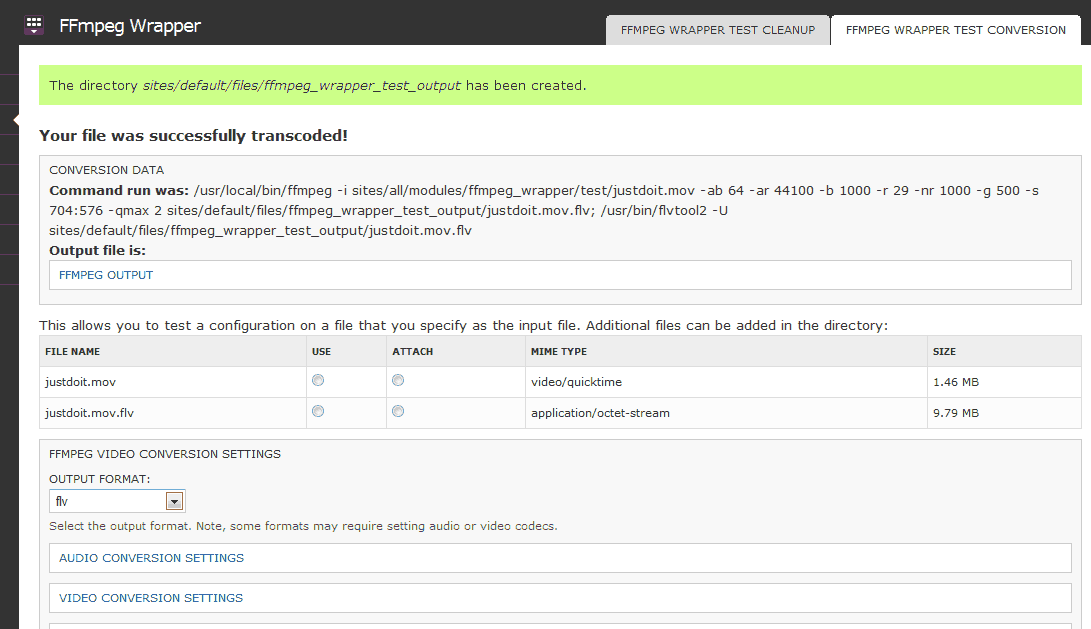
3) in ffmpeg wrapper test, the conversion went thru without problems either with or without custom command. select 'use', and click 'transcode'. but (may has nothing to do), when i tested it WITH custom command & flvtool2, i can't seems to expand FFMPEG OUTPUT fieldset, unlike if it's WITHOUT custom command.
4) at /tmp folder, converted file is there even the node creation failed.
Comment #8
zoo33 commentedOK, we're making progress.
It seems like the second command you put into your custom command field does something to FFmpeg Wrapper's result handling. I think the problem is that the shell output from FFmpeg is lost and replaced by that of flvtool (which is empty?). Also, you say that the output file is actually generated sucessfully.
If this is true, you should be able to make FFmpeg Converter work by changing its $output check so that it's strictly typed. The conversion function in FFmpeg Wrapper returns false on failure, and the command's output on success. If the output is empty, that is equal to false in the PHP world.
So on this row, just a few rows below where you put the other stuff before:
if ($output == false || !file_exists($output_file) || filesize($output_file) == 0) {we'll add an equal sign like this:
if ($output === false || !file_exists($output_file) || filesize($output_file) == 0) {See if that works.
Comment #9
sadist commentedIT WORKS!!! Thank you so much! but with 1 little problem ;D
at my filefield settings, i set the file to be uploaded to 'sites/default/files/video' folder, which it does. but ffmpeg_converter saves the converted flv file and the 3 thumbnails in 'sites/default/files'.
Comment #10
zoo33 commentedGreat! I'm committing the change in #8.
I'll create a new issue for your second problem.