Closed (fixed)
Project:
Agenda
Version:
6.x-1.6
Component:
Code
Priority:
Normal
Category:
Bug report
Assigned:
Unassigned
Reporter:
Created:
13 Nov 2009 at 18:12 UTC
Updated:
6 Jan 2010 at 12:20 UTC
Jump to comment: Most recent file


I had run into this problem before, no CSS styling for anonymous users, but I fixed it in permissions. Well, now no users (anon or authenticated) are getting any styling, just raw text. The style sheet is not loading at all. All other style sheets are loading though. Any ideas?
Tested in: FF, IE, Safari
| Comment | File | Size | Author |
|---|---|---|---|
| #29 | Screen shot 2009-12-23 at 4.06.38 AM.png | 78.55 KB | edyoung75bfc |
| #29 | Screen shot 2009-12-23 at 4.07.07 AM.png | 78.06 KB | edyoung75bfc |
| #29 | Screen shot 2009-12-23 at 4.06.16 AM.png | 266.1 KB | edyoung75bfc |
| #29 | Screen shot 2009-12-23 at 4.06.47 AM.png | 160.9 KB | edyoung75bfc |
| #13 | cssaggon.jpg | 92.78 KB | Branjawn |



Comments
Comment #1
Branjawn commentedStill trying to resolve this, please help.
Comment #2
Branjawn commentedComment #3
Branjawn commentedHello all. So it turns out I was calling the Agenda block, and it was spitting out date with no styling. I moved the block to a region I'm not using, a dummy region and now the styles (and javascript) are working. Hope this helps someone else who has this issue in the future.
Comment #4
Branjawn commentedRut roh! So now it doesn't load CSS for Anon users. All other CSS loads, so this is a Agenda issue?
Comment #5
Branjawn commentedOK, I switch on CSS Aggregation and it works, good thing I'm mostly done with theming the site!
Although now I new problem, see my site in IE and check the Agenda block. http://foc4u.org/
The
<li>class of "cal_0" stay fixed on the screen and overflow the block!I'm guessing it has something to do with position:relative not working in IE?
Comment #6
Branjawn commentedSomething is definitely awry here. Are any other Agenda users having problems?
Comment #7
Branjawn commentedOK, I went to admin>settings>performance and 'disabled' everything except "Optimize CSS files" and it works now perfectly. So, now I wonder if it's a javascript issue affecting css.
Comment #8
kevinquillen commentedI think this is due to too many CSS sheets loading in IE. IE cannot support more than 30 CSS sheet includes in a document, thats why when you turned on Optimize CSS the theme came back up in IE.
There is nothing wrong in your CSS or JS. This is a known IE flaw.
Comment #9
Branjawn commentedThen why, when I don't have CSS optimization on, does ALL css fail to load except agenda?
Comment #10
kevinquillen commentedDo you have a screen shot of the header source in both cases?
Comment #11
kevinquillen commentedYou may also have whitespace at the top of your CSS document.
Comment #12
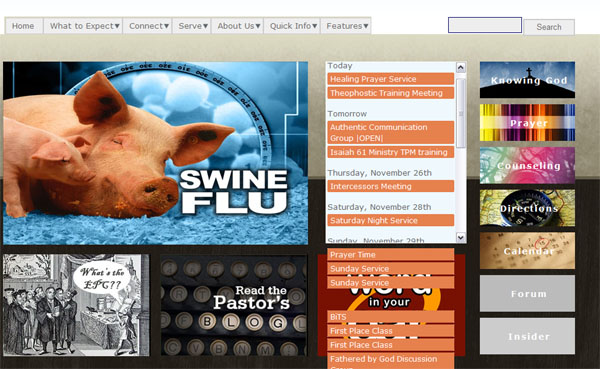
Branjawn commentedUpdate. I have tweaked some things, can't exactly reproduce earlier problems. But there is still a problem. Here is a screenshot with no CSS optimization enabled. Notice Agenda is the ONLY thing that has any css applied to it.
Comment #13
Branjawn commentedHere is a screenshot with CSS optimization applied. Now i get funky FIXED position event list items. They go outside the block and don't scroll. I checked the css and the only position style is applied by the module using element.style.
Comment #14
Branjawn commentedNew info. I find that if I enable "block cache" then no css loads for agenda. not even the style sheet.
It seems no combination I have tried will correctly load the Agenda block in Internet Explorer 7.
Comment #15
kevinquillen commentedDisable all caching under Performance and disable block cache, then clear Performance cache. What happens then?
Comment #16
kevinquillen commentedI don't particularly think this is an Agenda issue.
Do you happen to have two themes with the same .info file? Looks like Framework/Zen for the one pic, and a custom theme for the second pic.
It doesn't make sense to me that without aggregation, no CSS loads, and with aggregation, CSS loads.
Comment #17
Branjawn commentedCaching has always been disabled. Block cache has been off since my last post. So no help there :\
Comment #18
Branjawn commentedTwo themes? I sub-themed ninesixty. So, I have a folder and sub-theme with it's own .info file with a different name than the ninesixty's .info file.
Yeah, I don't know for sure what is causing this (or I would have solved it by now). I checked ALL of my css (both custom and core) and there are no instances of fixed or static even, Everything is 'relative' except a few 'absolute', which would not cause this anyways.
So it is a mystery that the orange event name items (refer to my posted images) act as fixed on the page and do not scroll in the block and bleed outside the block.
Comment #19
arhak commentedmaybe it is a sub-theme issue
did you tried to redefine all css files in your sub-theme's .info?
Comment #20
kevinquillen commentedHmm, can you double check that the .info file does infact have a unique name? I've had similar issues before with two themes with the same name inside the info file that messed me up.
Comment #21
Branjawn commented@arhak: "did you tried to redefine all css files in your sub-theme's .info?" I do not understand what you mean. I created one new stylesheet for changes to the main theme.
@stripped: I double checked. Unique names for .info files verified.
I noticed today that when I expand the details of an event, the "date" scrolls and hides in the iframe, the javascript event and details portion goes outside the iframe. Not sure if this adds useful info. I wish someone else with this problem would chime in.
The only solution I have now is to limit the number of events displayed so that the content cannot go outside the box. :\
Comment #22
arhak commentedI meant that maybe you could be running into #335106: sub-theme doesn't import parent's css
(follow related links to get more info about it)
Comment #23
aidanlis commentedIt works in all browsers when using Garland. If you've made changes to your theme which stop it working, those problems are not related to Agenda.
Comment #24
SamSteinig commentedQuick question: looking at your screenshot, how did you get the vertical scrollbar on the block where you placed Agenda? I want to do the same.
Comment #25
Branjawn commentedOK. New info.
I tried the CSS in 3 diff themes including Garland, still have the problem.
Now, I do not know if it's my CSS' fault or Agenda's, let's have an open mind about this. :)
Here is the CSS I use to make my nice little scrolling block (using the Agenda block).
#block-agenda-0 {height:292px; width:225px; overflow:auto;}Something about this makes the Agenda block flip out in IE. This code seems legit, I've been using CSS expertly since 2001.
To recap the problem, the date titles, which are not in the "list" but presented in
<p>tags scroll.The event and all other info stored in the list, a combination of
<ol>,<li>, and<ul>remains fixed on the page and flows outside of the box even though I constrain the box to a fixed size. I suppose z-index may fix the overflow problem, but the main issue here is the fixed position of the list items.Comment #26
Branjawn commentedI hope someone comes across this someday.
The "fix" is to add
position:relativeto the container, which was in this caseblock-agenda-0. It's an IE bug. And the sky is blue and ice is cold. IE sucks.I thank all of you for your help. You helped me in analyzing the problem, gave me some new troubleshooting tools.
Perhaps that bit of code could be added to the module?
Comment #27
aidanlis commentedWhat version of IE were you using, so it is documented with this bug?
Comment #28
Branjawn commentedIE 8.0. Did not test on other versions of IE.
Comment #29
edyoung75bfc commentedHere's the problem I'm having, I'm trying to get agenda going on a site I'm developing, but the agenda.css disappears from the site. I'm attached screen shots of what's happening and I can't find an explanation of why its there at first and then disappears after a reload. Any ideas? Thanks a lot!
Ed