Single issue patch for master issue #537828: Help text for core modules - update to conform to new standard
Will cross-post.
Please review, suggest changes.
Index: modules/user/user.module
===================================================================
RCS file: /cvs/drupal/drupal/modules/user/user.module,v
retrieving revision 1.1080
diff -u -p -r1.1080 user.module
--- modules/user/user.module 13 Nov 2009 10:21:50 -0000 1.1080
+++ modules/user/user.module 16 Nov 2009 02:14:59 -0000
@@ -2731,21 +2731,30 @@ function user_help($path, $arg) {
switch ($path) {
case 'admin/help#user':
- $output = '<p>' . t('The user module allows users to register, login, and log out. Users benefit from being able to sign on because it associates content they create with their account and allows various permissions to be set for their roles. The user module supports user roles which establish fine grained permissions allowing each role to do only what the administrator wants them to. Each user is assigned to one or more roles. By default there are two roles <em>anonymous</em> - a user who has not logged in, and <em>authenticated</em> a user who has signed up and who has been authorized.') . '</p>';
- $output .= '<p>' . t("Users can use their own name or handle and can specify personal configuration settings through their individual <em>My account</em> page. Users must authenticate by supplying a local username and password or through their OpenID, an optional and secure method for logging into many websites with a single username and password. In some configurations, users may authenticate using a username and password from another Drupal site, or through some other site-specific mechanism.") . '</p>';
- $output .= '<p>' . t('A visitor accessing your website is assigned a unique ID, or session ID, which is stored in a cookie. The cookie does not contain personal information, but acts as a key to retrieve information from your site. Users should have cookies enabled in their web browser when using your site.') . '</p>';
- $output .= '<p>' . t('For more information, see the online handbook entry for <a href="@user">User module</a>.', array('@user' => 'http://drupal.org/handbook/modules/user/')) . '</p>';
+ $output = '<h3>' . t('About') . '</h3>';
+ $output .= '<p>' . t('The user module allows users to register, login, and log out. Users benefit from being able to sign on because it associates content they create with their account and allows various permissions to be set for their roles. ') . '</p>';
+ $output .= '<h3>' . t('Uses') . '</h3>';
+ $output .= '<dl>';
+ $output .= '<dt>' . t('User management') . '</dt>';
+ $output .= '<dd>' . t('Drupal makes it very easy to create users through the <a href="@people">people admnistration page</a>. In addition to creating users you can also change their roles, and delete users.', array('@people' => 'admin/people')) . '</dd>';
+ $output .= '<dt>' . t('User roles and permissions') . '</dt>';
+ $output .= '<dd>' . t('The user module supports user roles which establish fine grained <a href="@permissions_user">permissions</a> allowing each role to do only what the administrator wants them to. Each user is assigned to one or more <a href="@roles">roles</a>. By default there are two roles <em>anonymous</em> — a user who has not logged in, and <em>authenticated</em> — a user who has signed up and who has been authorized.', array('@permissions_user' => 'admin/config/people/permissions#module-user', '@roles' => 'admin/config/people/roles')) . '</dd>';
+ $output .= '<dt>' . t('Account setting') . '</dt>';
+ $output .= '<dd>' . t('The <a href="@accounts">account setting page</a> allows you to manage who can create users and the requirements to create users.', array('@accounts' => 'admin/config/people/accounts')) . '</dd>';
+ $output .= '</dl>';
return $output;
case 'admin/people/create':
return '<p>' . t("This web page allows administrators to register new users. Users' e-mail addresses and usernames must be unique.") . '</p>';
case 'admin/config/people/permissions':
return '<p>' . t('Permissions let you control what users can do and see on your site. You can define a specific set of permissions for each role. (See the <a href="@role">Roles</a> page to create a role). Two important roles to consider are Authenticated Users and Administrators. Any permissions granted to the Authenticated Users role will be given to any user who can log into your site. You can make any role the Administrator role for the site, meaning this will be granted all new permissions automatically. You can do this on the <a href="@settings">User Settings</a> page. You should be careful to ensure that only trusted users are given this access and level of control of your site.', array('@role' => url('admin/config/people/roles'), '@settings' => url('admin/config/people/accounts'))) . '</p>';
case 'admin/config/people/roles':
- return t('<p>Roles allow you to fine tune the security and administration of Drupal. A role defines a group of users that have certain privileges as defined in <a href="@permissions">user permissions</a>. Examples of roles include: anonymous user, authenticated user, moderator, administrator and so on. In this area you will define the <em>role names</em> of the various roles. To delete a role choose "edit".</p><p>By default, Drupal comes with two user roles:</p>
- <ul>
- <li>Anonymous user: this role is used for users that don\'t have a user account or that are not authenticated.</li>
- <li>Authenticated user: this role is automatically granted to all logged in users.</li>
- </ul>', array('@permissions' => url('admin/config/people/permissions')));
+ $output = '<p>' . t('Roles allow you to fine tune the security and administration of Drupal. A role defines a group of users that have certain privileges as defined in <a href="@permissions">user permissions</a>. Examples of roles include: anonymous user, authenticated user, moderator, administrator and so on. In this area you will define the <em>role names</em> of the various roles. To delete a role choose <em>edit</em>.', array('@permissions' => url('admin/config/people/permissions')) . '</p>';
+ $output .= '<p>' . t('By default, Drupal comes with two user roles:') . '</p>';
+ $output .= '<ul>';
+ $output .= '<li>' . t('Anonymous user: this role is used for users that don\'t have a user account or that are not authenticated.') . '</li>';
+ $output .= '<li>' . t('Authenticated user: this role is automatically granted to all logged in users.') . '</li>';
+ $output .= '</ul>';
+ return $output;
case 'admin/config/people/accounts/fields':
return '<p>' . t('This form lets administrators add, edit, and arrange fields for storing user data.') . '</p>';
case 'admin/config/people/accounts/display':




Comments
Comment #1
samirnassar commentedOops, I dropped a bracket.
Comment #2
samirnassar commentedComment #4
jhodgdonStandardizing tags and title
Comment #5
jhodgdonText review (note that some of these apply to text that you didn't write, but we still need to clean it up):
a)
The user module allows users to register, login, and log out. Users benefit from being able to sign on because [...]- I think if we are using the term "log in", we should not then call it "sign on" in the next sentence.
- The verb form is "log in" (two words) not "login". See http://drupal.org/node/338208
b)
[...] because it associates content they create with their account and allows various permissions to be set for their roles. '- Rather than saying "allows various permissions to be set for their roles", how about "gives them additional permissions".
- No space between the period and the end quote.
c)
By default there are two roles <em>anonymous</em> — a user who has not logged in [...]- Should be a colon after roles:
- I also think a comma is better than mdash here, or use parentheses or maybe even a UL list
d)
array('@permissions_user' => 'admin/config/people/permissions#module-user', '@roles' => 'admin/config/people/roles'))(and possibly other spots)
- You need to use the url() function to make these links work, e.g.:
Needs a comma before the and (see style guide link above)
Comment #6
jhodgdonAlso new capitalization standard: name of module should always be capitalized.
Comment #7
batigolixapplied jennifers suggestions
i dont like the text very much. contains phrases like: "Drupal makes it very easy...", "Users benefit from being able to log in"
also dont like the mix of "users" and "people" (i think i dont like the term "people")
let's mark it: "needs extreme make over before 01.12 if time allows us"
Comment #9
lisarex commentedThere are three default roles now so I'll tidy this up.
Comment #10
lisarex commented- added
$output = '';to first new line as per other help patches- rewrote first sentence
- changed link to permissions. Goes to permissions page, not just user module area (since permissions are set across many different modules and content types)
- removed 'Drupal makes it very easy '
- lots of rephrasing
Needs a thorough review! :)
Comment #11
lisarex commentedComment #12
arianek commented- rewrote all but 1st sentence of the About section, added link to handbook.
- changed "use" titles to be active.
- moved the help hook to the top of the .module file.- rewrote lots of other stuff...i'll just post it!
Comment #13
tobiasbChanges:
'@user' => url('user/register') -> '@register' => url('user/register')and case 'admin/config/people/roles'
Comment #14
batigolixchanges made:
* "and text for for default user account" => "and text for default user account"
* "(any users that are registered and logged in)" => "(users that are registered and logged in)"
proposed change:
still feel that this is a long complex sentence
"The Account settings page allows you to manage settings for default role titles, personal contact forms, user registration and account cancellation, account personalization (including signatures and user pictures), and text for default user account related messages."
cutting the sentence in 2 would simplify:
"The Account settings page allows you to manage settings for default role titles, personal contact forms, user registration and account cancellation. On this page you can manage settings for account personalization (including signatures and user pictures) and adapt the texts for the e-mails that are being sent in the user registration process."
Comment #15
lisarex commentedChanging status so testbot can do its thing
Comment #16
arianek commentedi'd give a thumbs up to the proposed change, except in the second sentence i'd suggest "On this page you can also manage..." (since it's continuing the thought). this one's just about ready.
Comment #17
lisarex commentedPatch in #14 good, but added suggestions from batigolix and arianek.
Comment #18
webchickSadly, this no longer applies. :( I can haz a quick re-roll?
Comment #19
arianek commentedya you can haz it... (and now i should stop rolling patches and go get dressed and hang out with my parents :-p)
Comment #20
webchickYay, thanks. Committed to HEAD.
Comment #21
jhodgdonThis help screen needs an update.
a) About section says "On this page you can also manage user roles...", but there is no antecedent for "this page". It should probably say "This module also lets you manage user roles...".
b) Permissions link in the Creating and Managing section should go to the user section of the permissions page (#module-user).
c) I don't have a default "Administrator" role (I installed this time using the Expert install profile, so that could be why -- is it created by the non-expert install profile?). Probably should say "depending on the install profile you use, you may also have other roles defined" or something like this.
d) "default role titles" ... what does this mean? I guess maybe it refers to the displayed name for the "anonymous user" role?
e) Possibly reword "adapt the texts for the e-mails that are being sent in the user registration process" to say "emails that are sent" (remove the word "being", since this is probably not happening while the person is reading the help file).
Comment #22
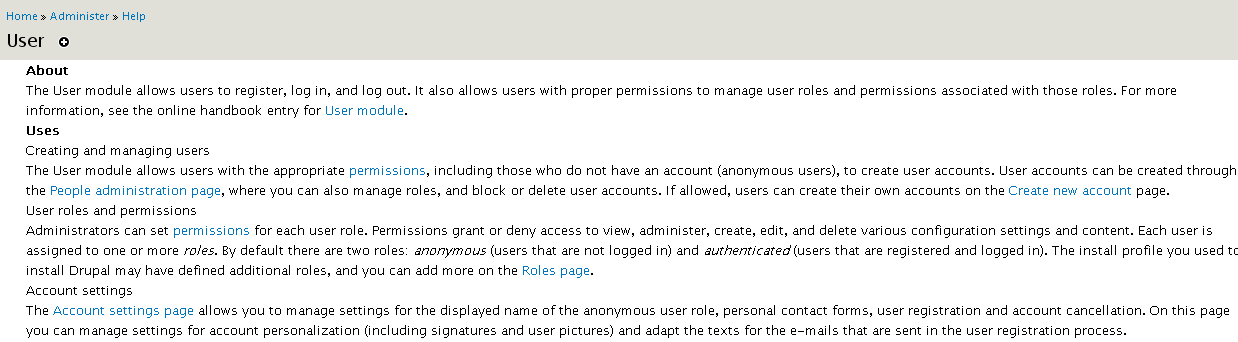
jhodgdonHere's a cleanup page. Attached is a screen shot of the proposed help screen. Definitely needs a review.
Comment #23
arianek commentedjust a couple things...
- people might not really realize they have used an install profile, i'm wondering if this is more confusing than helpful to mention?
- under 'account settings' - "...manage settings for the displayed name of the anonymous user role..." - 'displayed name' is a little awkward, maybe "...rename the default anonymous user role..." (?)
- and same section "...adapt the texts for the e-mails that are sent in the user registration process." --> maybe "...adapt the body text for the e-mails that are sent automatically during the user registration process." (?)
Comment #24
jhodgdon- On the install profile, maybe we chould say "depending on choices you made when you installed Drupal"?
- Displayed name is what it is. You are not changing the name of the role, and I don't think it changes on the Permissions page. It's just what is displayed as the author for comments, content, etc. I believe.
- Adapt the texts... I didn't write that (was left over from previous version)... Hmmm... Actually, I don't think "texts" should be plural either, but I don't think "body" is necessary either.
Anyway, needs a new patch...
Comment #25
arianek commented1. i like it
2. you're totally right
3. so then "...adapt the text for the e-mails that are sent automatically during the user registration process." ?
just gimme a thumbs up on that last one and i'll roll a new patch.
Comment #26
jhodgdonThumbs up on that last one. Roll!
Comment #27
arianek commentedi tweaked things a little more just to flow nicely in the changed parts:
1) "Depending on choices you made when you installed Drupal, the installation process may have defined additional roles; you can create additional custom roles on the Roles page."
3) "On this page you can also manage settings for account personalization (including signatures and user pictures), and adapt the text for the e-mails that are sent automatically during the user registration process."
New patch ahoy!
Comment #28
jhodgdonI like the better wording... Still there are a few issues with the latest version, to get it all ship-shape (my review of the user module help, nearly last in alphabetical order after all the other help screens I reviewed, should have been more thorough to begin with apparently):
a) We don't apparently have a standard for it, but I normally think pluralizing e-mail is a bad idea. Should be e-mail messages, or just singular e-mail (it's a non-countable noun, like water or milk or air). As in, we don't say "I sent mails to my relatives" (talking about paper mail), but "I sent mail to all my relatives". Same for electronic mail, or e-mail. Suggest changing to "adapt the text for the e-mail that is sent automatically..." or "for the e-mail messages that are sent".
b) In the "Creating and managing" section, it looks like we are saying twice that people can create their own accounts? How about rewording that paragraph to:
The User module allows users with the appropriate permissions create user accounts through the People administration page, where they can also manage roles, and block or delete user accounts. If allowed, users without accounts (anonymous users) can create their own accounts on the Create new account page.
c) In the Roles and Permissions section, it looks like it uses the term "role" before it defines it a sentence or two later? Maybe needs rearrangement?
d) "user registration and account cancellation" needs a comma before "and" in the last paragraph.
Comment #29
arianek commenteda) now "e-mail messages that are sent"
b) done
c) done and NEW - realized we don't say what a "role" is, so added a bit into the about (in brackets): "It also allows users with proper permissions to manage user roles (used to classify types of users) and permissions associated with those roles."
d) done
review me!
Comment #30
jhodgdonI like it all now except this paragraph:
By default there are two roles: anonymous (users that are not logged in) and authenticated (users that are registered and logged in). Depending on choices you made when you installed Drupal, the installation process may have defined additional roles; you can create additional custom roles on the Roles page. Administrators can set permissions for each user role. Permissions grant or deny access to view, administer, create, edit, and delete various configuration settings and content. Each user is assigned to one or more roles.
I don't think we need the EM on the last word roles, since we're not defining it here now (as it is now defined in About, which is a good thing). I also think maybe we should put the last sentence first, or move it up into the previous section? It just doesn't seem to flow logically to me where it is now.
Actually, maybe in the previous section, we could change
...through the People administration page, where they can also manage roles,...
to say
...through the People administration page, where they can also assign users to one or more roles,...
and then remove that last sentence from the section above? Because they cannot actually manage roles per se on the People page.
Comment #31
arianek commentedi'm totally confused about what you're suggesting to be moved where!
Comment #32
jhodgdonSorry. Here's a patch. Ended up being more of a rewrite than I'd planned, so see attached screen shot.
Comment #33
arianek commentedlooks good - i think the testbot has been down pretty much for a day or so, so we might need to resubmit this but thumbs up.
Comment #34
dries commentedCommitted to CVS HEAD. Thanks.