

 Come together with the global Drupal community in Rotterdam, 28 Sept – 1 Oct 2026. Sessions, contribution, connection, and Early Bird savings until 8 June.
Hello. Interesting thing happening with the activity module. I was previously using the October 20th commit and went from that to the November 11th commit. I noticed that new certain new activities were not showing up in the view. Specifically, activities related to comment. My template is "Comment" and "Record an activity message when: comment insert type MYTYPE".
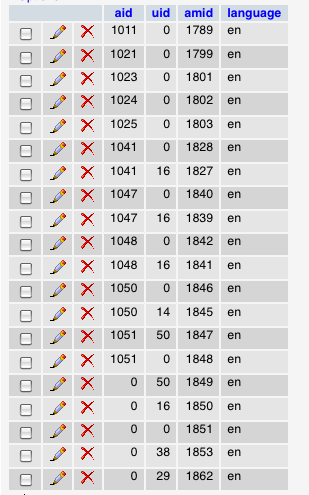
I thought this was strange and went to the database to check on what was there. The activity_messages table has what seems like correct activity messages reported so it looks like they are being written there successfully and they look exactly like all of the others. I then headed over to the activity_targets table and the entries now look different from the others. All of the old messages had a numeric entry in the 'aid' column except for the most recently generated ones - they now have 0 in the 'aid' column. The entries with 0 correspond to the 'amid' numbers of the items that are not showing up in the view. I have screenshots of this attached.
I reverted back to the October 20th version, commented on a node (with no other changes to anything), and now it works. I also attached screenshots of the activity_targets table which now seem to be back to working behavior. So I think something in the November 11 commit is perhaps problematic.
You see three screens - the two with the 1111commit tables, and one which was taken after that where I reverted to the 1020 code and added a comment.
| Comment | File | Size | Author |
|---|---|---|---|
| activity_targets_table-revertedto1020commit.png | 45.11 KB | rjbrown99 | |
| activity_targets_table-1111commit.png | 39.73 KB | rjbrown99 | |
| activity_messages_table-1111commit.png | 75.58 KB | rjbrown99 |



Comments
Comment #1
Scott Reynolds commentedright so this is because of a database change that doesn't have an associated update function
run this sql
And you will be set.
Comment #2
rjbrown99 commentedAwesome, thanks Scott I'll give it a try later today.
Comment #3
Scott Reynolds commentedClosing
Comment #4
rjbrown99 commentedFor what it's worth if anyone else happens to come across this ticket, I'm updating with a bit of help. I just now moved from the October 09 code to current (April 2010) and had to make a few more database schema adjustments.
1) I strongly recommend installing the schema module. http://drupal.org/project/schema. This will allow you to browse any schema mismatches from the module to your database at /admin/build/schema.
2) I had a number of changes that were required based on the schema module's discovered mismatches.
There may be others that are needed in the future so be sure to check out the schema.