I'm using Drupal 6.14, Embedded Media Field 1.15, and Views 2.6.
1. I have an rss feed that outputs a directory of drupal videos:
http://yadadrop.com/drupal-video
2. In this feed, there is a media enclosure tag for each node:
<enclosure url="blip.tv/.../somefile.flv" length="214681390" type="video/x-flv" />
3. This feed is being generated by Views and there are no options within Views to turn off enclosures. There are Embedded Media options within my custom content type to configure RSS options. BUT, none of those options include enclosures:
http://DOMAIN/admin/content/types/CONTENT-TYPE/display/rss
Any thoughts on how to disable the output of rss enclosures?
Peace,
Brian





Comments
Comment #1
aaron commentedThere should be a field setting on the admin page in 3, that has '
<hidden>' as an option, as well as an 'exclude' check box. (edited because drupal didn't like hidden in gt/lt)Comment #2
Brian294 commentedthanks aaron. so this should be resolved in views 3?
Comment #3
aaron commentedno, i meant number 3 of your example. http://DOMAIN/admin/content/types/CONTENT-TYPE/display/rss should have
<hidden>(which ended up not coming through drupal's filter, sorry). or an exclude check box.Comment #4
Brian294 commentedThanks for the quick response aaron!
Ah, I see what you mean. Check out the two image files that I have attached to this issue. They illustrate the mapping between admin and the actual rss.
The Embedded Media in admin *is* correctly mapped to the Embedded Media field in the rss (illustrated with the black circle). However, there is an attachment/enclosure that is being included in the RSS. I can't find a way to shut off that feature anywhere in Drupal. (illustrated with a black question mark)
Peace,
Brian
Comment #5
aaron commentedbrian,
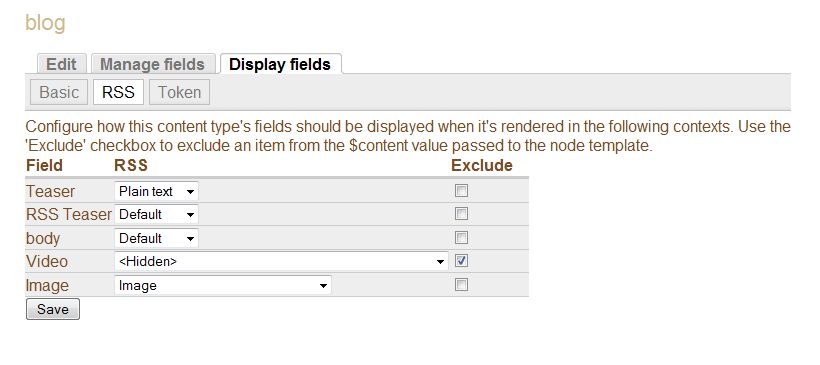
try checking the 'exclude' checkbox, and selecting 'hidden' from the drop down (that currently reads 'Image Thumbnail' in the screenshot).
Comment #6
Brian294 commentedhere's what happens... see attached. that pesky media enclosure doesn't want to go away.
Comment #7
TKS commentedI can confirm this problem (which affects our standard em_video field, but not the Flickr Photoset "video" field provided by the Media: Flickr companion module, for whatever that's worth).
I've set our Video field to hidden and checked the exclude checkbox, and it still appears in the RSS feed. And since only the first enclosure "counts" when it comes to podcasting and valid RSS, I can't create an iTunes-compliant podcast that includes a content-type that has video as well as an MP3.
Here is an example of what appears in the feed for a node that has both a populated Embedded Media field and an MP3 in its Filefield:
I even rearranged the fields in the node, but the embedded video enclosure still comes ahead of the filefield enclosure.
Help?
Comment #8
feuillet commentedSame problem here, would like to remove the attached files too and can't find a way...
Its in general not easy to define the exact output of what fields should be in the feed...
Suggestions?
Best Regards,
Sandro
Comment #9
RockSoup commentedI am also experiencing this issue.
I am using embedded video field.
I am producing my feed with Views.
I have set the field to hidden on the display tab and also checked the exclude option (see screenshot)
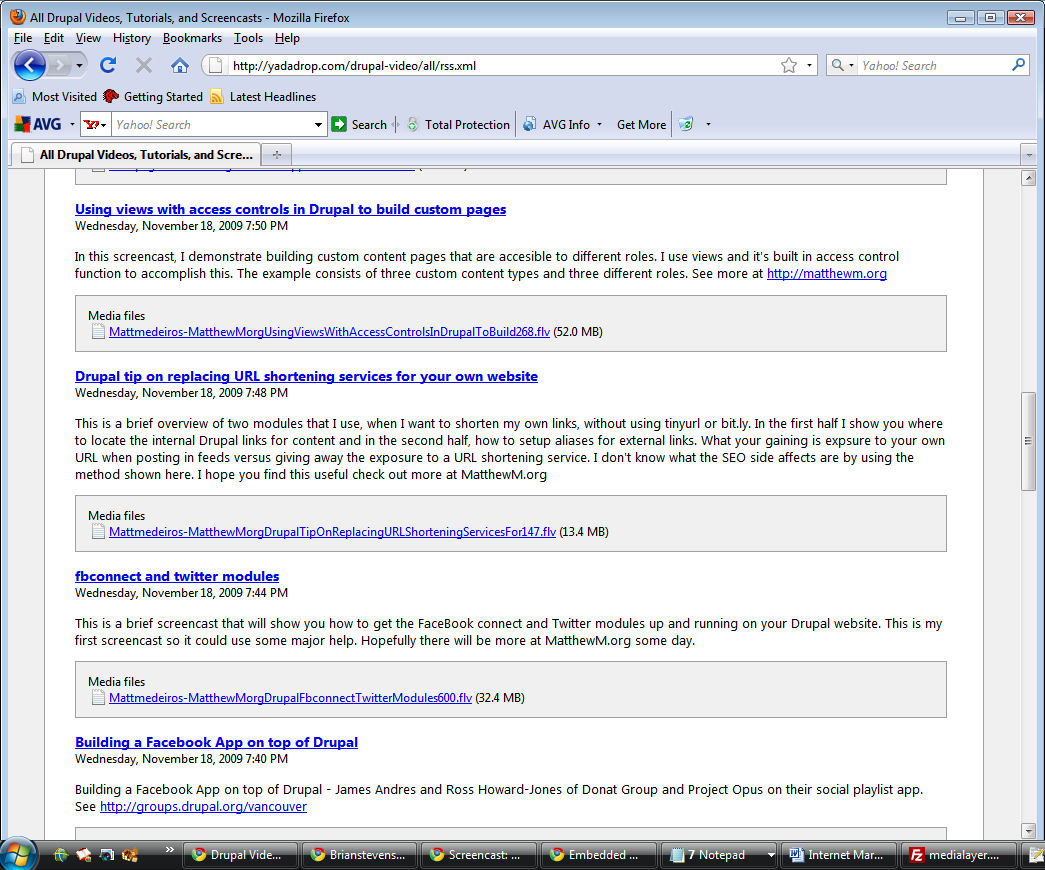
I am still getting the enclosure in the feed output (see second screenshot)
I thought maybe I could just override a .tpl in views, but when I went looking through the ones in the theme information section I did not see a place where the enclosure is added in the template, so I assume that is happening elsewhere.
Any help is greatly appreciated.
thanks
Comment #10
RockSoup commentedTotally not a solution that should be used, but I was able to remove the enclosure from my rss by commenting a function in emvideo.module
to
this will only work for the video field and is definitely not best practice, but until I can figure out the way to do this properly I am using this.
Comment #11
metastate commentedI can confirm this is happening using Drupal 6.15, CCK 6.x-2.6, Emfield 6.x-1.18.
Under Content Type -> Display Fields -> RSS, the video field is marked as hidden and excluded, but the media enclosure is still showing up in blog module's RSS feed.
Also, my watchdog was getting the following error every time someone tried to view the feed: "Could not connect to youtube, HTTP error 404"
The hack in comment #10 gets rid of both problems for me (temporary solution).
Comment #12
jayson commentedSubscribing.
Comment #13
jayson commentedAlso an issue in 6.x-1.20.
Comment #14
jelo commentedSubscribe
Comment #15
ilyarogov commentedHere is the solution I found that worked for me.
http://drupal.org/project/remove_upload_enclosures
Comment #16
adamcadot commentedSubscribe
Comment #17
johnpitcairn commentedSame problem, Drupal 6.20, Emfield 6.x-2.4. YouTube fields are not affected by the CCK RSS Display settings and will output as an unwanted enclosure in the feed. I think this should be considered a bug?
Comment #18
johnpitcairn commentedChanging title, category, version, status accordingly
Comment #19
TC44 commentedI'm just wondering if anyone has found a definitive workaround for this issue? I noticed the issue has been open for 1.5 years.
Comment #20
hongpong commentedYeah another year on I have not been able to get the references to the video to go away in the RSS even after setting exclude and hidden on RSS field settings in the content type display settings. :(