

 Come together with the global Drupal community in Rotterdam, 28 Sept – 1 Oct 2026. Sessions, contribution, connection, and Early Bird savings until 8 June.
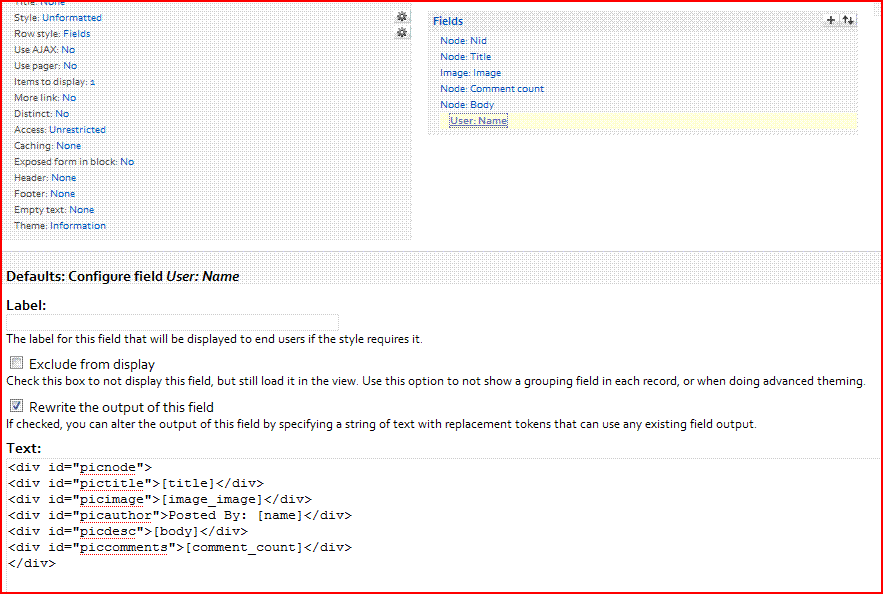
Could anyone tell me how to get the path to an image file (not the node) from a View? In the screenshot below you can see how I am setting up the view. Basically I'd like to get the file path to the image and use it in the fields section of my view.
Something like:
<|img src="/sites/default/images/blah.jpg" />
I don't know what other information to include here so please let me know if I can provide any more details?
| Comment | File | Size | Author |
|---|---|---|---|
| #2 | Capture.GIF | 36.27 KB | jchuck5612 |
| Capture.GIF | 26.2 KB | jchuck5612 |

Comments
Comment #1
joachim commentedYou can use the Image: File relationship to get data about the file.
And: what on EARTH are you doing in that view with all those divs rewriting the username?
Comment #2
jchuck5612 commentedImage: File Relationship was exactly what I needed for this! Thank you joachim.
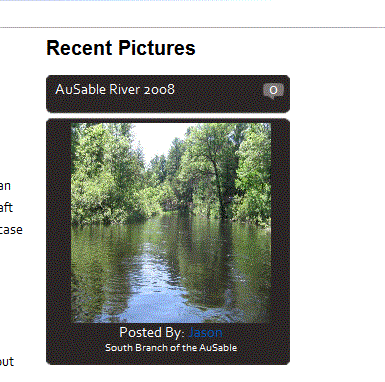
To answer your question about the divs in the username field I included the screenshot below. I was trying to format the output of the view to look like this. I bet there's an easier way (but this way was easy too...). I just wrapped all the different view fields in divs so I could control them through css.
Comment #3
joachim commentedAll the fields get divs anyway, though the classes take some figuring out.
If you want to finer control than that, I think a theme template is a much better way -- you seem to be rewriting the final field to hold all the earlier ones!
Anyway, glad you got the file data you need.