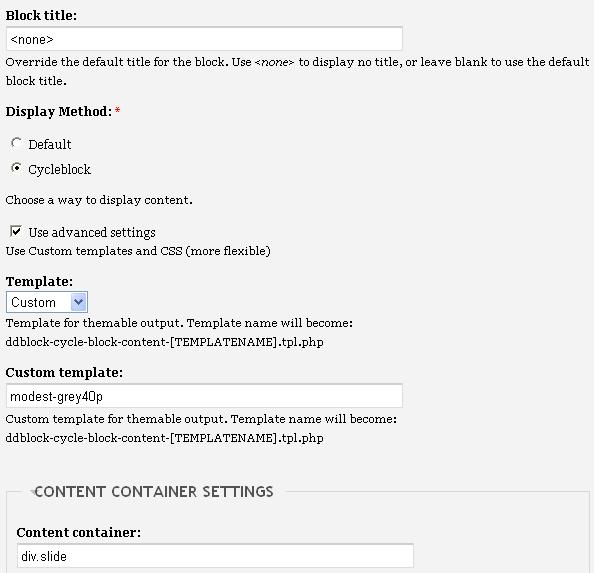
I trying to imnstall the slideshow using the video tutorial on your website for the "Advanced style". But I have reached to the point where you go to Admin>Site Configuration>DDBlock.

On the video I see that there are various catorigies like:

Top story 1
Top story 2

But in my stie it shows : No Dynamic displays blocks available.

How can I solve this. Thank you

CommentFileSizeAuthor
#9 template.php__1_20.txt6.09 KBppblaauw
#8 block.JPG41.68 KByudhistir
#8 views item.JPG50.85 KByudhistir

Comments

hungdo’s picture

Hi yudhistir.
I think you haven't problem about your ddblock, maybe Top story 1,Top story 2 have created before so they exists in database.

yudhistir’s picture

Thanks for the quick reply.

But how i procede from here?

Should I skip that part of the video and continue?

Thank you

ppblaauw’s picture

Status: Active » Postponed (maintainer needs more info)

What steps did you do?

You created already the news_item content type or imported it?
You created at least two nodes?
You created already the news_items view or imported it?
You enabled the news_item content type and the news_items view in the settings tab?
You are now going to make a ddblock instance in the instance tab?
You can now create the ddblock_news_items instance, configure it and place it in a region or a node.
Just go further with the video, if you did all these steps.

Hope this helps you further, please let me know.

yudhistir’s picture

thanks for the assist.

i did go further and created instance, imported the preprocess and changed the settings as per the video.

But I dont ge the slide screen, as its shown on the video.Its on

http://indiabasket.net

Thank you.

ppblaauw’s picture

did you download the ddblock themes upright10-50?
did you place the custom directory in
/site/sites/all/themes/fusion-6.x-1.x-dev/fusion/fusion_core/

or

/site/sites/all/themes/acquia_prosper/

Depending on the theme you use?

I don't see a ddblock theme css file

Did you change the [theme_name] in the preprocess functions to the theme you use?

Edit:In the video we used another ddblock theme as an example.

yudhistir’s picture

I did all that you have mentioned and also tried templates with upright50p, but i got a error. So I changed back to Custom with "Modest-grey40p" on. But its still the same.

But how do I solve this otherwise?

Thanks for the patience :)

ppblaauw’s picture

#6 I had a look at your site before and saw a similar error like this:

Invalid argument supplied for foreach() in /drupal/sites/all/themes/[THEME-NAME]/custom/modules/ddblock/ddblock-cycle-block-content-upright10.tpl.php on line 43. error

This means you are making progress, the ddblock template file can be found, only not the content.

Have a look at the faq question: warning: Invalid argument supplied for foreach() in... solution? how to solve this.

Hope this helps you further, please let me know.

yudhistir’s picture

StatusFileSize
new50.85 KB
new41.68 KB

I have tried all the points on the FAQ, still the problem presists. I have also uncommented the drupal set message for you to check it out. I also attaching my template.php (I use acquia_prosper as my theme). I have also attached the screenshots for my views page and the blocks settigns page.

I have check the :

1. Theme name
2. Views Name
3. 2 nodes are created

<?php
// $Id: template.php,v 1.1.2.3 2009/11/05 03:32:15 sociotech Exp $

/**
 * Changed breadcrumb separator
 */
function acquia_prosper_breadcrumb($breadcrumb) {
  if (!empty($breadcrumb)) {
    return '<div class="breadcrumb">'. implode(' &rarr; ', $breadcrumb) .'</div>';
  }
}
/*!
 * Dynamic display block preprocess functions
 * Copyright (c) 2008 - 2009 P. Blaauw All rights reserved.
 * Version 1.6 (01-OCT-2009)
 * Licenced under GPL license
 * http://www.gnu.org/licenses/gpl.html
 */

 /**
 * Override or insert variables into the ddblock_cycle_block_content templates.
 *   Used to convert variables from view_fields to slider_items template variables
 *
 * @param $vars
 *   An array of variables to pass to the theme template.
 * 
 */
function acquia_prosper_preprocess_ddblock_cycle_block_content(&$vars) {
  if ($vars['output_type'] == 'view_fields') {
    $content = array();
    // Add slider_items for the template 
    // If you use the devel module uncomment the following line to see the theme variables
    // dsm($vars['settings']['view_name']);  
   //  dsm($vars['content'][0]);
    // If you don't use the devel module uncomment the following line to see the theme variables
  drupal_set_message('<pre>' . var_export($vars['settings']['view_name'], true) . '</pre>');
  drupal_set_message('<pre>' . var_export($vars['content'][0], true) . '</pre>');
  // if ($vars['settings']['view_name'] == 'news_items') {
  //  if (!empty($vars['content'])) {
        foreach ($vars['content'] as $key1 => $result) {
          // add slide_image variable 
          if (isset($result->node_data_field_pager_item_text_field_image_fid)) {
            // get image id
            $fid = $result->node_data_field_pager_item_text_field_image_fid;
            // get path to image
            $filepath = db_result(db_query("SELECT filepath FROM {files} WHERE fid = %d", $fid));
            //  use imagecache (imagecache, preset_name, file_path, alt, title, array of attributes)
            if (module_exists('imagecache') && is_array(imagecache_presets()) && $vars['imgcache_slide'] <> '<none>'){
              $slider_items[$key1]['slide_image'] = 
              theme('imagecache', 
                    $vars['imgcache_slide'], 
                    $filepath,
                    check_plain($result->node_title));
            }
            else {          
              $slider_items[$key1]['slide_image'] = 
                '<img src="' . base_path() . $filepath . 
                '" alt="' . check_plain($result->node_title) . 
                '"/>';     
            }          
          }
          // add slide_text variable
          if (isset($result->node_data_field_pager_item_text_field_slide_text_value)) {
            $slider_items[$key1]['slide_text'] =  check_markup($result->node_data_field_pager_item_text_field_slide_text_value);
          }
          // add slide_title variable
          if (isset($result->node_title)) {
            $slider_items[$key1]['slide_title'] =  check_plain($result->node_title);
          }
          // add slide_read_more variable and slide_node variable
          if (isset($result->nid)) {
            $slider_items[$key1]['slide_read_more'] =  l('Read more...', 'node/' . $result->nid);
            $slider_items[$key1]['slide_node'] =  base_path() . 'node/' . $result->nid;
          }
        }
      }
    }    
    $vars['slider_items'] = $slider_items;

  
/**
 * Override or insert variables into the ddblock_cycle_pager_content templates.
 *   Used to convert variables from view_fields  to pager_items template variables
 *  Only used for custom pager items
 *
 * @param $vars
 *   An array of variables to pass to the theme template.
 *
 */
function acquia_prosper_preprocess_ddblock_cycle_pager_content(&$vars) {
  if (($vars['output_type'] == 'view_fields') && ($vars['pager_settings']['pager'] == 'custom-pager')){
    $content = array();
    // Add pager_items for the template 
    // If you use the devel module uncomment the following lines to see the theme variables
    // dsm($vars['pager_settings']['view_name']);     
    // dsm($vars['content'][0]);     
    // If you don't use the devel module uncomment the following lines to see the theme variables
     drupal_set_message('<pre>' . var_export($vars['pager_settings'], true) . '</pre>');
    drupal_set_message('<pre>' . var_export($vars['content'][0], true) . '</pre>');
//   if ($vars['pager_settings']['view_name'] == 'news_items') {
//   if (!empty($vars['content'])) {
        foreach ($vars['content'] as $key1 => $result) {
          // add pager_item_image variable
          if (isset($result->node_data_field_pager_item_text_field_image_fid)) {
            $fid = $result->node_data_field_pager_item_text_field_image_fid;
            $filepath = db_result(db_query("SELECT filepath FROM {files} WHERE fid = %d", $fid));
            //  use imagecache (imagecache, preset_name, file_path, alt, title, array of attributes)
            if (module_exists('imagecache') && 
                is_array(imagecache_presets()) && 
                $vars['imgcache_pager_item'] <> '<none>'){
              $pager_items[$key1]['image'] = 
                theme('imagecache', 
                      $vars['pager_settings']['imgcache_pager_item'],              
                      $filepath,
                      check_plain($result->node_data_field_pager_item_text_field_pager_item_text_value));
            }
            else {          
              $pager_items[$key1]['image'] = 
                '<img src="' . base_path() . $filepath . 
                '" alt="' . check_plain($result->node_data_field_pager_item_text_field_pager_item_text_value) . 
                '"/>';     
            }          
          }
          // add pager_item _text variable
          if (isset($result->node_data_field_pager_item_text_field_pager_item_text_value)) {
            $pager_items[$key1]['text'] =  check_plain($result->node_data_field_pager_item_text_field_pager_item_text_value);
          }
        }
      }
    }
    $vars['pager_items'] = $pager_items;
    
  
ppblaauw’s picture

StatusFileSize
new6.09 KB

I can not find any wrong things in your code or in the result of the debug lines, except the commented if statements and wrong ending of the preprocess functions.

Changed template.php file attached.
Can you clear the cache again at administer > Site configuration > Performance

Do you have more copies of the custom folder in your drupal install?

yudhistir’s picture

Status: Postponed (maintainer needs more info) » Fixed

Thank you very much for your assistance. I pasted your changed template.php and it worked.

Looks like the code tweaking didn't work out well.

Thanks for all the assistance.

Status: Fixed » Closed (fixed)

Automatically closed -- issue fixed for 2 weeks with no activity.