

 Come together with the global Drupal community in Rotterdam, 28 Sept – 1 Oct 2026. Sessions, contribution, connection, and Early Bird savings until 8 June.
background: http://drupal.org/node/537828
| Comment | File | Size | Author |
|---|---|---|---|
| #23 | 640216revised.patch | 5.02 KB | jhodgdon |
| #22 | updatesnoauth.png | 16.75 KB | jhodgdon |
| #21 | update.png | 33.35 KB | jhodgdon |
| #20 | 640216-20.update_help_text.patch | 5.09 KB | dww |
| #19 | help_update7.patch | 4.6 KB | arianek |




Comments
Comment #1
batigolixmy remarks:
"The Update status module periodically checks for new versions of your site's software (including contributed modules and themes), and alerts you to available updates. "
=>
"The Update status module periodically checks for new versions of your site's modules and themes, and alerts you to available updates. "
Maybe with links to themes and modules
"Please note that in order to provide this information, anonymous usage statistics are sent to Drupal.org. "
=>
"In order to provide this information, anonymous usage statistics are sent to drupal.org. "
"If desired, you may disable the Update status module"
is it switched on by default in D7?
"Update alerts"
=>
"Checking available updates"
(for conformity: all sub headers of 'Uses' start with verb)
"The report of available updates will alert you when new releases are available for download."
=>
"The updatesreport will alerts you when new releases are available for download."
I personally would mention the Drush module here as a companion to the update module.
"The contributed module Drush helps you updating your website's modules and themes"
apart from those few remarks that i think it is all right ;)
Comment #2
jhodgdonI don't think I'd mention Drush, myself. It's a contrib module that works from the command line, certainly not for the average person who has the help module turned on!
Comment #3
arianek commentedDrupal.org (with caps) is per styleguide: http://drupal.org/node/338208 but i did remove the "Please note that" at the start of that sentence.
Changed the heading as suggested.
Didn't do the other 3 suggestions, as they seemed to be more confusing than clarifying. Oh, and as far as being turned on by default, the answer is sort of - there's a checkbox when you go through install.php to turn it on, so I imagine most people will have it enabled from the get go.
Comment #4
jhodgdonMinor fix:
"The Update status module..." at the beginning - on other help screens we are not capitalizing the name of the module.
Note that if the module is turned off, the help screen won't be visible either, so I agree it is fine to just mention how to disable it.
So, is it true that update status is checked via cron? I think that is the case, and if so we should mention that and put in a link to the Handbook page on configuring cron http://drupal.org/cron
Comment #5
arianek commentedAll the committed texts have had that capitalization, to be consistent with how the links to the handbook pages read, so I'm trying to make sure it's all uniform.
I actually have no idea re: cron... can someone confirm before I change anything?
Comment #6
arianek commentedfrom IRC - will add this later if someone doesn't beat me to it (please? i can't keep up with all the reviews, nobody is posting new patches anymore!)
[4:18pm]
arianek: last i checked you had two options
[4:19pm]
arianek: it checked on cron
[4:19pm]
swill joined the chat room.
[4:19pm]
arianek: but if you were impatient you could do manually.
Comment #7
webchickYep, Update Status goes and checks for updated projects on cron run. You can also trigger it manually if you want.
One thing to note is that we have a "Poormanscron"-like functionality in core now, which basically means that setting up cron is no longer a requirement. Each time a user visits your site, it'll check to see if it's been long enough since cron runs and it'll run it for them automatically. This information, however, probably better belongs in System module help rather than Update Status.
Comment #8
jhodgdonThe capitalization convention, as I see it: In the About section, the module itself is not capitalized, but links to the Handbook pages have the first word of the module name capitalized. So:
The node module is the blah blah blah. See the online handbook section for Node module.
Right?
I think the above patch does not follow this convention.
Comment #9
batigolixmodule seems to have changed name to "Update manager"
- renamed
- recapitalized
- added short mention of cron
- changed
"The report of available updates will alert you"
to
"A report of available updates will alert you"
question: is "to alert of" or "to alert to"? see:
a. "The Update manager module [...] alerts you to available updates"
b. "The Update manager module [...] alerts you of available updates"
if a: then review and rtbc
Comment #10
arianek commentedjust sneaking one in before dinner ;-)
added an explanation of what "project" refers to: "The Update manager module checks for updated projects (Drupal core, modules, and themes) on every cron run." Looks good - RTBC
Comment #11
webchickSo this one still needs a bit of work. We renamed the Update status module to Update manager because as of D7, it now does way more than just check for updated projects. It also allows you to install and upgrade your modules and themes through the UI!
At the top of the modules and themes pages you'll see links to "Update existing X" and "Install new X." This will take you to a screen where you're prompted for the address to the download, or to upload a tarball. From there, you are prompted for your FTP/SSH password, which will then securely transfer the file into your Drupal installation, overwriting your old files.
A step-by-step walkthrough is obviously out of scope for this help page, but as an action item for the documentation team in general, we need to make sure there's really easy-to-follow tutorials that explain how this works, and ideally we'd link to it from here.
Comment #12
webchickOh, and just as a general nit-picky thing, this inconsistency/repetition is bothering me. :)
"The Update manager module periodically checks for new versions of your site's software (including contributed modules and themes)"
...
"The Update manager module checks for updated projects (Drupal core, modules, and themes)"
Are they "software" or are they "projects"? And do we really need to define what they are twice?
Comment #13
skessler@webchick I had the same question when working on this patch. http://drupal.org/node/537828#comment-2312902
I did not see this work had been done after I had agreed to work on it.
I will look at this closer and see if there are any changes I would recommend on this patch.
Comment #14
arianek commented- addressed @webchick's comments
- used a couple of the lines from @denverdataman, which had been posted on the main thread, but much of it was not formatted according to standard, so it was more effort than worth to use the code as a whole.
hopefully this will be the best of both worlds ;-)
Comment #15
skesslerI don't know PHP so I was having trouble with this sorry.
What is the Modules and Themes Page - admin/config/modules? Because this does not clearly tell me it has themes right now. Is this something else we need to address before String Freeze? I know its getting late. If that is what it is then it should link to admin/config/modules if that is not what it is than we should link to something else.
What is Drupal doc team policy on linking to outside sources. Do we need to define FTP/SSH?
Do we have links yet for the online documentation for the Update manager (upload tool)
Are we recommending backups or is there a tool for this. My D7 is not showing me any updates right now so I can't see this. I think its important that we remind people of those practices when we can.
Comment #16
batigolixi added links to themes, modules page and online handbook as denverdataman requested
havent adressed his other remarks
Comment #17
arianek commentedlooks good @batigolix i'm gonna RTBC this.
@denverdataman - thanks for the review. we have to assume a certain level of technical competence from site admins, so basics like FTP and SSH don't need external links. backups is sort of a separate issue, so not addressed here.
Comment #18
dwwMostly this looks great, thanks!
1 minor problem:
you will see links to update and install new releases. This will take you to a screen where you are prompted for the URL to the download or upload a tarball.
That's not actually true. ;) There are two pages:
A) Update all your existing stuff. You don't paste URLs at all.
B) Install something new. Here's where you paste a URL or upload a tarball.
I think we should have a link to (A) in this help text. That's the single most important page the Update manager now provides.
I'll reroll later this afternoon if someone doesn't beat me to it, but I gotta run right now...
Comment #19
arianek commentedwow thanks dww - just a smidgen of an oversight!
updated the entire text to reflect this, and split a separate (uses) section so updating and installing new aren't lumped together. pls have a review, and if it looks good, let's get this in! :-)
Comment #20
dwwRe-rolled to fix a handful of problems:
A) The text about updating and installing still wasn't right.
B) It only checks for updates as often as you tell it, not on every cron run.
C) s/@thempage/@themes_page/ and s/@modpage/@modules_page/
D) The stuff about updating and installing should disappear if the 'allow_authorize_operations' killswitch turns them off. In that case, a site builder went out of their way to disable this functionality, so we shouldn't then brag about it in the help text that the site admin is going to be reading, linking to pages that don't exist on their site, wondering "WTF? Why can't I see any of this? That sounds good!". ;)
E) A few stray whitespace issues.
PHP on my local box is broken again to work with HEAD (hurray for fragile PHP + PDO!!! ugh). So, I can't really see how this all looks. But, at least php -l is happy. ;)
Comment #21
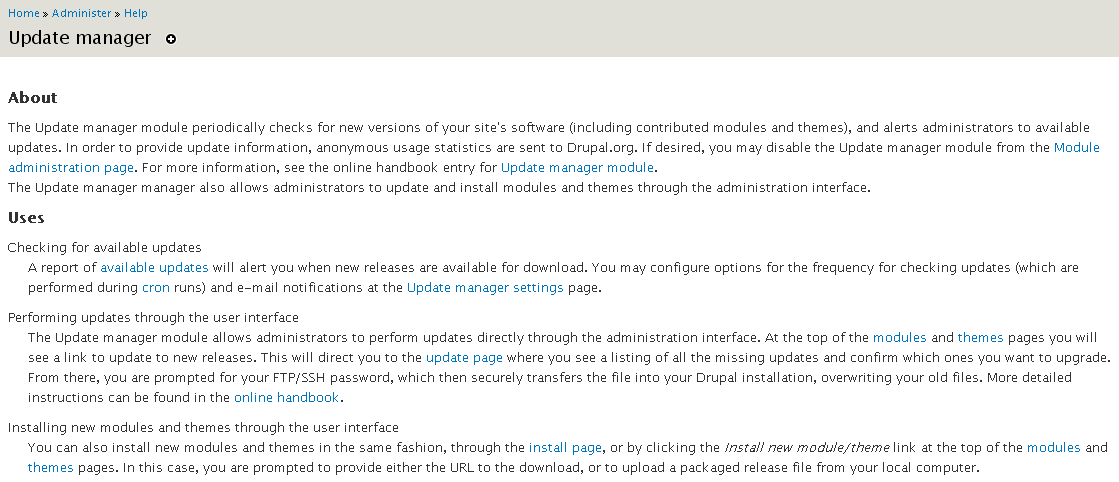
jhodgdonHere's a screen shot.
Proceeding to review the text...
Comment #22
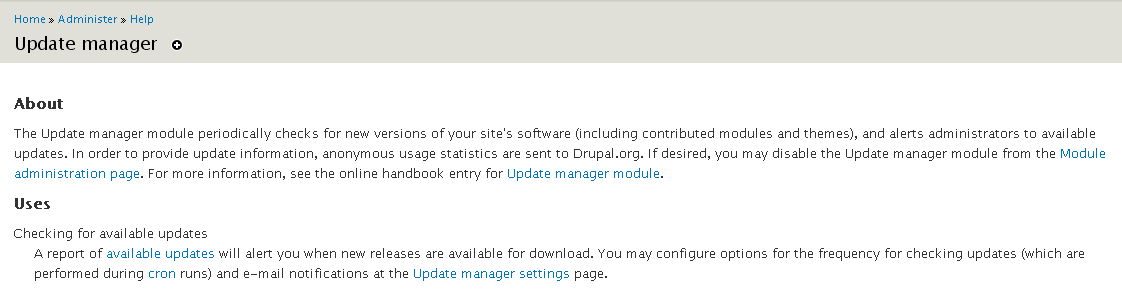
jhodgdonHere's a screen shot of what it looks like with $conf['allow_authorize_operations'] = FALSE; in the settings.php file.
Comment #23
jhodgdonOne small change, here's a new patch. As soon as the testing bot approves it, it's RTBC.
Comment #24
jhodgdonYeah! I think that's the last one!
Comment #25
webchickJust one minor fix:
+ $output .= '
' . t('The Update manager manager...
manager manager. ;) removed one.
This help file is a bit more technical than others, and seems a little inconsistent in that way. On the other hand, this is a module specifically geared toward website administrators, unlike other modules such as taxonomy and toolbar which are for content editors. So I actually think this is fine. Better to be more verbose than we need to be here than not enough.
Committed to HEAD!