

 Come together with the global Drupal community in Rotterdam, 28 Sept – 1 Oct 2026. Sessions, contribution, connection, and Early Bird savings until 8 June.
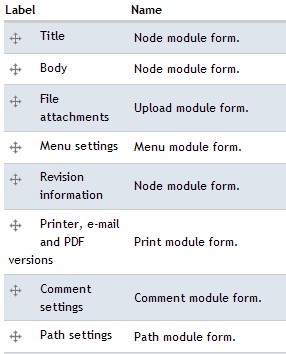
I need to create new field in a Node template and don't need the Title and Body fields, is there a way to remove them?
please see the attached image.
| Comment | File | Size | Author |
|---|---|---|---|
| #1 | node_fields.jpg | 27.73 KB | vako |
| node_fields.jpg | 89.23 KB | vako |


Comments
Comment #1
vako commentedSorry I attached the wrong image to the topic. The correct one is attached here.
Comment #2
choster commentedYou can suppress the Body by removing the label for it when defining the node type.
Probably the easiest way to suppress the node title is to use http://drupal.org/project/auto_nodetitle .
Comment #3
markus_petrux commentedGood advice, choster. Thanks!
Comment #4
calte commentedTo elaborate on the above answer if you select 'Automatically generate the title if the title field is left empty' and submit '<-?php ?> (without the -) into the 'Pattern for the title:' box (within 'Administer / Content management / Content types / 'edit' / Automatic title generation') you will get no title generated. This gives you the option of submitting a title-less node.
I use this personally for when I 'sticky to top of lists' as an intro to something like a blog page when I don't particularly want to edit my css to apply (display: hidden). It also keeps your code a tad cleaner. If you're really picky you can have node.tpl.php remove the < h2 > tags when the title is empty see below:
Change
to
Comment #5
calte commentedIt might not hurt to mention that I took '!$page' right out of there.
If I want a page with or without a title, I now have that option, as well as every other content type.