

 Come together with the global Drupal community in Rotterdam, 28 Sept – 1 Oct 2026. Sessions, contribution, connection, and Early Bird savings until 8 June.
I tried to use Node Relationships to create parent/child relationship possibilities between nodes, but in the end wasn't happy with the results. So I deleted what I thought were the fields used for referencing other nodes and ended up with what I can only describe as "dangling" or "orphaned" back references, with names like "field_backref_586f355f4619babcbb". I don't see any way to delete these guys from the system. For example, when Managing the Fields of a Content Type, one of the Operations I should be able to perform on that field is "Remove". Any assistance would be appreciated!
| Comment | File | Size | Author |
|---|---|---|---|
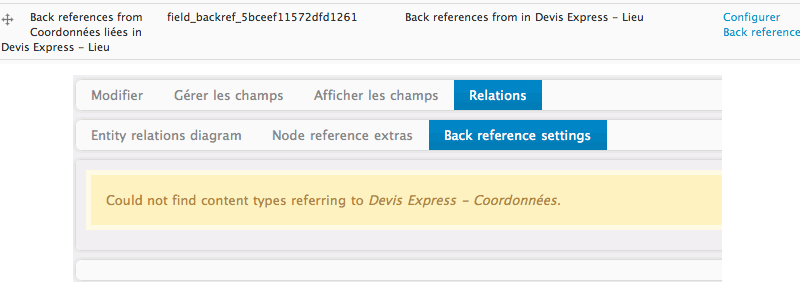
| #6 | backref.png | 11.69 KB | ethnovode |

Comments
Comment #1
markus_petrux commentedThis is fixed in CVS. All you need to do is install the -dev release before uninstalling the module. Please, see #583870: Uninstall should remove all back reference fields.
I should have packed a new release including that fix, but I haven't got the time, yet. Sorry for the headache.
[EDITED] If you do not want to uninstall this module, then you should remove the back reference fields from the Node Relationships tab, Back references subtab. Just disable the back reference fields from there.
Comment #2
photoboy commentedHi - Don't be sorry, it's no big thing.
Can you clarify:
When I'm editing a content type, the main tabs are Edit, Manage Fields, Display Fields, and Relationships.
The subtabs of Relationships are Entity relations diagram, Node reference extras, and Back reference settings.
In the Back reference settings subtab, it only says "Could not find content types referring to myContentType.
Thanks for your help
Comment #3
markus_petrux commentedYes, I mean that tab. You used it to enable the back reference field. When the back reference field is disabled from here, it is also removed from the "Manage fields" screen of that content type.
Do you mean the back reference field is not visible any more from that tab where you enabled it? If so, hmm, maybe it is not exactly related to the issue I mentioned above... could you please describe step by step instructions to reproduce the issue?
Comment #4
markus_petrux commentedNot enough information to further analyze this issue. I'm assuming it was fixed.
Comment #6
ethnovode commentedHello, I think I have the same issue.
I deleted the node reference field in the "back-referenced" content type before I could remove the back reference from the "Back reference settings" tab. Now I don't have the option to do so and the back reference field is still there on the "manage fields" tab. I don't really know how do I remove it.
Thank you for your help.
Comment #7
markus_petrux commentedAh! Thanks for posting your description. So when a nodereference field is deleted, we also need to check to see if we have back reference fields related and remove them as well in the same step.
Setting the issue back to active. This needs a patch.
Comment #8
recrit commentedif anyone needs to remove the back ref field before any patch is available...
Comment #9
markus_petrux commentedI think this is now fixed in CVS. Related patch:
http://drupal.org/cvs?commit=367602
It will be available with the next dev snapshot. Thanks for the feedback!
Comment #11
doublejosh commentedHaven't tried the patch yet, but this is supposedly done here: http://drupal.org/node/842456#comment-4166918
Comment #12
doublejosh commentedThought it was worthing noting http://drupal.org/project/cck_referential_integrity