

 Come together with the global Drupal community in Rotterdam, 28 Sept – 1 Oct 2026. Sessions, contribution, connection, and Early Bird savings until 8 June.
As explained in #515714-7: Tutorial for Rules Scheduler Module, having an on-update trigger that schedules an action which produces a change can result in an endless rescheduling loop, which iterates on every cron run. Following Tutorial 3: Publish content based on a CCK date field (including the on-update triggers) leads exactly to that situation.
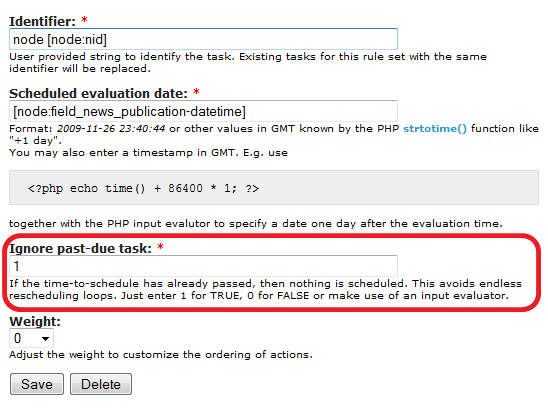
The attached patch adds a boolean parameter that allows avoiding scheduling past-due actions, see the attached screenshot.
| Comment | File | Size | Author |
|---|---|---|---|
| rules_scheduler.past-due.patch | 1.93 KB | salvis | |
| rules_scheduler.past-due.png | 19.03 KB | salvis |

Comments
Comment #1
salvisComment #2
klausiFor me this is a won't fix. I think Rules users should use additional conditions to make sure their rules do not re-trigger themselves in a loop.
I think scheduling of rule sets with a date in the past is more logical than just omitting them. Date in the past means immediate execution on the next cron run, which is quite ok for me.
Comment #3
salvisPlease let's leave this open until you get your Tutorial 3 to work without looping.
Comment #4
fagoI agree with klausi that loops for scheduled sets are in general desired. Well in cases like this it's not the case, but the suggested option wouldn't fix this in general. so -1 for that.
The problem here is that the recursion is triggered "on-update" of the node, thus when the rule-set updates the node, it schedules itself again.
Fixing it in general would mean that the recursion prevent would have to deal with scheduled invocations too. This won't happen for rules 1.x for sure, but I plan to partly do that for rules2 - but only for triggered rules, not for rule-sets. It should automatically prevent this case then.
For now, I think we should
* document that scheduling currently bypasses the whole rules recursion prevention
* fix the tutorial to explain it and to don't run into the recursion. Wouldn't a "Delete scheduled tasks" action which is executed as last action in the scheduled rule set fix it?
Comment #5
salvisNo. For one thing it's embarrassingly cumbersome, and for the other it doesn't work, because the saving (and thus the rescheduling) happens after the "delete" rule runs.
I'll be happy if you find another solution — in the meantime my patch is just what's needed to get one of the obvious use cases for Rules (your Tutorial 3) to actually work. This was my reason for downloading Rules. Not covering this use case is ridiculous.
I agree that loops can be desired. But not loops that are scheduled in the past. You can schedule in a week, in a day, in an hour, whatever, but scheduling in the past rarely makes sense unless you're keen to fill up your watchdog log as quickly as your cron allows. I'm not proposing to disallow scheduling in the past, but only to introduce an option that allows to avoid it.
Two rules that fire on every cron run and pollute your watchdog log without performing any desired action — I wonder how long you'd tolerate that on one of your sites. Two rules for every scheduled node, that is!
BTW, it'd be nice to have a checkbox for boolean values rather than an entry field taking 0 or 1.
Comment #6
fago>it doesn't work, because the saving (and thus the rescheduling) happens after the "delete" rule runs.
of course, I see.
Well I dislike having a lot of options. Also we can't add the patch as above as it changes the arguments for actions out there already in the wild, so this would cause incompatibility issues. Still you could use a condition and compare the scheduling time with now instead, and only schedule if this condition is met. -> That's the same as your option.
-> Anyway we have to fix the docs!
>BTW, it'd be nice to have a checkbox for boolean values rather than an entry field taking 0 or 1.
Yep, that is so you can make use of tokens for it. That's currently not ideal in rules 1.x and will be solved with 2.x.
Comment #7
salvisI see, too bad about the compatibility issue. Thanks for reviewing it.
The UI offers only equal/unequal comparison for dates and I don't know how to correctly compare for earlier/later — I'll wait for the updated tutorial...
Comment #8
YK85 commentedI just came across this issue where content that is already unpublished is once again saved, and the rule is scheduled to unpublish the published content on a past-date. Even after cron run the scheduled rule is still there in the scheduling. Is there a solution to removing these and preventing it from happening going forward?
Comment #9
fagoFollow the solution I described in #6. For comparing dates one has to use the "numeric comparison" for now.
Comment #10
klausiI updated Tutorial 3 now and added a condition to check whether the date is in the future or not. Please have a look and test.
http://drupal.org/node/520012
Comment #12
klausiSetting back to needs review, will you stay out of our documentation issue now, test bot?
Comment #13
salvisThank you for looking into this.
Having to enable the PHP filter module is an undesirable requirement. Can't
<?php echo time(); ?>be built into Rules? The current time is a pretty basic concept. The PHP filter was moved into a separate module and disabled by default for good reason, and a lot of people take this a step further and actually remove the module from the file system.Could
<?php echo time(); ?>be replaced with something like[site-date-timestamp]? Not sure that exists...Do you understand fp's comment? I don't understand what you mean with "So be aware that the content of the date field is interpreted as UTC/GMT." Is there a way to 'just make it work' as expected? Can you take the timezone issue into account and integrate proper timezone handling into the tutorial?
Comment #14
klausiYou are right, it would be nice to have a condition to compare dates. At the moment we compare the dates with the numeric data type condition, so we need the Unix timestamps (milli seconds from 1970 I think). The token [node:site-date] does not return that timestamp number and I don't see any other token returning it :-(
The timezone handling would be possible by converting the date with one or more PHP functions in the "Scheduled evaluation date" field. However, you need to know from which timezone you are converting form (the site setting? the user setting?).
Comment #15
fagoThanks for having a look it this klausi. I set the issue to fixed, as the docs are fixed now. :)
@improving: Please a open a new issue for that. Having a timestamp token doesn't make much sense (apart from rules), so I don't think it's a good idea to go this way. So probably the best improvement would be the date comparison condition making use of strtotime().
Comment #16
salvisYes, I think it works correctly now, thanks for updating the tutorial.
There should be a more straight-forward way to do this, though...