

 Come together with the global Drupal community in Rotterdam, 28 Sept – 1 Oct 2026. Sessions, contribution, connection, and Early Bird savings until 8 June.
hi
i dont know what im doing, but when i go to my user profile page..i can not see add as a friend user icon link, i already setup anything but the link is only appear in autho pane in forum.. please help me
| Comment | File | Size | Author |
|---|---|---|---|
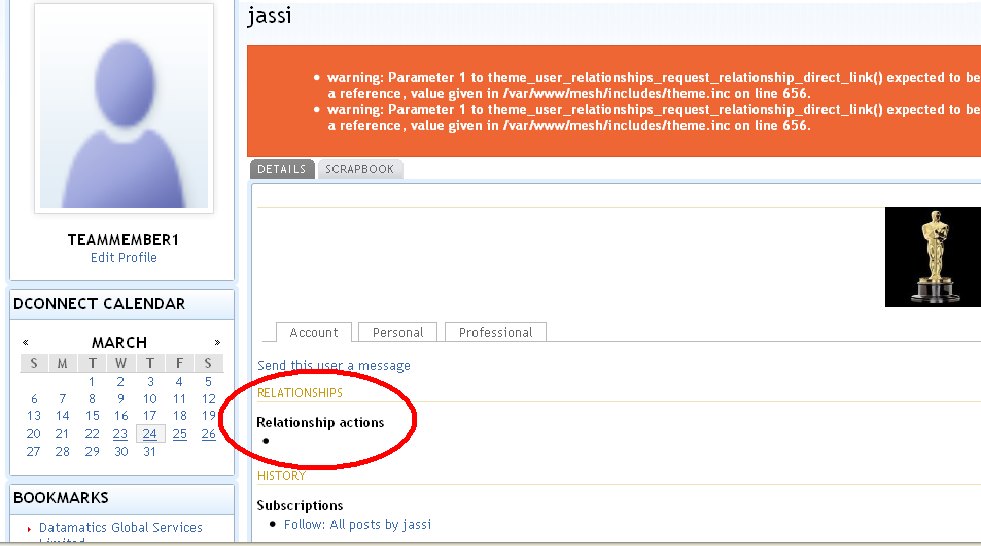
| #7 | user_relation.jpg | 1.53 MB | tanu487 |
| user.jpg | 61.96 KB | kakajoe |


Comments
Comment #1
sadist commentedwhat i can see is that, you customised your user profile page template. so you need to add the button/link manually there.. which i am looking for too. ;D
Comment #2
kakajoe commentedwell its not customise template...its APK and PANEL3 ...
Comment #3
kakajoe commentedfix it....i dont know what happening but there's two author pane, one in "APK" and the second one is in "Miscellaneous" and the "work" is in Miscellaneous....what happening ??
Comment #4
Rhino commentedSubscribing.
Comment #5
kompressaur commentedi will subscribe too as i have the same problem. Ive switched off all my modules and just have the ones requ to run but no link in profile.
Comment #6
kompressaur commentedi see now why the Activity block isnt showing up with the link. I had to add a type here
admin/user/relationships/add
Friend
Friends
and the options and it should show. great module thanks.
Comment #7
tanu487 commentedIn spite of checking all the settings correctly, i am unable to figure out the problem.
My biggest concern is that it works perfectly well on one server, but doest not in another server with the same environment and settings.
When i select a particular user, his profile is displayed but the link to add as colleague is not displayed.
also it throws the following warning:
* warning: Parameter 1 to theme_user_relationships_request_relationship_direct_link() expected to be a reference, value given in /var/www/mesh/includes/theme.inc on line 656.
* warning: Parameter 1 to theme_user_relationships_request_relationship_direct_link() expected to be a reference, value given in /var/www/mesh/includes/theme.inc on line 656.
Please check the attached file.
Comment #8
mrf commentedtanu487 can you confirm if you are still having this error? I can't replicate and a google search for that message doesn't turn up any results.
Comment #9
tanu487 commentedHi mrf, i no longer face this problem. My site had a customized theme, so a lil workaround helped me sort it.
Comment #11
mrf commentedTanu487 thanks for getting back to me, setting this as fixed.