

Closed (fixed)
Project:
Fusion
Version:
6.x-1.0-rc1
Component:
User interface
Priority:
Normal
Category:
Bug report
Assigned:
Unassigned
Reporter:
Created:
28 Nov 2009 at 04:58 UTC
Updated:
23 Jul 2010 at 17:20 UTC
Jump to comment: Most recent file

Comments
Comment #1
j. ayen green commentedThe temporary fix is to put an entry in the IE fix css files for #primary-menu #primary-menu-inner and make position: static.
Comment #2
jeremycaldwell commentedComment #3
sociotech commentedFixed in beta 3 release.
Comment #5
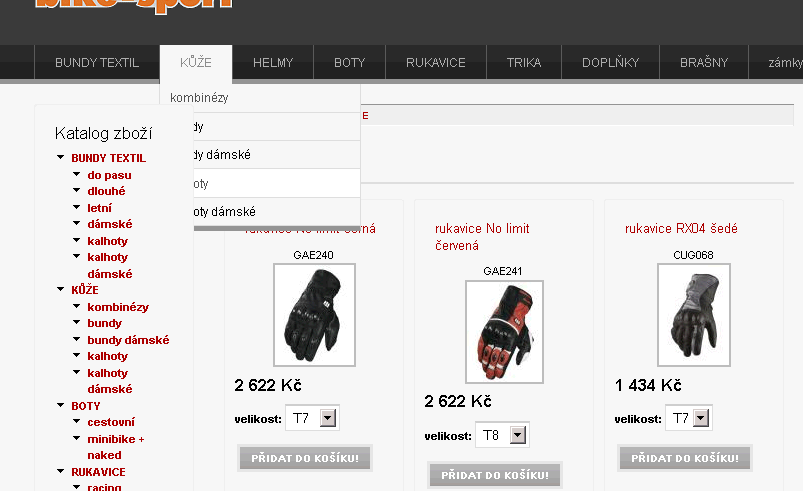
johhan commentedHaving 6.x-1.0-beta3 now, but regardless it, still not going well (see picture please) ...
Strictly describing my error, the catalog block overlaps (overlays) the items of the primary menu dropdown.
- affected system:
Drupal 6.15
Fusion 6.x-1.0-beta3
Acquia Prosper 6.x-1.0-beta3
Skinr 6.x-1.1 (it is now patched with drupal.org/node/648816 #15, but it make no change to discrepance behavior described above in this reply)
Comment #6
jeremycaldwell commentedJohhan, can you provide me with a link to your site that this is occurring so I can take a closer look? And what browser is this happening in?
Comment #7
sociotech commentedThis issue should now be fixed in the latest beta 4 release.
Comment #8
johhan commentedThanks.
Eternalistic: Sorry for not answering (not being here for some time)...
Comment #10
vrteach commentedI'm seeing this same problem with fusion rc1. I'm using the superfish module, and an additional menu (not primary links). No matter where I put the superfish block, the pull-down cells are cut off at the edge of the block, or are overwritten by the content below.
I get the same results when using other menu modules that implement superfish, like Nice Menus.
Comment #11
derekawalker commentedI had the same problem, but found that it was caused by some css that I'd added to the header-group section of the page. If you have any absolute or relative positioning attributes applied to anything in the header-group section, it could cause the overlap to occur in IE.
Comment #12
vrteach commentedWell, I have not tested in in IE, just in Firefox and Chrome.
I think there are some relative positioning attributes somewhere. I'll look around.
Comment #13
vrteach commentedFixed it, got the answer from a closed issue for the superfish module. This problem stems from overflow. I added the following to my local.css:
div#preface-top, div#block-superfish-1 {
overflow: visible;
}
Comment #14
stephthegeek commentedThanks for the info. Please don't close issues that may still need fixing in the project itself.
Comment #15
rubs commentedI've fixed it by inserting the following code in local.css:
Comment #16
jeremycaldwell commentedI just finished testing this locally in many browsers (Safari, FireFox, Opera, IE8, IE7, IE6, Chrome) and it appears to be working correctly. I even placed blocks similar to what is found in the screenshot above and it worked correctly. Can someone provide me with a URL to a site that is having similar issues so I can see it in action? I was unable to replicate it locally but would like to see if someone else is using the latest release of Fusion and is having the same issues.
Comment #17
gmclelland commented#15 worked for me on a site I'm developing locally. I had the problem in IE6 and IE7. As far as I could tell it didn't mess up layout in any way.
Comment #18
sociotech commentedThere are some fixes in the latest 1.0 release of Fusion that should help mitigate this issue, but ultimately it may have to be dealt with on a case-by-case basis because there can be different regions next to a dropdown menu and setting the .block .inner position to static is not always an option.
The good news is that we're looking at ways to eliminate this issue in the 7.x version of Fusion, where we can start with a clean slate without worrying about breaking existing themes.
In the meantime, we've added the above solutions to the troubleshooting section of our documentation: http://fusiondrupalthemes.com/support/documentation/troubleshooting