

Closed (fixed)
Project:
Drupal core
Version:
8.0.x-dev
Component:
Seven theme
Priority:
Minor
Category:
Bug report
Assigned:
Unassigned
Reporter:
Created:
28 Nov 2009 at 06:06 UTC
Updated:
29 Jul 2014 at 18:34 UTC
Jump to comment: Most recent file



Comments
Comment #1
Bojhan commentedSounds fine to me?
Comment #3
aloyr commentedrerolled the patch to the current git version of drupal 8.
Comment #4
aloyr commentedmmm trying to upload the patch again.
Comment #5
kscheirer#4: drupal8-fix_background_for_watchdog_table_on_some_messages-645234-0.patch queued for re-testing.
Comment #6
kscheirerRetesting against latest HEAD since it has been over a year.
Comment #8
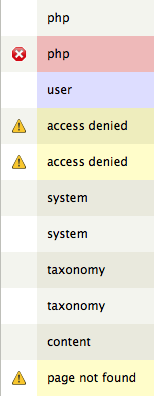
echoz commentedLooks like this is no longer an issue. Screenshot of current D8 dblog shows color coding that makes sense and is intentional.
