

 The 2026 Drupal Business Survey is open. Your response will help shape the future of the Drupal business ecosystem.
In trying out the development module I ran into a problem. When I schedule a meeting I get the message "Unable to schedule Dimdim meeting". I am using the default settings for the module. I've tried setting different times for the meeting, but this has no effect on the problem.
| Comment | File | Size | Author |
|---|---|---|---|
| #1 | DimDim_Module_Issue_1-a.png | 81.17 KB | matt.robinson1 |
| issue.png | 50.34 KB | sapelzin |


Comments
Comment #1
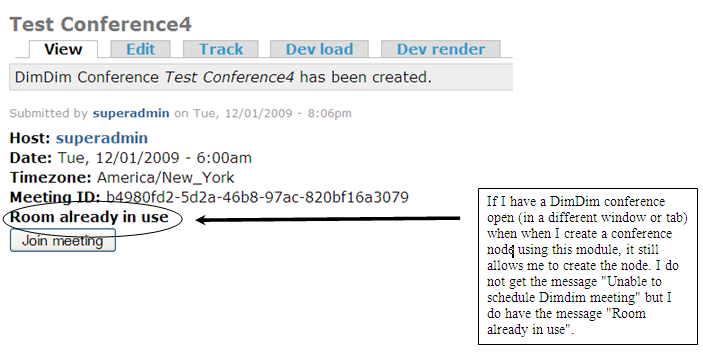
matt.robinson1 commentedAt first glance, I thought the problem might be from the line in your attached screen-shot that says: "Room already in use". But now I'm not sure.
If I do not have a DimDim conference open (in a different window or tab) when I create a conference node using this module, it allows me to create the node and do not get the message "Unable to schedule Dimdim meeting". I also do not have teh message "Room already in use".
If I do have a DimDim conference open (in a different window or tab) when when I create a conference node using this module, it still allows me to create the node and do I still do not get the message "Unable to schedule Dimdim meeting". However, in this case I do have the message "Room already in use".
That is my experience so far for whatever it is worth.
You can see my attached screen-shot as well.
Comment #2
univate commentedUnable to schedule Dimdim meeting - means the communication with dimdim failed, I have added a debug option in the settings pages so if enabled it will log the messages to the watchdog.
The room already in use message is because you already have a room running at the moment - a dimdim account will only allow you to have one conference running at a time, this message is just replacing the "start meeting" button (which is only visible to those with the correct privileges).
I am open to suggestions on the default UI for these various pages - what I have so far was just thrown together to get something working.
Comment #3
univate commented