

 The 2026 Drupal Business Survey is open. Your response will help shape the future of the Drupal business ecosystem.
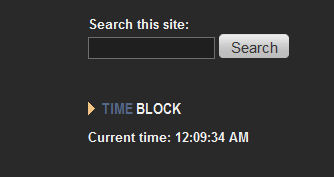
As I write this, it is 12:33pm EST. Timeblock is displaying that it is AM.
| Comment | File | Size | Author |
|---|---|---|---|
| #5 | Image2a.jpg | 15.28 KB | Starminder |
| #4 | Image2.jpg | 55.1 KB | Starminder |


Comments
Comment #1
jerdiggity commentedHi...
Thanks for taking the time to submit the report. :)
However, the time that's displayed in the time block itself is based on whatever the time is according to your computer's time clock. e.g. If you were to manually change the computer's time so that it's set to 5:00 when it's really 3:00, as soon as you apply the change it should immediately also be reflected in the time block on your web page.
Hope that helps...
jeremy
Note to self / d.o admins:
Nothing to (not) fix ∴ setting status as BD as opposed to WF
Comment #2
Starminder commentedOK, let me try again.
My system time is set to EST. The time block displays the correct time, EXCEPT between 12:00 and 12:59. The am and pm are reversed. When every clock on the east coast is set to 12pm (which is in the afternoon), time block displays 12am. At midnight, when it is 12am, the timeblock displays 12pm.
My server and drupal system times are set properly, as is every clock i own including my pc. The time block code needs an adjustment as 12am and 12 pm are reversed somehow.
Comment #3
jerdiggity commentedThanks again for the info... Just to clarify, do you think it's an issue with the code and EST or the just the code ? Only reason I ask is because the time on my computer (now) is 12:19am (19 min past midnight) & I can't seem to replicate the issue. On the project page I posted a Try out a demonstration link -- is it still messed up when (if) you follow that link?
Either way, plz let me know so I can address the issue asap (your input is much appreciated again). Thanks!
Comment #4
Starminder commentedI'm not really sure where the problem is, only that I'm experiencing it. Let me know what I can check on my server or where exactly it pulls the time from. I've attached a screenshot, it's a few minutes after noon as I write this. Site is www.hoslotracer.com
My users really appreciate the clock btw, this is just something odd I noticed and it could somehow be limited to my install.
Comment #5
Starminder commentedNevermind, it IS the code. I just went to your demo and it is doing the same thing. It is 12pm, but the clock is displaying 12am. See attached.
Unrelated, i also submitted a geosniper problem but I don't think you saw it.
Comment #6
jerdiggity commentedGood call.
Code has been updated & a new version (6.x-1.1) has been committed. Please see http://drupal.org/node/655480 and also download the new version when you have a chance in order to fix the problem.
Thank you for the input!!
:)
jeremy
Comment #7
Starminder commentedGlad to help, thanks for the quick fix! I'll set this to reviewed and tested when I can check it :)
Comment #8
jerdiggity commentedComment #9
Starminder commentedConfirmed fixed - thanks again!!