

 Come together with the global Drupal community in Rotterdam, 28 Sept – 1 Oct 2026. Sessions, contribution, connection, and Early Bird savings until 8 June.
Hello, great module you made, thanks!
I am having getting DDblock to... uhm, work. It sounds kinda simple and generalistic but the thing doesn't animate (scroll,fade, anything)
I tried finding the installation guide in case I forgot something but the link in the project page sends you over to a homepage where i couldn't locate it
I have a Drupal 6.latest , DDBlock rc6, jquery_update 6.x-1.1 . First I created 2 stories, then I went to the block settings and selected "Content Type" -> "Story" , then a default node to begin with, no container, (then a "img" container), containing div's width and height etc etc..
What is I see is the default node, but the thing stays there, doesn't move. (all the scripts I need are loaded I check that on the source code)
Thanks in Advance!
| Comment | File | Size | Author |
|---|---|---|---|
| #13 | print4.png | 31.99 KB | gkatsanos |
| #12 | print.jpg | 10.87 KB | gkatsanos |
| #12 | print2.jpg | 57.11 KB | gkatsanos |
| #12 | print3.png | 25.17 KB | gkatsanos |


Comments
Comment #1
greta_drupal commentedI had this same issue, and Philip was kind enough to help me troubleshoot. For me, there was confusion about in what directory the "css and image files" and theme files should go. (At least, I believe that was the issue.)
Your directory would look something like this:
My configuration was Advanced and using Views.
Of course, always good to check your file permissions.
Comment #2
ppblaauw commented@gkatsanos
The Basic slideshow tutorial, Advanced slideshow tutorial and video tutorials can be found at http://ddblock.myalbums.biz
A basic slideshow use images from a folder or one node of a content type (HTML).
An advanced slideshow uses CCK, views and ddblock themes.
Other tutorials can be found in the How to section.
Hope this help you further, please let me know.
Comment #3
gkatsanos commentedHello, thank you for these links.
Unfortunately I can't get it to work. No JS errors or warnings in Firebug, nothing. The thing doesn't animate. No images either, just a couple of nodes (stories). Please help me I need to deliver the soonest possible
Comment #4
ppblaauw commented#3
What functionality do you want to accomplish?
What tutorial did you use?
What steps did you do?
What did you expect?
What is not as expected?
These are some of my questions which are useful to help you better.
In your first post I assume you want to make a basic slideshow using one node of a content type.
What HTML code did you use in the node?
What are your configuration settings of the ddblock?
Do you have a link to the site?
Tip: Just to inform you.
Giving detailed descriptions in an issue will quicken getting the right answers, putting the priority to critical for a support request will not give you quicker answers.
There are no issues with to much text to describe what is the issue.
Information about posting issues can be found at: Issue queue handbook
Reading this will make your issues more fruitful and will probably give you quicker answers in the future.
Set status to normal.
Comment #5
greta_drupal commentedYep, actually mine is broken now again too. The view works, and just displays the ddblock items one atop the other, as a normal threaded content. The HTML shows them in a ddblock styles div, but no template is being applied.
Only thing that I did was to add taxonomy filter.
Very frustrating. I have no idea what is causing it to go awry.
Version: DDBlock Advanced, with View
Preprocess: Basic Plus preprocess code
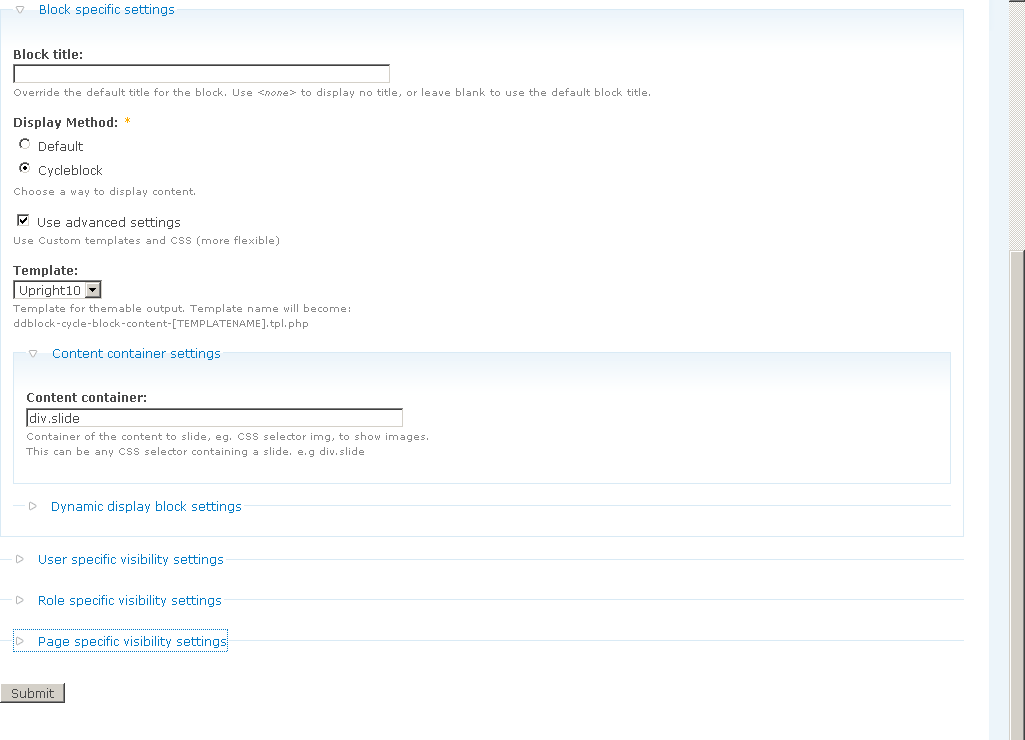
Theme: Upright10
Pager: numeric
Effect: default Fade in/out
I find the DDBlock config settings are confusing. It seems that you must always create an Instance; however, for mine, the only "original block" it shows to associate with that instance is some old referenced view no longer selected. Not the one checked in the Settings blocks config.
Also, in the Settings page, there are many theme blocks (and custom blocks) listed, except the actual theme block (theme region) where I am using the DDBlock. It makes sense that I would set that as the settings Block. Instead, I have had to set the Views block. And, that is not working, so confused about that.
This did work for 2 minutes. Then the client decided that they wanted to be able to create a slide from within the story edit form. So, I added the slideshow fields there and a taxonomy field for "slideshow". Then added the taxonomy term filter to the View.
Again, the View itself works.
Comment #6
greta_drupal commentedPhilip was kind enough to help me troubleshoot, and it had to do with the field names. So, I'll pass along my tips:
For Advanced Slideshow:
+ Node Title
+ Slideshow Page
+ Slideshow Image
+ Slideshow Text
+ Node Teaser
You certainly can do any of the above, but you must verify that the Template.php file code (re: field name) matches the current field names used in the View.
* Since these CCK fields are written to one CCK table, if you use the fields more than once, CCK has to modify the names (append/prepend) so as not to overwrite the other instance of those fields in another content type.
Did I explain that correctly, Philip?
Comment #7
gkatsanos commentedThank you for your reply ppblaauw. I will try to answer all these questions, although note that there is one thing following the issue submission rules and another abusing the these rules. Simply put I don't see the point on describing ALL settings of all modules when I used out-of-the-box-default settings. Anyhow I can understand how supporting a popular module can be a pain in the a$$.
I will try to gather all the info and repost!
Comment #8
ppblaauw commented#7
I did not mean that you have to describe all settings of all modules used (There is no point doing that like you say), but i mean: when you give enough information about your issue, I can help you better and give the right answers on the right questions, instead of having to assume what you want to accomplish, what code you used in your settings and what steps you did.
My tip about posting issues is just to help you to get quicker and more accurate answers on your issues.
Another tip is searching the issue queue on all issue to find similar question, so you can get direct answers on your issue and don't have to wait for it.
Comment #9
gkatsanos commentedSo, what did I do...
I created 2 nodes (stories)
I installed the module..
I go to /admin/settings/ddblock/ and enter a block name in the "Block Title" field, and click on: "Add Block".
Then I click into Configure (for this block of course)
I set Transition effect, speed, timeout, Content type (Story), Node: (title of the first of my 2 stories) , Input type: Content type..
Then I visit the webpage. I see the 1st node static. No animation, No scrolling.
This is the HTML markup produced:
What other kind of information do you need? Unfortunately I don't have an online URL.
Comment #10
ppblaauw commentedThe way you describe is you use 2 nodes and want to use these with the ddblock module.
When you want to have this setup you need to create a view for the nodes, the view needs a views block display. For this views block display you need to make a ddblock instance. this ddblock instance you can now configure.
All this is described in the advanced slideshow tutorial.
When you use add block in the ddblock settings page you are using the basic options of the ddblock module and can use images from a folder or a slideshow from one node (made by HTML code)
All this is described in the basic slideshow tutorial.
Hope this helps you further, please let me know.
Comment #11
gkatsanos commentedhi again and thanks for the reply. what I managed to do is have a block who presents all the nodes together.. no animating one-by-one..
I created a view, added an instance on that view and then published the Block.. I don't know what else I should change (amongst the million options of Views and ddblock configuration options)
I have to say from an end-user point of view this is quite complicated, for a simple node cycle animation.. Views, Instances, Blocks.. I would suggest sticking with basic functionalities but making it easier to achieve. Even if I finally make it work, if I ever want to go back and update it couple of months after I won't remember a thing.
Comment #12
gkatsanos commentedI am attaching 3 printscreens. the 1st one is the result the 2nd is the Views and the 3rd the block configuration!
Comment #13
gkatsanos commentedI am sorry for the multiple posting, adding a printscreen of the result with all the web developer information in case this is a CSS thing(?)
Comment #14
ppblaauw commentedFrom what I can see what you want to accomplish: (Show node post data, node title and node teaser in a slideshow)
I would advise you to use one of the other slidehow modules which you can find in the slideshow comparison
Comment #15
gkatsanos commentedI am sorry, what is ddblock if not a node slideshow module?
Comment #16
ppblaauw commentedThe dynamic display block module is more flexible and has more functionality then the other slideshow modules you can use with Drupal. But this flexibility comes at a price, it involves more steps to use this flexibility and users which are not that familiar with PHP have more difficulties to make the module work.
When you don't need this flexibility and all the functionality and just want to cycle nodes, it is better to use one of the other slideshow modules.
Hope this explains enough.
Comment #17
gkatsanos commentedPhilip, with regards and respect to your work and contribution, Flexibility and functionality pluralism doesn't have to harm User Experience. If you make a module for a thing such as rotation, achieved with one jQuery plugin, and you end up using zillions of options and configuration menus and combinations of configurations then the value of using a Module is diminished.
I would be at your service to provide with detailed suggestions or maybe undergo Usability testing so we can make this module a better one.
ps: I would appreciate if you could pinpoint me to a specific module in order to save some time testing all 15 of them :/
Comment #18
airen2011 commentedThe flexibility of the module lies in using preprocess functions to combine fields provided by CCK and Views.
We tried to think of a User interface for all these options, but this would make the module complex and at the moment the module was developed there was not really a simple way to make multistep forms. Maybe in the future we will add a user interface for the most simple cases.
For users with experience in PHP and the drupal theming system adjusting the preprocess functions makes the module flexible and we will add more and more code snippets to use in the preprocess functions.
Also other module maintainers are not sitting still and e.g. the views_slideshow module, which is also by far the most used module, has improved a lot.)
I would use this module, when I had to develop your functionality.
Hope this helps you further, please let me know.
Comment #19
gkatsanos commentedIren, thank you for your kind reply. I don't think a module should be made with the hypothesis that its users are PHP experienced. Especially a module made for the Front-End.
Comment #20
gkatsanos commentedComment #21
ppblaauw commentedI can not agree with you. Drupal is build with PHP and when you want to override something you need to have some PHP knowledge.
Like said before, just use a module which does not require some PHP knowledge.
This is the last thing I have to say about this issue.