Closed (duplicate)
Project:
Drupal core
Version:
7.x-dev
Component:
theme system
Priority:
Critical
Category:
Bug report
Assigned:
Unassigned
Issue tags:
Reporter:
Created:
2 Dec 2009 at 15:02 UTC
Updated:
17 Dec 2009 at 05:36 UTC


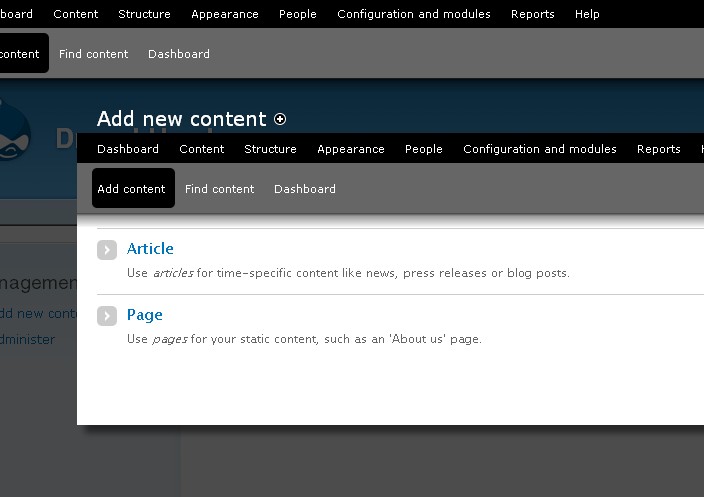
Fresh install, o_O ;)
| Comment | File | Size | Author |
|---|---|---|---|
| Screenshot-431.jpg | 50.64 KB | eigentor |


Comments
Comment #1
eigentor commentedadding tags
Comment #2
seutje commentedsubscribe, but I would swear I've seen another issue about this, can't find it anymore though
Comment #3
ksenzeeIt's a bug elsewhere in core, in which the preprocess functions in overlay module aren't registered after the module is enabled for the first time. If you clear caches all is well.
Comment #4
ksenzeeForgot to retitle. I should also point out this is only true if you enable the module after your site is installed. Modules enabled as part of an install profile get their preprocess functions called correctly.
Comment #5
ksenzeeBumping to critical. People are reporting this makes overlay unusable for them, since they can't see the close button (and aren't good enough mind-readers to know they can close the overlay using the ESC key).
Comment #6
eigentor commentedThis happened from a fresh install. So Overlay was activated from the profile.
Gonna double-check to confirm this was not just some error in my personal install process.
Can confirm clearing cache tables removes the problem, clearing theme cache (by going to appearance page and hit save) is not enough.
Comment #7
David_Rothstein commentedI think this is probably a duplicate of #651086: Cache clearing is an ineffective mess in module_enable() and system_modules_submit() - is it?
(Well, technically that one's the duplicate, but there's a patch there and I think it identifies a more-encompassing version of the same problem....)
Comment #8
eigentor commentedHm the error is still there. Fresh install: deleted all files incl. CVS files, fresh checkout from CVS.
All database tables deleted, installed anew.
Can confirm clearing drupal caches via admin/development/performance fixes the problem.
I am a bit unsure if these caches can be in the browser, since I reinstall Drupal in the same directory and with the same name that is has been before.
But aren't those Drupal's internal caches that have nothing to do with the browser?
Maybe an install of someone that had never installed it before or in a completely different path or browser can get more relevant results...
Comment #9
eigentor commentedFeedback shows this is still there for some people from a fresh install http://drupal.org/node/659488#comment-2381650 see points 2 and 4
Comment #10
David_Rothstein commentedOK, I'm close to 100% sure that this is a duplicate of #651086: Cache clearing is an ineffective mess in module_enable() and system_modules_submit().
If applying the latest patch in that issue (and then reinstalling Drupal) does not fix this for anyone, please feel free to reopen it, though!