

Closed (duplicate)
Project:
TinyMCE
Version:
4.7.x-1.x-dev
Component:
User interface
Priority:
Critical
Category:
Bug report
Assigned:
Reporter:
Created:
22 May 2006 at 23:12 UTC
Updated:
23 Mar 2007 at 03:37 UTC
Jump to comment: Most recent file

Comments
Comment #1
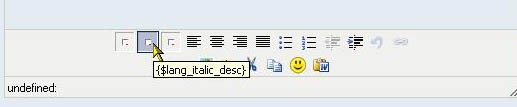
francoud commentedI also have similar problem. Just, not all buttons appear - "B", "I", "U" are broken images in I.E, not displayed in Firefox. The "ALT" attribute for all button images is wrong, it shows: "{$lang_italic_desc}" and similar....
This with Drupal 4.7.2 and 4.7.3. Any help?
Comment #2
francoud commentedI solved... :-)
In tinymce setup I choosed the italian language.. .but not it.js was installed in my tinymce folders... so it couldn't work! I switched to the english language and all worked again. I suppose that if I will install the italian language support, it will also work.
Comment #3
kreaper commentedHere here. I have the problem as well. I have 4.7.3. I checked the language settings, turned off compression with no avail.
rajeev
Comment #4
zeitenflug commentedThis is a security issue. A default drupal install will block access to the modules directory for security reasons. TinyMCE however will be copied to the modules/tinymce directory, thus browsers will not be able to access tinymce. You could edit your htaccess file, but this is not advisable because it reduces security on your server. I'd suggest putting tinymce in your drupal directory (let's say /htdocs/drupal/tinymce) and edit the path in the tinymce.js's as well as in tinymce.module.
Comment #5
kreaper commentedWhy don't other modules suffer from this issue ?
Comment #6
inforeto commentedWhen none of the buttons appear you should check if the access is denied, as mentioned here.
When only the localized strings aren't being parsed it is because the language pack is missing.
These are downloaded from this page, according to the readme file on the lang folder:
http://tinymce.moxiecode.com/download.php
Comment #7
tburton commentedI am having the same issues with firefox 2 and IE 6. With FF I don't get the B, I or U buttons (but do get the others albeit with $lang as the alt ). In IE I see these buttons, but as broken images . I have two sites which are duplicates on the same shared server and one is fine, but the other has this problem . Am running 4.7.2. Is this a permissions issue ?
Comment #8
inforeto commentedAt /admin/settings/tinymce/edit/profile_name there's a language selector.
It must be set to "en" or to language packs that have been installed.
Or it will be enough to copy the file en.js for quick translation of the button filenames.
Comment #9
kreynen commentedTranslation
Comment #10
kreynen commentedhttp://drupal.org/node/130303