

 Come together with the global Drupal community in Rotterdam, 28 Sept – 1 Oct 2026. Sessions, contribution, connection, and Early Bird savings until 8 June.
Hi,
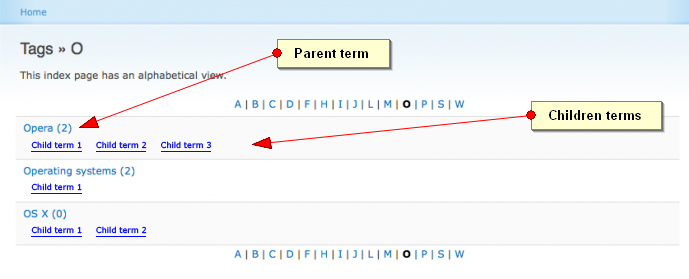
How i can obtain a view like the image in attachment?
(a view showing the children terms under the parent one)
Thank you!
MXT
| Comment | File | Size | Author |
|---|---|---|---|
| NewView.jpg | 84.1 KB | mxt |

Comments
Comment #1
xanoSupport != feature request.
You can achieve something like this using a tree view. Use your theme to style the list according to your wishes. The zebra striping will probably not work like this, but you will however be able to position items correctly.
Index will allow you to write your own views without hacking the module, so stay tuned!
Comment #2
mxtI Xano, sorry for my "bad post", but I meant ask for a new feature (not a support): a fourth kind of view in addition to the default ones (tree, alphabetical, browsable).
With a solution like themeing a tree view I think I can't achieve my goal because tree view doesn't have the alphabetical filter on the top and because the zebra striping issues you have already noticed.
Do you/anybody else have a suggestion?
(another question: Will new module INDEX you're developing replace the vocabulary index one? Are both module coexist in future? )
Thank you very much!
MXT
Comment #3
xanoI won't be adding new features to Vocabulary Index, as Index is rapidly becoming more stable. It will indeed replace Vocabulary Index. As soon as it's ready I'll release Vocabulary Index 3, which allows you to convert all Vocabulary Indexes to Indexes very easily.
I'll move this issue to Index, so I can think of a way to achieve this kind of view :)
Comment #4
xanoComment #5
xanoWould this display mode be browsable or just a single page? Some sort of tree view with just two levels?
Comment #6
mxtHi Xano, thank you very much for your praiseworthy effort!
About your question: yes, it would be browsable (with paging I mean)
I'll try to explain better the view (always sorry for my bad english):
Thank you!!!
MXT
Comment #7
xano- I'm not sure if I'll put the alpabetical filter into Index, as it hasn't got anything to do with hierarchy. If I do, it will be an option for every display mode, but I'm not yet sure how to implement this.
- The whole idea behind Index is the hierarchical display of data. Displaying levels 2 and beyond exactly the same doesn't really fit into this picture. I think we'll just stick to two levels for this display mode.
- Index is not just about Taxonomy anymore. Nodes, users, etc. can be used instead of terms as well. In some cases this matters.
Comment #8
xanoI added this display mode as Upper two levels.
Comment #9
mxtTHANK YOU VERY MUCH!
I can't wait to try this module: when can I do that? Is it now stable? I already have vocaboulary index installed: what I have to do?
Thank you!
MXT
Comment #10
xanoYou can always try :) If there's anything wrong or missing, feel free to open an issue.
Comment #12
xano