

Closed (outdated)
Project:
Barcode
Version:
6.x-2.x-dev
Component:
Code
Priority:
Normal
Category:
Feature request
Assigned:
Unassigned
Reporter:
Created:
4 Dec 2009 at 23:41 UTC
Updated:
2 Nov 2021 at 04:43 UTC
Jump to comment: Most recent, Most recent file

Comments
Comment #1
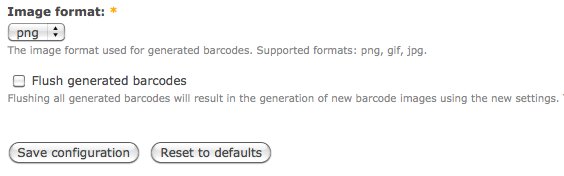
xatoo_ commentedThis one takes the Drupal coding standard into account.
Comment #2
slip commentedI meant to respond much sooner, but got caught up in other stuff...
I like this idea and the patch looks good. I tested it out and it worked very well.
A couple suggestions/questions:
1) Have you tried out the coder module? You still have a couple small style issues and coder is a huge help with that.
2) What do you think about changing it from a checkbox to a separate button like the 'Clear cached data' button at '/admin/settings/performance'. I've seen the checkbox setup similar to yours in other modules, but I've always thought it was a little odd to have that with the rest of the form.
3) When you say 'File not found', couldn't be impossible to delete for other reasons, because of permissions for instance?
4) I wonder if this would be a more complete solution if there was a way to check which file types to delete. Like three checkboxes for 'png', 'gif', and 'jpg/jpeg'. Or if it'd be better to delete all three automatically. Right now it only clears out the currently selected filetype, so it might be nice to somehow point that out to the user and give them options to, say, delete all gifs if they've now switched to pngs.
Let me know what you think. I like what I've seen so far.
Comment #3
xatoo_ commentedHi Slip,
Thank you for your feedback. I forgot to check with the coder module before I created the patch but solved the issues afterwards. I will make the suggested changes and then post a new patch. I like the idea of the possibility to choose the filetype before deleting any images. You are also right about the error message, it would in fact be very strange if the file didn't exist since it was reported by a Drupal function. Would a message like "Could not remove '@filename'. Please check whether your web server has write permission on this file." be better? (I'm not a native English so chances are I am talking nonsense when writing such a line :) .)
I stand neutral in the button vs checkbox debate. Having a checkbox makes it possible to delete your images while saving your settings, resulting in fewer mouse clicks. I personally believe it also reduces the risk of accidental image removal, since you need two clicks instead of one to delete the images. (Well, we could make a confirmation page but that's a bit more work.)
A button might although be more inline with how a user currently expects such a feature to work, because of the same option you pointed out at the performance page. I myself was being doubtful about putting a button or a checkbox on the form and I finally decided to go for a checkbox, but since you prefer a button I suggest to change it to a button in a separate field set on top of the page, just like on the performance page.
Comment #4
tr commentedDrupal 6 is long out of support, and the community no longer provides help for upgrading from D6.