

Closed (fixed)
Project:
FileField
Version:
6.x-3.2
Component:
Miscellaneous
Priority:
Normal
Category:
Support request
Assigned:
Unassigned
Reporter:
Created:
5 Dec 2009 at 20:37 UTC
Updated:
27 Apr 2011 at 21:12 UTC
Jump to comment: Most recent file


Comments
Comment #1
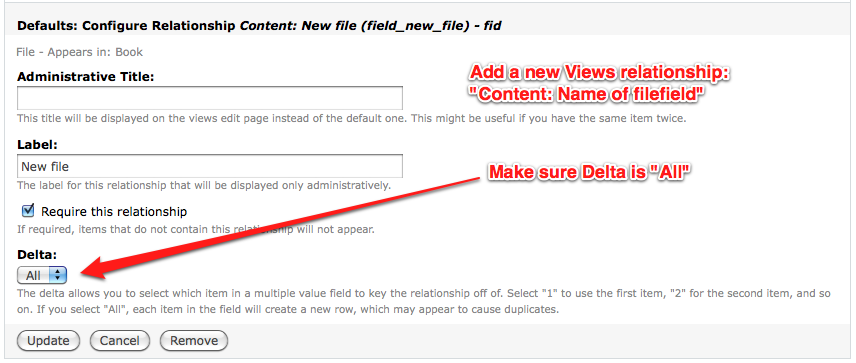
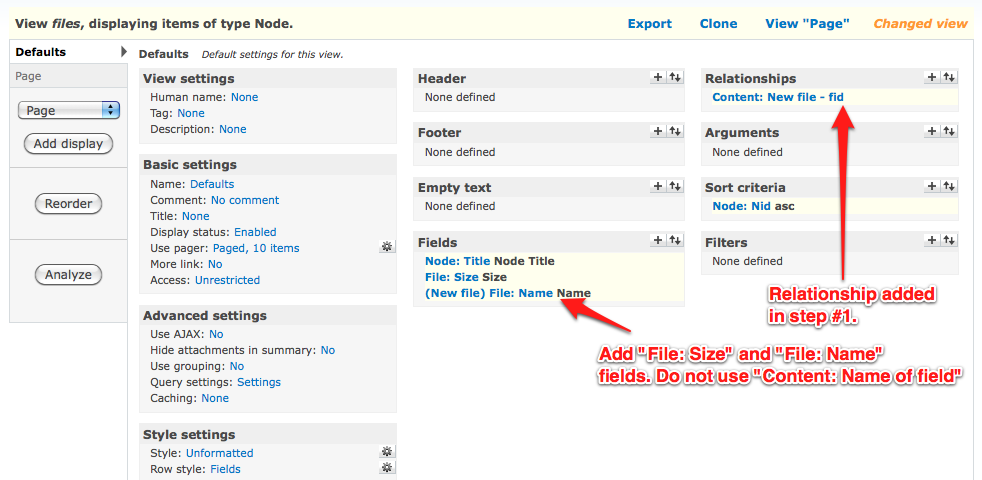
quicksketchThere's no way to set up views to show you the filesize of multiple files in a single row. You can however use a relationship over to the files table and make it so that there is one row per file, and include the file size that way. However this may cause the title of the node to show up repeatedly. To do this, add a relationship for "Content: [Field name]" for your file field, make sure you use the "All" option for the delta, otherwise you'll just get the results for the first file uploaded. Also be sure that the "Distinct" option underneath the main view settings is set to "No", otherwise it will cause your additional files to not show up.
If you need to have multiple files shown within a single row in the view, you'll need to do some theming. The easiest approach would probably be to override theme_filefield_file(), and include the filesize there. Then you wouldn't use a relationship at all, instead you'd just use the "Content: [Field name]" *field* instead of a relationship.
Comment #2
Golem07 commentedThanks a lot for the prompt and detailed post!
Here is the part that I am having trouble with:
I have added the relationship as you have suggested and put everything in a table view. However, when I add the content field (holding multiple files they will listen one underneath the other but apparently still in the same row - see attached screenshot (as you can tell by the other fields). I need to check "group multiple values" in order for all files to show up.
Using the "File: Name" field will only show one item, no matter what I do.
Whenever you get to it would you mind to tell me how I 'd have to change the view settings to get an extra row for each of the uploaded files, like you mentioned in the previous post?
And thanks again for the really great help.
Comment #3
quicksketchIt looks like you're on the right path since you already have the relationship set up to retrieve the file size. However you've added the "Content: Field name" field to get the field name. You should instead use the "File: Name" (I think that's what it's called) field, which should show you a row for each file.
Comment #4
Golem07 commentedThnaks you for the reply.
I have followed your instructions closely and made sure that in the relationship "Delta" is set to "all". Still the file field is returning only one single result (the first file uploaded).
Comment #5
quicksketchClosing after lack of activity.
Comment #6
glass.dimly commentedI'm interested in a solution to this problem since I'm trying to display descriptions for files under that file from a multiple file filefield. Same problem, description from first item shows up under all. I've tried the solutions quicksketch has offered, and I can't get it working.
Any takers for setting up something working (or discovering a bug), and then posting a walkthrough or a bug?
Comment #7
quicksketchI cannot give Views support to everyone in my issue queues. Please do not reopen.