I just installed the Drupal 7.x-dev tarball for the first time and I would like to share this experience in order to make the installation procedure as smooth as possible. After unpacking the tarball and navigating to my site I instantly got the installation screen. I like that. After I choose my profile I got a screen indicating some requirements problems. Now, I know how to fix these so that was not a problem, but then... If I want to see if my problems are fixed, should I refresh the screen or click "proceed with the installation"? I choose to refresh my screen but later I noticed that proceeding with the installation would do exactly the same thing. In my opinion (but I am not a native English speaker) the word "proceed" implies skipping these checks and I think the use of the word "retry" would clear things up. Besides that does "Check the error messages" mean that I have to check them or that Drupal is going to do that for me? I thought of the first option since this text was not part of the link.
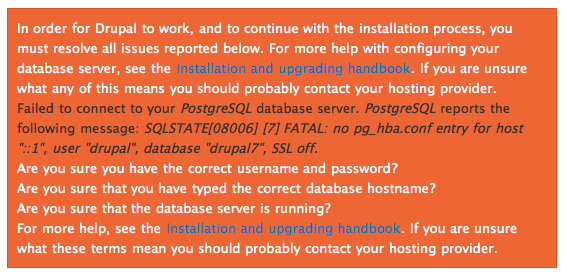
In the next stage, when I mistype my database information, I get an error message. This message gives some double information (It refers to the Installation and upgrading handbook twice and suggests to contact my hosting provider twice.) Furthermore, the blue links on the orange background are unclear and the possible explanations may be itemized.
Another question I have: Can't removing the write permissions from the default folder and the settings.php file be done automatically? It can always give this notice when it doesn't succeed because of i.e. php safe mode or something.
Maybe I am nitpicking but these are just my 2cents.



Comments
Comment #1
xatoo_ commentedSeems one of my points was already addressed here:
#641008: Duplicated text in install error message
Comment #2
Ryan Palmer commentedComment #3
xatoo_ commentedI found my question regarding the usage of chmod by PHP answered here #418302: Copy default.settings.php to settings.php during install IFF webserver owns files (FTP on shared hosting) #90, so that only leaves the proceed vs. retry as an issue.
Comment #4
yoroy commenteduse tag 'usability' to get ux team attention :) Thanks for this first-timer report, valuable insights. I agree the text you point out could be more specific. User interface texts are basically frozen now though :\, I think we even have an issue open somewhere about this that didn't get resolved.
Comment #5
yoroy commented#484186: Improved error message for missing settings.php file
Comment #6
webchickJust a note that if there is evidence that these types of messages are causing significant confusion, I would classify that as a "bug". Though it'd be nice to get these kinds of things cleaned ASAP.
Comment #7
xanoComment #8
Niklas Fiekas commentedHaving that you suggested "retry" and that update.php uses something like that as well
here is a patch with
Check the messages and <a href="!url">try again</a>.Comment #9
David_Rothstein commentedIt makes a lot of sense to me to have it use the same text as update.php, and the patch looks good... Probably needs one more person to review it though.
Comment #10
yoroy commentedYay for simpler wording!
Comment #11
catchYes much better :)
Committed/pushed to 8.x.