Closed (fixed)
Project:
Webform
Component:
Miscellaneous
Priority:
Minor
Category:
Support request
Assigned:
Unassigned
Issue tags:
Reporter:
Created:
7 Dec 2009 at 13:28 UTC
Updated:
3 Jan 2014 at 01:08 UTC
Jump to comment: Most recent


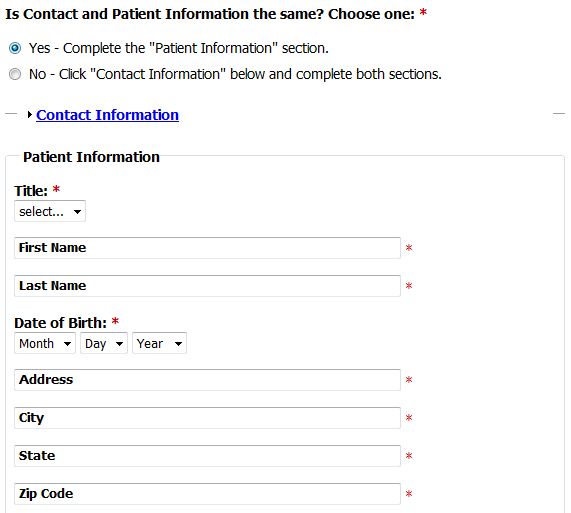
Example: I've created a form for a patient or guardian to submit information to request an appointment.
- The first question on the form, "Is Contact and Patient Information the same?" with Yes, No radio buttons, required.
- The first fieldset is the Contact Information, collapsed.
- The second fieldset is the Patient information, expanded, not collapsible.
What is the best method to auto expand the collapsed Contact Information section upon user input choice of "No"?
Possibly even better UI: Could we hide the whole Contact section (even the link to expand the section) from view until the selection of "No".
| Comment | File | Size | Author |
|---|---|---|---|
| Capture17.JPG | 43.36 KB | crutch |

Comments
Comment #1
oskarblue commented@crutch - I used a guide to accomplish this quite easily: http://drupal.org/node/342183
Good luck!
Comment #2
quicksketchAn excellent guide, thanks oskarblue!
Comment #3
crutch commentedThanks oskarblue!
Comment #4
wolftmc commentedHi, I am working on the very same thing. I noticed in your example you mentioned that you have the field set "collapsed", how did you do that? I have been looking for anything in the documentation but have not found it (sorry if I missed it).
Ideally for what I need to do, we need something like a plus sign for the user to select if they want to complete that part of the form (possible without javascript). I guess what I am trying to create is an expandable form. I hope that makes sense.
Thanks for your advice in advance.
By the way, this is by far one of the best modules, I hope to contribute more as I continue to work with it!
Wolftmc
Comment #5
Marat commentedI think this is related somehow to #254728: Conditional fields because there is a condition, if YES do something and if NO do something else.
Comment #6
MBroberg commentedThere are several good form modules, including:
Multistep, which allows you to define sections of the form for each step. Not sure if it can handle branching steps.
Node form columns, which not only allows you to drag and drop your form elements into columns and regions, but also gives you fine control over hiding and collapsing fields. Very useful!
I don't think either does exactly what you want but they are good options.