

I'm trying (quite unsuccessfully mind you) to move my login to the header beside my primary links page (see link: http://www.totalactionadventure.com). I've tried the following 3 steps:
1- Simply moving the Login Block to the header location
2- Following these steps: http://www.topnotchthemes.com/blog/081204/horizontal-user-login-block-us...
3- Following these steps: http://drupal.org/node/311125#comment-1098725
All of these resulted in me losing my login block completely and only being able to access my login by going to site.com/user to hit a login prompt.
Being so new to PHP and CSS, I've been trying to teach myself a lot of this, so maybe I've been too brazen with going in and changing stuff, but I think I am doing everything correctly. I am using the Marinelli theme (Giordani).
I'd REALLY like it to match something like this: http://drupal.org/files/issues/sky-6.x-3.1_user-bar.png
The only odd thing I noticed was that after I added the "

Comments
=-=
doesn't sound like you cleared the cache taboles after making any of the changes. When adding theme files or altering them be sure to clear the theme registry by visiting administer -> performance
Theme?
What theme are you using? Would you attach your page.tpl.php file or something so we can see more of what's going on? And, yes, try clearing the cache at the bottom of the page on 'admin/settings/performance' after you make your changes.
I did try clearing the cache
I did try clearing the cache at some point, just tried it again to no avail. Please find my attached page.tpl.php
Thanks for the quick response Experts!
EDIT: And sorry, I forgot to mention again that I am using the Marinelli theme (with the Giordani subtheme)
I added it after the area where it prints the primary links thinking that it might print it in the area I am hoping. Does that make sense?
=-=
And you added the other snippet to template.php?
have you tried going to administer themes and resaving the form forcing template.php to be read again?
Yep, added it to the bottom
Yep, added it to the bottom of my template.php and went in to administer themes, saved the config, and logged out. Still nothing. See the code below.
This is what I added to the bottom of template.php. Just went all the way to the bottom and did a CR followed by pasting in this code.
So do you just want a link to
So do you just want a link to the login/register page, or do you actually want a login form at the top of your page?
I guess either or, just
I guess either or, just getting something to show up would be a victory at this point. Am I maybe trying to do two different things here?
Yeah, they're different. The
Yeah, they're different.
The example you gave in your first post had a little note with a login/register link. The 'login' block is an actual form for people to sign in to. After examining the theme, it's apparent that there is no 'header' region being printed. The block is defined, but it's not being used in the template. So, to include anything in the header it will either have to be hard-coded or the header region will need to be used along with some styling to make it appropriate.
Check this out. http://drupal.org/node/92657
That looks perfect actually!
That looks perfect actually! The only problem is the very first step. I don't appear to have a div id="navigation" section in my /sites/all/themes/marinelli
Is that something I can just add? I took a look at a few other themes and they don't have it as well (including the default Garland theme).
So I just went ahead and
So I just went ahead and added the navigation section into my page.tpl.php to no avail. Tried it in the body and head section just in case. In both instances, it doesn't appear when I view the source of the rendered site... which I think is wrong.
Am I by some freak chance editing the wrong page.tpl.php? Is there any way to test that?
Also, it says to add a call to my newly created css file (for the user login block) in my page.tpl.php, but shouldn't that go in marinelli.info? When I had to add calls to scripts and stuff, I had to put stuff there before and it does seem to get populated on my rendered site code.
=-=
part of the issue may be that the documentation provided in callison's comment is for Drupal 5.x and not drupal 6.x where this may have to be handled a but differently in template.php.
Testing of the topnotch documentation in original post seemed to work fine for me, albeit with a differen theme.
Guess who was editing the
Guess who was editing the wrong page.tpl.php file?
So, I assume that if I am using the subtheme, then I don't edit the main themes page.tpl.php file? What happens to the main themes page.tpl.php file?
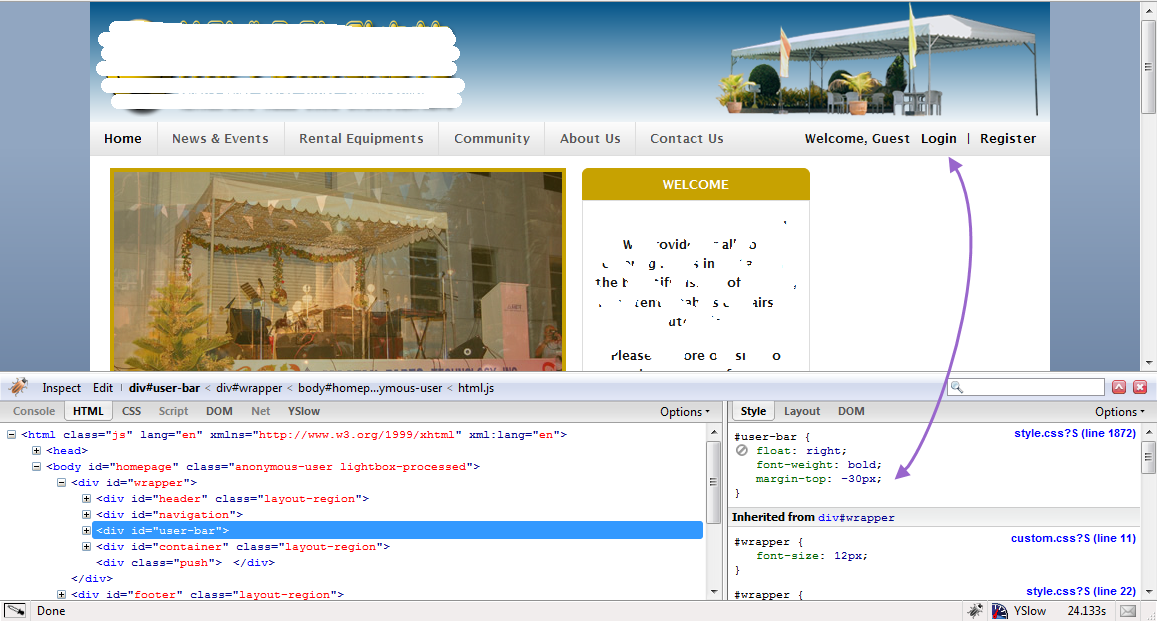
So, I got it to work, my only issue now is that it appears on a line above my primary links. Any way I can easily move that down to the same line as Primary Links? Now that I know where all the files are, I think I can muddle my way through it, but wow... what a breakthrough!
=-=
the page.tpl.php file of the main theme isn't called. The tpl.php file of the subtheme is used unless there is no page.tpl.php included in the subtheme the it reverts to the page.tpl.php of the main theme, I believe. same would hold true of all tpl.php files.
I guess that is something
I guess that is something super basic that I should have known. My apologies, and I appreciate the insight.
Learning tons and still having fun doing it! Thanks so much for your help. I've got it to show up, so now I just need t play with the placement to get it to show up on the same line as my primary links. So, last questions, is that possible to even do? Can I share the header with my Primary Links?
Got it!
Got it in a great place now! Thanks so much for all your help!
Am having the same problem
I have been having the exact same problem and i cant seem to find a solution! Since you figured it out, could you help me with the modified page.tpl.php code for Marinelli (giordani) that you made or modified and made it possible. I will really appreciate Thanks.