

 Come together with the global Drupal community in Rotterdam, 28 Sept – 1 Oct 2026. Sessions, contribution, connection, and Early Bird savings until 8 June.
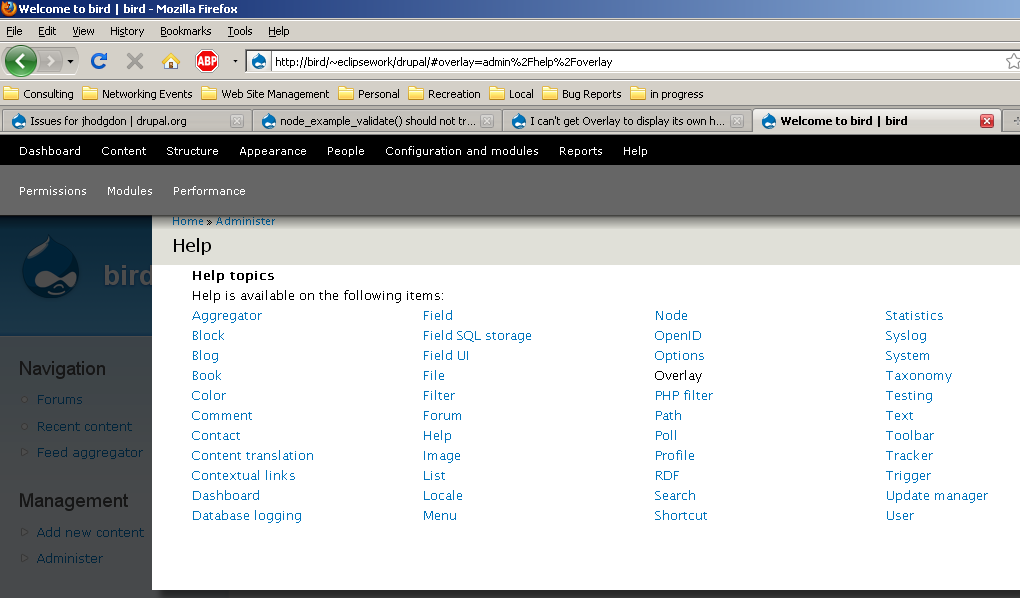
With the Overlay and Help modules both enabled, I click on the Overlay help link (either on the Modules page using the ?Help link next to Overlay module, or on the admin/help page, the link that says Overlay).
This takes me to (sitename)/#overlay=admin%2Fhelp%2Foverlay
But what I have displayed on the screen is as if I had gone to (sitename)/#overlay=admin%2Fhelp (i.e. the Help overview screen). Other module help pages display OK (e.g. . (sitename)/#overlay=admin%2Fhelp%2F/trigger). I've also looked at the overlay_help() implementation and I don't think that's the problem, especially because it was working a week or so ago when I reviewed or created the patch that added the help in the first place. But maybe?
| Comment | File | Size | Author |
|---|---|---|---|
| #2 | afterenable.png | 79.98 KB | jhodgdon |
| #2 | helpscreen.PNG | 48.07 KB | jhodgdon |
| #1 | screenshot_033.png | 53.28 KB | ksenzee |



Comments
Comment #1
ksenzeeI can't manage to replicate this. When I go to /#overlay=admin/help/overlay by either of the methods you describe, here's what I get:
Was this on a clean install? Were you using the default profile, or did you enable overlay through the modules page? What happens if you clear cache?
Comment #2
jhodgdonI used the Expert profile, and later enabled Overlay through the modules page. ... I had disabled and re-enabled Overlay several times and was getting the same behavior... now I cleared the Drupal cache and it's OK.
So it looks like the bug is that the overlay module should be clearing some cache when it's first enabled. Try this to see the bad behavior:
a) Disable Overlay.
b) Enable Overlay from modules page. See attached "after enable" screen shot. Overlay is broken, not appearing in the right spot, and none of my links work in the toolbar or shortcuts.
c) Click on the overlay module's Help link (links inside the page are OK), and you'll see the main help page as described in initial issue report above. See "help screen" screenshot.
d) Visit the performance page (you can get there via the link in the System help page - other links are still not working). Clear the cache. Overlay is now really broken, as no links are displayed that work.
e) Manually clear the URL bar back to base site URL to make Overlay go away. Then click on some admin toolbar link.
f) Now Overlay is working properly and looks like your screen shot.
Comment #3
jhodgdonBy the way, I just followed these same steps again and got exactly the same behavior. It seems to be quite reproducible on my machine at least.
Comment #4
David_Rothstein commentedI can reproduce this, but most of it is fixed by the patch at #651086: Cache clearing is an ineffective mess in module_enable() and system_modules_submit().
However, the original bug with the help screen I can still reproduce even with that patch.
It seems likely that that isn't an overlay module bug either and that it will be fixed with a more comprehensive solution for the cache clearing problems at the other issue, but let's leave this open for now until that's actually the case :)
Comment #5
eMPee584 commentedIt is not directly caused by this bug but is clicking on a help link on the module page supposed to replace the complete overlay with the help screen for that module? Because in the use case where you click that link to find out more about a module you are considering (especially plausible on fresh install where you might do this for several modules) you loose all changes to the module selection... Of course the back button works but wouldn't it be more user-friendly to display the help in another, smaller overlay on top?
Comment #6
jhodgdonRE #5: If you want to request this behavior, please file a separate issue as a feature request. I don't think it's likely to be adopted -- can't imaging having multiple layers of overlay -- but you can try!
Comment #7
casey commentedI don't think this issue still exists. Feel free to reopen however.