

Closed (fixed)
Project:
Insert
Version:
6.x-1.0-beta3
Component:
Code
Priority:
Normal
Category:
Bug report
Assigned:
Unassigned
Reporter:
Created:
16 Dec 2009 at 17:15 UTC
Updated:
27 Mar 2010 at 21:30 UTC
Jump to comment: Most recent file

Comments
Comment #1
srobert72 commentedI have 5 textarea in a node and it works.
I've find that you must click in right editor before you click insert button.
Insert works in last clicked editor.
Could you confirm ?
Comment #2
drupalninja99 commentedohhh excellent, ok
Comment #3
quicksketchInsert should work as described by srobert72 in #1 when using the WYSIWYG module. Unfortunately if using the FCKeditor *module*, it does not have an API for knowing the active textarea so it will only work with the body field. FCKeditor (and TinyMCE) work properly when used with WYSIWYG.
Comment #4
srobert72 commentedThat's right, i confirm I have WYSIWYG module installed.
Comment #6
jhedstromThis isn't working for me. I have a content type with no body, and 2 CCK text areas. I get the following js error in FF 3.5, from an imagefield using Insert beta3 when I click the insert button:
EDIT: I'm using the wysiwyg api in combination with tinymce as well.
Comment #7
geerlingguy commentedI'm having an odd problem with this too (using WYSIWYG): I can insert images I attach through an imagefield field, but if I attach a filefield to the same node (with or without any images), the file won't insert when I click the Insert button.
And, to top that off, I have another content type where the same filefield is working perfectly...
Comment #8
MixologicI just ran into this exact issue as stated in #6, and found a solution:
The javascript in insert.js is looking for the data to embed in the textarea in some hidden form inputs
in my case there was the following in the source:
And also the following:
So line 35 was looking for "image" when it should have been looking for auto.
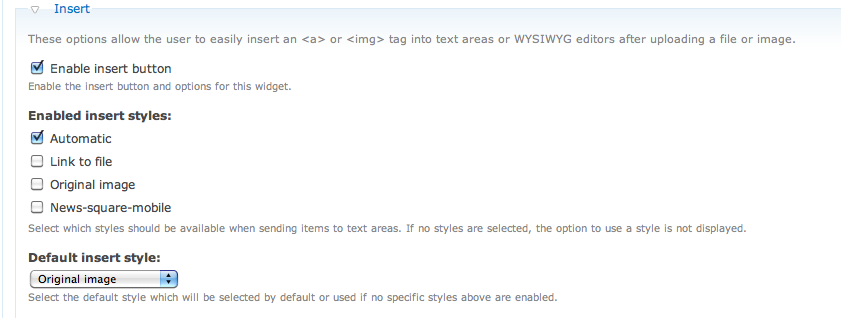
I went back into my cck widget settings and sure enough, I had "enabled" only the auto checkbox, but had selected the "original image" to use as the "default". So... maybe the widget shouldn't let you do that? Or maybe the javascript should always look for 'auto' if it cant find anything? Anyhow, google chome's javascript debugger is the bomb.
Clever, embedding html within html.
Comment #9
quicksketch"auto" just means it will insert an img tag if it's an image, and will insert a link to the file if it's anything else. Since you uploaded an image, the "auto" value was the "img" tag.
Comment #10
MixologicWhen you configure the field if you select "auto", and no other checkboxes in the "enabled insert styles" area, and have "Original Image" selected in the Dropdown (see attached screenshot) you will be able to duplicate this issue. It seems to me that the insert-style hidden field gets its value set by the default_style dropdown, and that the insert_template gets set by the checkboxes.
oh, and I meant line 36 was looking for the word "image"
Comment #11
quicksketchThanks for the description Ryan Aslett. This turns out to be more a documentation/configuration problem than anything else I think. What's happened is that you've selected one style to be enabled, then a separate style to be the default. Since the "default" style isn't actually enabled (but another style is), the default style doesn't work.
This patch makes it so that the default style is ALWAYS enabled. Previously we'd only enable it if no styles were enabled at all. In your situation, this means that after you update to the new version, the Dropdown list of styles will appear with two options: Automatic and Original Image, because you've enabled "Automatic" but set "Original image" to be the default.
In the mean time, I'd suggest you configure your field and disable the option for Automatic, and things should work properly until the next version. I also updated the documentation on what "Automatic" means, which would probably work just as well for you rather than using Original Image.