

Closed (fixed)
Project:
Orange
Version:
6.x-1.2
Component:
User interface
Priority:
Normal
Category:
Bug report
Assigned:
Unassigned
Reporter:
Created:
19 Dec 2009 at 19:19 UTC
Updated:
24 Feb 2010 at 21:10 UTC
Jump to comment: Most recent file

Comments
Comment #1
nomonstersinme commentedi'm not understanding what you mean, could you please take a screen shot and post it here so i can help you.
Comment #2
ale_89 commentedI have the same problem:
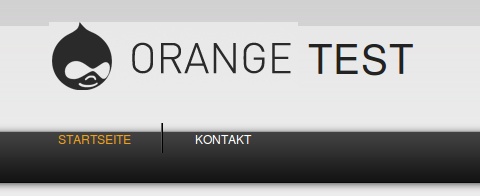
The menu items are not in the bar, they are a bit above the middle of the bar.
Same problem with the logo as you can see.
On your demo page everything looks fine.
Comment #3
nomonstersinme commentedAh, i found the problem, its the slogan. I will fix this and recommit... in the mean time, you can make a slogan?
Comment #4
ale_89 commentedYou're right if I enable displaying the Slogan under "admin/build/themes/settings/orange" everything works fine.
If "display slogan" (in the theme settings) is enabled but there is no Slogan written in the "admin/settings/site-information" the same issue appears.
Thanks for the quick response.
Comment #5
nomonstersinme commentedThis is fixed with the latest release. 6.x-1.3