After having come across this great sounding module, I was all set to bin the combination of Location and GMap in favour of this solution. Because I had had quite enough of battling with the Location / GMap Views combination in order to get some simple map pins based on addresses in Nodes. Can’t be that difficult can it? Even for a fool like me.
This module appear much more logical and indeed feature-filed than what I am used to HOWEVER, having installed the module(s) and followed the instructions to the letter, I cannot for the life of me get any pins on (Views-based) my maps – the maps themselves simply show up as minimum height ‘slivers’ with no pins!!!?
Can anyone provide a simple but sufficiently detailed set of instructions on how to get a map of a collection of nodes which have a ‘GMaps content AnP element’ field? PLEASE. Ladies and Gentlemen, proper documentation please.
Thanks


Comments
Comment #1
sirclickalotComment #2
pitxels commentedThis is how i use the module
1. Add the gmap api code in settings/gmaps
2. Add a cck gmap field to a node and configure
3. Add a few nodes with a gmap marker
4. Add a view like this: Image
5. Done :)
Comment #3
sirclickalotThank you jusspitti - that has helped me along the way - still nonjoy though - I guess I might need a little more guidance on STEPS 2 & 3 though.
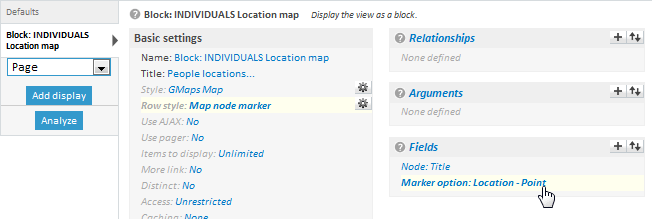
The CCK field that I am using is a 'GMaps Address and Point' and my View appears to in line with your advice as in ATTACHMENT 1 below.
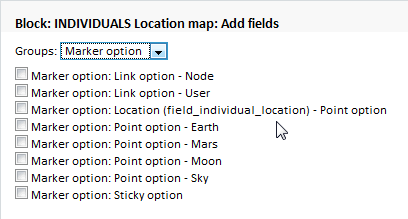
When I go to add a GMaps field to my View I only get the options shown in ATTACHMENT 2.
Any more advice very gratefully received.
Comment #4
looplog commentedI have to say I'm in a bit of the same position as SirClickALot. Having set up a content type, created some nodes, and setup the view as per above I still have no markers appear on the view. Any suggestions to help troubleshoot would be appreciated.
Comment #5
pitxels commentedok, I have only used the point option and not the address one, but I was also having trouble seeing the markers...
In my case I find out that cck was not showing the information on the nodes, so I tried creating a regular cck text field, and the gmap field also appeared, then I removed the text field.
Hope that helps...
Comment #6
looplog commentedFor my part I created a regular table view to see if the gmaps data is being outputted. Content AnP: GMaps location (field_gmaps_location) - Latitude outputs fine, but Marker option: GMaps location (field_gmaps_location) - Point option produces no output.
Comment #7
xmarket commentedStupid questions, but perhaps.......
Does the map type of the field (Earth, for example) match the map type of the view (preset option of the style)?
Does caching added to the view?
Comment #8
looplog commentedFrom some of the absurd mistakes I've made in the past, no question is too stupid...
I could be wrong, but I may have figured out what the problem was. Just tried setting up the view again, and did everything the same as before EXCEPT this time I actually added some fields to the minimized and maximized content options for the row style. This, or something magical in the meantime, seems to have made the view work and the map display the markers correctly.
Comment #9
asb commentedSame issue for me in 6.x-2.1. I simply don't get what "Add a view..." (as mentioned in #2) has to do with geo data stored in a node. A view can override a node, or it can create a block. With an argument on the nid and a lot of overhead it might be possible to display a map in a block, and with another block it might be possible to show the address data (like on the node edit form). However, this are ugly workarounds that probably will have a heavy impact on site's performance, so I can't believe that this is the right approach...?