

Closed (won't fix)
Project:
Video Upload
Version:
7.x-2.x-dev
Component:
User interface
Priority:
Normal
Category:
Feature request
Assigned:
Unassigned
Reporter:
Created:
27 Dec 2009 at 10:01 UTC
Updated:
3 Oct 2010 at 16:12 UTC
Jump to comment: Most recent file




Comments
Comment #1
jhedstromIt's unlikely that I'll have time to implement this in the 6.x branch. I will gladly accept patches though, and provide guidance and advice for the effort.
Comment #2
youkho commentedSubscribing that's really an important module for my project hope someone can get this to work.
Comment #3
mikeytown2 commentedsubscribe
First step:
#656494: Towards removing the Strong Coupling to FileField
Comment #4
tyler-durden commentedAlright,
I know that many people have been requesting the browser upload version for 6.x, and I am in some desperate need for this to happen. I have played around with the current 6.x version, and I received memory exhaustion errors uploading a 50 MB file and I currently have 180 MB alloted for memory in my hosting package. For $50 more a month it can be bumped up to 256 BUT there's no way around the 96 MB max file upload size, so I still have issues. The only real alternative is my own server, which I am not ready to jump into.
Seeing that throwing $50/month more for hosting MAY make this module serviceable for me, I'd rather spend that $$ and try to help get the browser upload working on 6.x for everyone. I'm not a programmer, but I could donate a few hundred dollars and my time for testing on this project. Is this browser upload a lot of work to make happen?
Comment #5
bojanz commentedI am working on browser upload.
Talked with the maintainer about the most optimal way to do this, and it's now in progress.
Will post an update once I have something that can be tested.
Bojan
Comment #6
tyler-durden commentedGreat, I'm excited! Does it look like a lot of work?
Comment #7
dropchew commentedsubscrbing!
Comment #8
invisibleink commentedsubscribing
Comment #9
simon_s commentedsubscribing
Comment #10
jmbailey commentedsubscribing
Comment #11
bojanz commentedNot easy at all. CCK, FileField, Zend GData, Youtube APIs which need to be understood, and clever code which needs to be written.
Proved to be time consuming because I needed to do it right (which means clean code, more thinking, no hacks)...
YouTube requires the upload form to be submitted to their url.
Video Upload 5.x tried redirecting the whole node add/edit form there, but that was less then ideal (translation: it sucked)
jhedstrom and me decided to use a jquery ui dialog this time, to show the upload form without leaving the node add/edit page.
This means that in order for this to work, you need to have jquery_ui installed (with JQuery UI 1.6).
If you use Acquia Drupal, you already have it.
Did some polishing, and I think it's almost ready. I will have the patch up here in the next 24h.
Comment #12
mikeytown2 commentedHere's code for updating the youtube Title/Description with the node's title & body.
I'm currently doing this; you have to be the owner of the video obviously. FYI youtube is not 100% accurate when saying the video is ready, sometimes it can't be played even though getVideoState() says it is; nothing can be done about it AFAIK. Can't wait for this to work; currently doing a very Ugly hack ATM (doing stuff in nodeapi when $op='view').
Comment #13
bojanz commentedMy client is testing the changes, I'm cleaning up the code a bit, the patch should be ready first thing tomorrow (we are in Europe)
Comment #14
sutharsan commentedsubscribing to follow progress and test patches.
Comment #15
tyler-durden commentedI'm eagerly waiting to help test this patch also.
Comment #16
bojanz commentedWanted to delay the patch for one more day, but I thought I'd give you a taste anyway.
Attached is the patch (requires the "#656494: Towards removing the Strong Coupling to FileField" patch) against latest dev. Apply in directory with "patch.exe < first.patch"
Attached are two screenshots.
This is experimental, and I will be posting an updated version soon (our internal testing continues).
1) The remove button only removes the video from the node, it stays on youtube (same behaviour like with the direct upload)
2) You need to enable browser upload in the cck field settings.
Known issues:
1) The title/description is the default one. I should add some code that updates using the node title/description after the node add/edit form is submited.
2) Form validation errors screw up the display of the widget, which means attached videos disappear.
All the usual warnings apply. Don't blame me if it eats your cat or steals your car.
Happy testing. All suggestions, bug fixes, comments are welcome.
Comment #17
bojanz commentedForgot to include the new css file.
Use this one instead.
Comment #18
mikeytown2 commentedIn regards to #12 the view op is there to hide the video via jQuery if it's not ready. I use the update/insert op to set the video title/description.
Comment #19
bojanz commentedUpdated patch. Rolled against the latest dev version.
1) Fixed the issue with form validations. A failed validation of the node add/edit form would cause widget errors, uploaded files not displayed (the whole field not displayed, to be exact).
Now this works as it should.
2) Switched the includes in hook_init() from module_load_include to require_once. This is recommended by the official drupal documentation (see the comment on http://api.drupal.org/api/function/module_load_include/6)
3) Fixed a JS bug where it would display the validation error "no file selected" even when there was a file.
4) Fixed the detection of the uploaded video's status. Doesn't list every uploaded file as duplicate any more. In fact, it always sets the status to "unknown" because at that point youtube doesn't know if the file is duplicate. (This means that the code is smaller since it doesn't need to handle "duplicate" errors any more)
5) Style fixes, display tweaks and other small changes.
There's an issue I have to look into:
After the cron is run, the status of the newly uploaded (via browser upload) files is still unknown.
Please test. I'm bumping the status since we are much closer to a "final" version.
Comment #20
sutharsan commentedbojanz, thanks for the work so far. I have tested the patch. I'm using jquery UI 1.6 (perhaps it matters) and the latest stable jquery ui module.
A .flv video is uploaded correctly to youtube. But when the node is saved no video or temporary image is displayed. It seams the node does not know about the video anymore. When I edit the node again, there is no trace of the youtube video, I can just upload a new video as if I did not upload already. Also when the node is deleted the video is not deleted from youtube.
The popup window used to upload the video gives the impression that it is modal, but it is not. Which itself is not a problem. However when submitting the node form before hitting 'uploading' in the popup, the node is saved without uploading the video.
Comment #21
bojanz commentedHm, after upload the video should appear on the node form.
Will test, maybe it has to do with the number of values allowed (1/2/unlimited...)
I am aware of the last problem, but I am not sure that the dialog uploads should start on node submit. I'm for the current approach, but we'll see what the others will say.
Comment #22
sutharsan commentedI use the file field with 1 value allowed.
There is a small chance my problem is caused by the patch which did not apply well. I used a CVS (head) checkout but the patch did not apply well on it and I had to correct it manually.
Comment #23
sutharsan commentedAfter upload, in the node edit form, a camera icon is displayed with a message that the video is not yet available.
I would appreciate it if you can give me a few pointers for debugging.
Comment #24
bojanz commentedThe camera icon and the message are expected behaviour
(the video has just been uploaded and has entered processing, no thumbnail is usually available at this point, so youtube returns the generic icon thumb. The message is the stock video_upload message for the "unknown" video status).
Saving the form should save the video information and having it present again on the next node edit...
Try increasing the number of allowed values to 2, that's my test value, see if it improves your experience. I will be giving it more testing tomorrow (as well as filling the functionality blanks), so I expect to have an updated patch in 24h.
Thank you for your time.
Comment #25
sutharsan commentedI expeted the camera and the text to be normal behavior. Changing allowed value to 2 has no effect.
All fields in table content_type_video (except nid, vid and delta) of the browser uploaded record contain
NULL. A record corresponding with a 'direct upload' video contains normal values.Comment #26
sutharsan commentedI've create a new patched file (using 6.x-1.x-dev and #19). Created a new content type and a new video 'browser upload' field. Only required values added and number of values set to 2. All remaining widget fields have default values.
The table content_field_testvideo now has:
field_testvideo_video_status = upload_pending (for both records)
field_testvideo_video_status_ts = 0 (for both records)
field_testvideo_fid = field_testvideo_list = field_testvideo_data = field_testvideo_video_id = NULL
vid, nid = 411
delta = 0 (first record), 1 (second record)
* video's correctly uploaded to youtube
* node display does not show a video
* node edit does not show a file name, thumbnail, etc.
Comment #27
bojanz commentedWhen the yotube upload is done, a function from video_upload_browser.js (Drupal.videoUpload.completeUpload) is called to update the video-id and video-status hidden fields. In my case it works. In your case, it doesn't reach the field (wrong id, or something)?
You can throw in a few alerts there and see which selectors jquery is using to reach those fields, and compare them with the actual id of the fields.
I will be updating the patch today, and when I do, if your problem persists, I will take a look so we can fix it ;)
Comment #28
sutharsan commentedThanks so far. I can only continue testing next weekend :(
Comment #29
php-workx commentedthe upload to youtube is done very well. i also checked the js function "Drupal.videoUpload.completeUpload", which fills the correct hidden fields. it seems, that these form values are not processed and stored in database. like Sutharsan said, all db fields are left blank and the node is loosing his reference to the uploaded file after node save.
Comment #30
bojanz commentedI'm afraid I can't reproduce the problem.
Could we continue this on irc or email?
Maybe even giving me some limited access to the test site?
I'm guessing it's a stupid bug, and that some debug output and a look at module versions/settings will do the trick.
Comment #31
bojanz commentedHere's my final patch (I hope), against current CVS.
Tested with Opera, Chrome, Firefox, IE8, IE7 (IE6 is unsupported by YouTube, which means it's unsupported by me).
I'm also uploading a zip file with the patches applied, so you can test faster.
Changes since last version:
1) This patch now also depends on #787976: No validation for required video_upload fields.
2) Fixed _video_upload_query_videos() to fetch videos uploaded by using the browser upload method, which means that the video status on the site, and video name/description on youtube are updated once cron has run.
3) Fixed CSS issues when the number of values was 1
4) Disabled the throbber (next to "Upload....") for IE7, since it looks terrible...
5) Cleaned up the js code.
6) The "Upload" button which launches the dialog is now "Launch the Uploader" (more user friendly, having just "Upload" made me think I was missing a Browse button or something...)
Comment #32
bojanz commentedIf anyone encounters errors with saving the video with the node (as reported earlier), contact me by email so we can get it fixed.
The only thing I'm pondering regarding the patch above is the new dependency on jquery_ui.
Maybe it should only be a recommendation, since some people might not use the browser upload at all.
The checkbox that enables the browser upload could then tell the user he needs jquery_ui for this.
Comment #33
simon_s commentedbojanz, thanks a lot, I'm really looking forward to the new realease with proper browser upload method!!! I'm currently designing a video portal and uploading big hd-videos with the direct upload method is totally jamming the cron job and server HD. REALLY THANK YOU & jhedstrom of course too!!!
Comment #34
php-workx commentedthanks a lot! the new patch is working fine. problems like yesterday did not occure again.
two small "bugs":
* the browser-upload does not respect the default settings for title, description, keywords
* the upload-field shows a default image, but no video file was uploaded (during node creation the field was left blank)
Comment #35
kloewer commentedPatch works perfectly.
Except for the few above mentioned bugs.
Also it uses the Throbber for displaying the upload-process..
Comment #36
bojanz commented@php-workx
* the browser-upload does not respect the default settings for title, description, keywords
The title, description, keywords are updated when cron is run.
* the upload-field shows a default image, but no video file was uploaded (during node creation the field was left blank)
This is video_upload behaviour in general, not related to the browser upload (I think). Will look into how that can be changed.
@kloewer
*Also it uses the Throbber for displaying the upload-process..
Yes, it does. YouTube doesn't support getting the upload progress, so a real progress bar is impossible.
Comment #37
bojanz commentedAlso, I'm glad to hear that everything is being saved correctly now.
Maybe you didn't apply #656494: Towards removing the Strong Coupling to FileField last time?
Comment #38
jhedstromThanks for all your work on this bojanz. I'm going to start testing this and hopefully get it committed soon. I'm moving the issue over to a 2.x branch, as the 1.x branch is fairly stable at this point.
Comment #39
simon_s commentedHopefully you could release the new 6.x.-2.x-dev very soon! :)
Comment #40
php-workx commented@bojanz
> Maybe you didn't apply #656494: Towards removing the Strong Coupling to FileField last time?
i am sure, i didn't applied that patch last time ;-)
> The title, description, keywords are updated when cron is run.
you are absolutly right. but maybe you missunterstood. the node title and description is set during cron run. that's right. but in cck field config of the video_upload field, you can set default values for title and description. that values should be used during initial upload to youtube, but are not used.
> the upload-field shows a default image, but no video file was uploaded (during node creation the field was left blank)
> This is video_upload behaviour in general, not related to the browser upload (I think). Will look into how that can be changed.
thanks alot. i think, that is not the behaviour which is expected by users of the module and that's right. it is not a matter of the browser-upload method. reason for displaying the preview image while no video was uploaded (field left blank) seems to be pretty simple. in that case, video_upload module writes an nearly empty database record with only status field set to 'upload_pending' (on every node save).
if you delete the needless database row from 'content_field_video_upload' and flush the caches, the preview image is not shown (until you save the node again ;) )
Comment #41
bojanz commentedThanks for the feedback php-workx, I agree with your points.
After the existing patch is in CVS I will take care of all small issues that popped up.
Comment #42
simon_s commentedHi bojanz, im currently testing the video_upload_cvs.zip you attached to comment #31.
It's cool to use browser upload now also in D6! :)
Here is a little problem I noticed:
When you change a perferctly working video node that is up and running, the changed data (title, tags, and body) is not synched with YouTube anymore after saving, even after cron runs.
In my videofield setup all fields are set to "synchronize".
I assume the expected behaviour is that when you change the title/tags/description of an existing node, the title/tags/description of the youtube video changes too, at least after cron run?
Thanks a lot!
(fyi: i'm currently using jquery ui 1.6)
Comment #43
simon_s commentedAnother problem occured in video_upload_cvs.zip of comment #31:
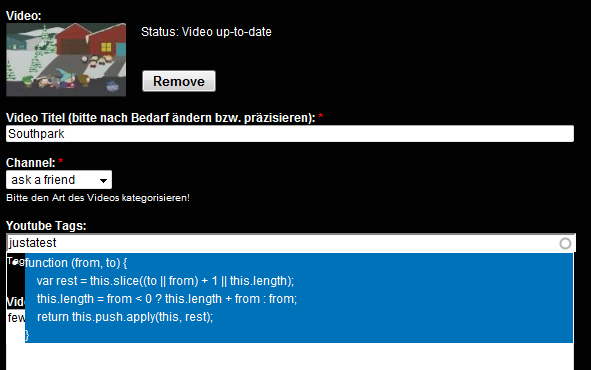
A normal taxonomy freetagging field in a video_upload node presents some function code (probably from the video uploader?) when you enter a new freetagging term. (please see attached screenshot.) When you choose this function code term proposal, the uploaded video is removed and "remove" appears as a freetagging term.
(my plugin setup: jquery ui 1.6 & zend gdata 1.10.4)
Comment #44
jhedstromHere's some initial thoughts/reviews:
* Any user facing text in the JS should use Drupal's JS translation method (similar to the t() function) http://drupal.org/node/323109
* Since the widget depends entirely on js, there should be a <noscript> fallback output letting people know that they must have js enabled to upload video
* I like the idea of simply disabling the checkbox if jquery ui is not present, rather than making it a module dependency. If it is made a dependency, we'll need an update hook that would fail until jquery ui was present. I could go either way since jQuery UI is part of Drupal 7.
I'm still leaving this at needs review because my plan is to get some version of this committed to 2.x. The issues above will be blockers to an official release though.
Comment #45
bojanz commented@kullerkeks
The code displayed is from the array.remove I included in video_upload_browser.js
I will namespace it to video_upload, and the problem should disappear.
@jhedstrom
Most of the JS text does use Drupal.t(), although I see that I've missed it in one place.
I agree with your points. I will try to implement the checkbox-disabled solution.
I will provide an updated patch to address the issues raised, but I would like to get the code in CVS as soon as possible, so that we don't have to bounce around a 40kb patch everytime we polish something.
Thank you for your time, guys.
Comment #46
agregate commenteduji coba
Comment #47
bojanz commentedWhat the ...?
Comment #48
simon_s commentedCould you please also care about the node update synch problem I mentioned in #42?
It is also addressed (and patched) here:
http://drupal.org/node/439170
It would be cool to see a new 6.x 2.x-dev branch soon, with all the browser upload stuff included.
Cheers & thanks again
Comment #49
bojanz commentedkullerkeks, I care about each raised issue, don't worry ;) Every issue will have it's turn.
I'm doing all this on my free time (my client sponsored the first 1/3 of the development), and since that time is limited, I'm trying to go after the most important things first (like the issues raised by jhedstrom, your js error, etc)
Comment #50
jhedstrombojanz, don't worry about incorporating the above into a patch on this issue. I should have something committed to the 2.x branch by the end of today, and then those can be addressed as separate issues.
Comment #51
bojanz commentedToo late, I have a new patch ready.
So, commit this one ;)
Changes:
1) Added Drupal.t for two strings in JS that didn't have it ("Launch the Uploader" and "Uploading..."). The only untranslated string left is "Upload" on the button, but that requires some special magic because of the jQuery UI Dialog.
2) Removed jQuery UI from dependencies.
Instead, we by default disable the checkbox that enables the browser upload method,
and if the jquery_ui module is installed, we enable it via JS.
We only do this if the value of the checkbox is 0
(which means that browser upload can be disabled without jquery ui, but not enabled)
3) Removed our custom .remove() function from the array object, which means that the issue kullerkeks was having should be gone.
Comment #52
bojanz commentedRegarding #2, we should probably tell the user in the checkbox description that he needs jquery_ui, so that he doesn't have to guess why his checkbox is disabled ;)
Comment #53
simon_s commentedCould you please upload a full patched version? I tried to apply the patch to different versions (1.x dev, 1.5, cvs), and it didnt work. Applying it to 1.x dev at least run successfully, but the browser upload doesn't work anymore. Videos dissappear after node saving. I guess I did something utterly wrong... :)
Comment #54
bojanz commentedHere you go.
Comment #55
cybertooth commentedhello ,
How do I implement the patch?
sorry im kinda new to this ...\
thanks
Comment #56
bojanz commentedJust use the attached zip (replace the existing files and clear your cache if you already had video_upload installed)
Or wait a few days until this hits CVS...
Comment #57
simon_s commentedCool, the problem with the freetagging field has vanished like you said!
Another small report:
The uploader window is a bit too small for the included elements, at least with german button description. Please see the attached screenshot.
Thanks again for your work, bojanz and jhedstrom, looking forward to the new module release!
Comment #58
bojanz commentedDid you zoom in? The dialog shouldn't be that small.
I will tweak it a bit when this hits CVS, in the meantime you can try setting your own width/height in video_upload_browser.js, lines 91 and 92 (and letting me know what works for you).
Comment #59
simon_s commentedGreat, changing width to 440 and height to 200 in the js file fixes the problem for me temporarily.
PS: No, zooming was not active. The upload dialog screenhot above was done in Firefox at standard settings.
Comment #60
jmbailey commentedI've clearly done something wacky with mine. I've attached the screenshot. Any thoughts on how to fix this? The window pops up, looks like the screenshot, then closes in a second or two without any intervention from me.
Comment #61
bojanz commentedCheck your jquery_ui install, looks like it's borked (no styling on the dialog).
The closing is probably a JS error which you can see in firebug.
Comment #62
jmbailey commentedThanks for getting back so quickly! I will check it out and post results.
Comment #63
sutharsan commentedWith all this activity in the threath I don't want to stay behind ;) and made some time for a quick test. #54 works fine. Thanks bojanz.
I saw that when the field count is 2 and only *one* video is uploaded, the full node display shows the first video and a 'processing' image as second video. But there was no second video uploaded. The image does not disappear when the first video is processed.
Comment #64
bojanz commented@Sutharsan
Yes, that was previously mentioned (video_upload behaviour for empty fields that needs to be changed). It will be fixed as soon as development has started in CVS.
Comment #65
bojanz commentedHi guys,
I've talked with jhedstrom, this patch will probably land in the next 24h.
I've opened #798162: Change default display of empty fields to address the most common complaint raised here.
Also, I have added my comment to #439170: update youtube video if node is updated. The patch should go into 1.x-dev, and I would port it to 2.x-dev. That should fix the node-sync issues that kullerkeks is worried about.
That should be it (other than the dialog-size and other small issues).
Most of the time making and refining this patch was unsponsored, on my own free time.
If it saves you some bandwith, feel free to show your appreciation through my Amazon Wish List
Thanks to everyone who tested, especially kullerkeks and php-workx.
Leaving to jhedstrom to close this, see you on other issues ;)
Comment #66
jhedstromThis has been committed to the 2.x branch. There is still quite a bit of work to be done before even a dev release is posted to the module page, but that can be pursued in separate issues. I'm also hoping to get this into 7.x. A big thanks to bojanz for taking charge on this, and to all those that tested it out.
Comment #67
jhedstromChanging title since this now needs to be ported to D7.
Comment #68
bojanz commentedFirst d7 patch. Very raw and unfinished, but a step in the right direction.
Of course, for this to work all the way it needs a ported version of #656494: Towards removing the Strong Coupling to FileField (which doesn't exist yet).
Noticed some problems due to the jquery_ui in Drupal core:
1) The dialog always opens in the top left corner
2) The Upload button and it's row (in the Dialog) aren't styled.
Make sure you have the latest Drupal 7 CVS, they just commited a fix for "parseJson is not a function".
Comment #69
bojanz commentedHere's the patch.
Comment #70
bojanz commentedNothing we can do about the dialog styling (core issue), the issue where this should be fixed is #614494: Give Seven a nice looking default jQuery UI theme
Note that this looks halfway decent only if the number of values is 1.
If it's 2 or more, it should be implemented differently, should look like the File widget with values > 1 (the drag&drop table of items, and a Upload button bellow the table)
I have no more free time to work on this (work+university+summer of code is calling), I hope someone continues this.
Comment #71
jhedstromI've started a DRUPAL-7--2 branch, since to do this properly, this feature should stay in a 2.x branch. If all goes well, there won't ever need to be a 1.x release for Drupal 7.
Comment #72
tyler-durden commentedHas this hit the 6.x CVS yet? The way I am reading the notes, it was in the CVS for a day and then removed? That last CVS date is May 16th and it is the 18th today. I haven't had a chance to test this yet and now I'm ready so I figured I should use the CVS instead of the patch supplied earlier in this forum dated May 7th (looks like there were quite a few updates after that).
Thanks for all your hard work so far bojanz, I'm excitied to test this out.
Comment #73
bojanz commentedIt's in CVS (6.x-2.x branch). What we are discussing in #67-#71 is the Drupal 7 version.
Have fun.
Comment #74
tyler-durden commentedThanks for everything bojanz, it seems to work well so far in my limited testing.
I have one quick question though, I don't want to hijack this thread on the question but I think it's a short answer but I cannot find it anywhere else. When using the browser upload feature, is cron still used to update the data after the video is uploaded, i.e. correcting the title, body, tags, etc?
Comment #75
bojanz commentedYes.
Comment #76
tyler-durden commentedOne last issue, and this may not be due to the browser upload change since I cannot test this module any other way. ALL videos are going into the category of "Entertainment" on youtube, even though I have tried selecting other options multiple times. Should I open a support request in a new thread, or is this a new issue with browser upload? Searching the old support tickets brings up no issues like this.
Comment #77
jhedstrom@tyler-durden This has never worked properly, as early on in the YouTube API there was a bug that would reject videos from certain supported categories. I'm guessing this is no longer the case, so the code can be fixed to actually pass through the selected category, but we should track that in a separate issue.
Comment #78
tyler-durden commentedok thanks again for the quick responses
Comment #79
BenK commentedSubscribing... very cool!
Comment #80
jhedstromAll the known critical issues in the 6.x 2.x branch are closed, so I just published the 2.x-dev release, which will be updated when the packaging scripts run. Please test that version, and create new issues for any bugs you come across.
Comment #81
jmbailey commentedI was able to get the dialog box's CSS working by moving it into the main stylesheet, but I don't know JavaScript, so I'm still struggling with the window automatically closing. I've looked around the JQuery UI threads and *think* I've installed things correctly, but help with the closing issue, and also the inability to select a video would be appreciated. I've attached a screenshot of what I'm seeing if that helps.
Comment #82
bojanz commentedjmbailey,
1) Update the module to the latest 6.x-2.x-dev. Remove your changes (the module css from the main css file)
2) Clear your cache.
3) Try again. Try with garland as the admin theme. See if firebug says something.
Then, we'll see.
Comment #83
jmbailey commentedThanks again for the quick reply, bojanz.
1) Downloaded and updated to dev and removed CSS from main stylesheet
2) Cleared the cache
3) Tried again with custom theme and garland and still had trouble. Firebug found an error in ui.core.js, on line 349. I've attached a screenshot of what I'm seeing.
I'd love to get this working; this module is promising for a several potential projects, so I really appreciate your work.
Comment #84
bojanz commentedjmbailey's problem was JQuery UI 1.7
We currently only work with JQuery UI 1.6, and that should be fixed in the future (so that both versions work, if possible).
It's not a big problem since 1.6 is currently the recommended version for jquery_ui (1.7 requires jquery_update and breaks the date cck module)
Comment #85
jmbailey commentedI installed JQuery UI 1.6 after bojanz's much-appreciated suggestion, and everything works perfectly now. Thanks so much for all the support!
Comment #86
whatsnewsisyphus commentedThis is not working for me, the ui popup is transparent and once the upload reaches 100%, nothing happens
Comment #87
bojanz commentedThis is an issue where the porting of the browser upload patch to 7.x should be discussed.
For everything else (troubleshooting), open another issue. I would be glad to help.
(report your module version and jquery ui version. If the dialog is not displayed right, it's probably a jquery ui problem)
Comment #88
bojanz commentedLooking back on this, I won't be providing a D7 port of the browser upload method.
This is because there's already a great effort to unify D7 media handling in the Media module.
Even now, at an early phase, it's looking great.
For example, there's a small overlay (like the one we use for the current browser upload) launched from a field (like filefield) or a wysiwyg editor, from where you can upload files, or add them from an existing library, or external site.
Basic YouTube support (adding a video from youtube) is in progress, and it is my opinion that further youtube functionality (like upload) should be done there.
Leaving this open just in case someone wants to give it a shot anyway, but it's "won't fix" on my side.
Comment #89
bojanz commentedReopen if interested.