

Closed (fixed)
Project:
Drupal for Facebook
Version:
6.x-3.x-dev
Component:
Facebook Connect
Priority:
Normal
Category:
Support request
Assigned:
Unassigned
Reporter:
Created:
29 Dec 2009 at 05:34 UTC
Updated:
10 Mar 2011 at 18:01 UTC
Jump to comment: Most recent file


Comments
Comment #1
ahansen1 commentedUpon further investigation of the firefox issue, the browser appears to go through a cycle where it calls on_connected. Then after the page has refreshed the javascript on_not_connected is triggered and since the user actually had been logged in, it now logs them out. See the attached screenshot.
Comment #2
Dave Cohen commentedThe IE stupidity is just IE up to its usual tricks. Not a bug we can fix, and yes everyone must make that change to their theme.
If you can track down exactly what causes your firefox issue I'd love to fix it. But I suspect its on the facebook side and there's nothing we can do. The fbconnect login is a tricky thing, involving cookies set by facebook that we must honor but have no control over, and also loads and loads of javascript. If the javascript is buggy only facebook can fix it.
Try deleting cookies and see if the problem continues. Enable the fb_devel debug block, and post its contents here.
Comment #3
ahansen1 commentedI know it may be IE just being difficult, but they still have 50% or more of the browser market looking at the stats on my non technical sites. It is good that now it is captured here that the namespace must be added to your theme. But, I wonder if it would also be possible to add something to the module? Maybe if someone enable facebook connect it could analyze the currently enable default theme and spit out a warning if it didn't have the proper thing? Seems like this is something that could save someone a lot of trouble. I know for months now I've just not bothered to try this facebook connect portion of the module thinking it was still a work in progress after seeing all these issues with it on drupalforfacebook.org itself. I think making this oddity that IE creates more in your face and proactively warning users about it there is a better chance for module adoption.
I'll continue to look into the firefox issue. It may be like the IE thing, but given that many large sites (digg.com fb connect on firefox works) are successfully using facebook connect there has to be away this can be made to work. I think firefox even works in the facebook connect module?
I would encourage you to set this back to a "bug report", if nothing else so that people who are thinking of using this module can more easily see the issues with it before doing so.
Comment #4
Dave Cohen commentedWhen I can, I add warnings to the fb_devel module. I hope they save people time, but there's only so much I can do. I will add something about the xmlns attribute to the README.txt and doc (I thought it was there already, but apparently not). If you submit a patch that adds a warning about the theme, great I'll commit it. however if someone had that time to kill, I'd rather see a patch to drupal core that allows my module to add that attribute to the page.
If I can reproduce the firefox issue I'll work on it, too.
Comment #5
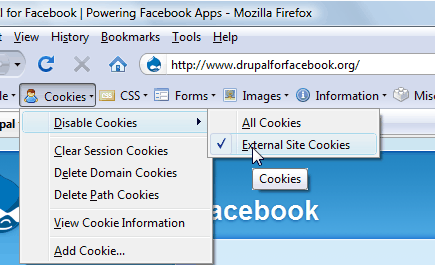
ahansen1 commentedWell, I finally figured out my issues with Firefox. Dave, as you probably already figured it had to do with my environment. The issue is that I have the Web Developer toolbar for firefox and had it set to disable "external site cookies", see screenshot.
I'm not sure there is any way to guard against this and give a meaningful message to the end user that it will not work with external site cookies disabled? My thought was in the on_connected callback we could get the status again to ensure it was actually connected.
However, it seems that the state gets pulled from cache and so it doesn't actually perform the test I was hoping. I then tried wrapping the above in a forceSessionRefresh, but as this recent forum thread describes it doesn't seem to be working either.
http://forum.developers.facebook.com/viewtopic.php?pid=187665
Since both of these things now appear to be issues external to the module and can only be resolved by giving the user additional feedback. Moving the categorization to feature request.
Comment #6
Dave Cohen commentedHey thanks for sharing the solution. (I had figured nothing out.)
I'm all for attempting to alert the user of the potential problem, but I think that belongs in fb_devel.module Or more specifically fb_devel.js which does not currently exist but probably should.
I'll put this on the "when I get around to it" list. Thanks for all the detail.
Comment #7
ahansen1 commentedI was thinking that this is something that should actually go in the module itself vs. a development module. This isn't something that only affects site admins, but could affect end users as well. End users who have these cookies disabled could be given a meaningful message that the facebook connect login was not going to work when they tried vs. making it look like the site doesn't work. I'm sure it is an edge case for folks to have the web developer pluggin with the external site cookies disabled like I did, but I wouldn't be surprised if other privacy or anti virus browser pluggins also block external cookies like that.
If I am able to come up with something, I'll post it back here.
Comment #8
jason ruyle commentedAnyone have a solution to this? We have an application where users are taken to a login screen with the connect button. If the user is in IE, it allows them to register. But after they register, it refreshes page, and they are actually logged out of Drupal, but stay logged into Facebook.
We verified that the drupal account is created, some of the js that we see:
Anyone know why this could be happening? We have shared cookie and sessions.
Comment #9
Dave Cohen commentedahansen1, recently I added the ability to store facebook's session inside Drupal's $_SESSION. In other words rely less on facebook's cookie. So please see if that works for you even when third party cookies disabled. Also see admin >> site building >> facebook apps >> settings where you can disable this feature.
Jason Ruyle, I'm not sure what the problem is, but it sounds like not the same issue. Please submit a new one to track it.