

Closed (fixed)
Project:
Whizzywig - A complete WYSIWYG Editor
Version:
6.x-1.0-beta9
Component:
User interface
Priority:
Normal
Category:
Support request
Assigned:
Unassigned
Reporter:
Created:
2 Jan 2010 at 16:20 UTC
Updated:
10 Sep 2010 at 23:49 UTC
Jump to comment: Most recent, Most recent file


Comments
Comment #1
drupalnesia commentedClick on "Choose style" select-list then choose "Heading 1", look at this image:
Comment #2
artatac commentedI havnt got that option
Comment #3
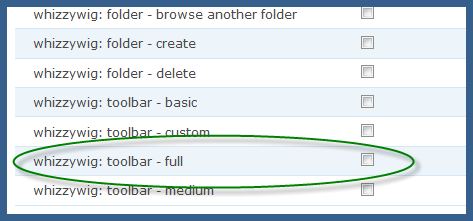
drupalnesia commentedMake sure you have permission to use Full Toolbar icon, see my attachment:
Comment #4
artatac commentedmine is beta 7 and at
admin/settings/whizzywig
toolbar buttons section I just have text that says
bold italic underline | left center right | number bullet indent outdent | newline color hilite rule | link image table | clean html
Comment #5
drupalnesia commentedYou need at least 6.x-1.0-BETA8 as shown below. But please use the latest version: 6.x-1.2 and report your result.
Comment #6
drupalnesia commented