

 Come together with the global Drupal community in Rotterdam, 28 Sept – 1 Oct 2026. Sessions, contribution, connection, and Early Bird savings until 8 June.
Greetings,
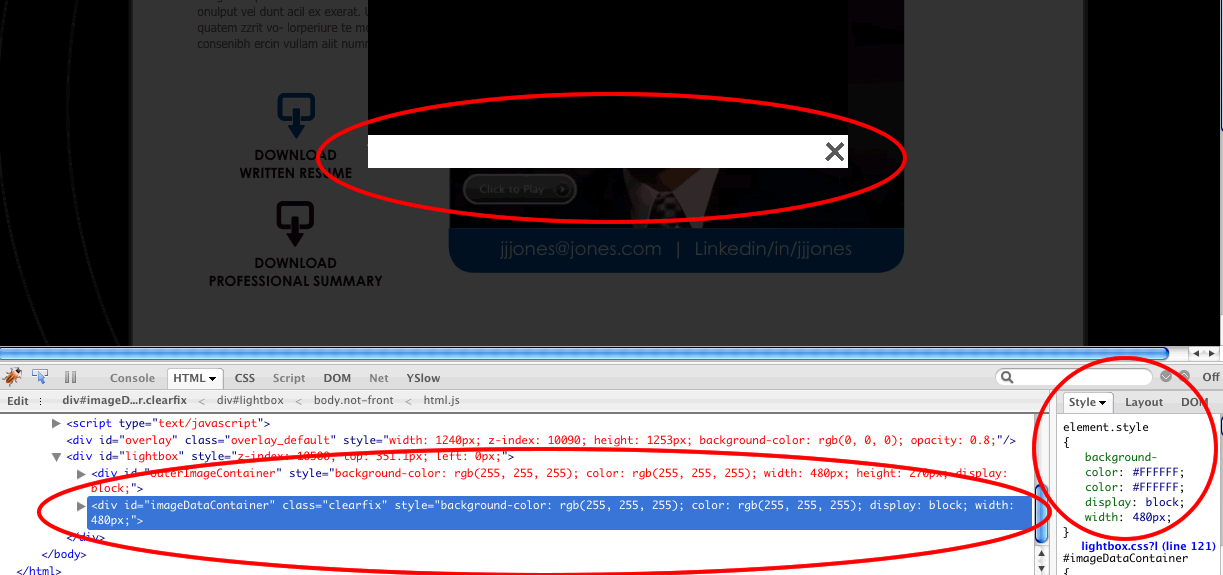
I am trying to modify the "imageDataContainer" style (that is currently #FFF) to.... background-color: transparent;
The default style is controlled by Javascript (in the file lightbox.js) and is applied as " element.style " which overrides any styles I make via the lightbox.css file.
I am attaching a screen-shot showing how it looks in Firebug. Is there anyway that I can modify this via the lightbox.css file rather than have to modify the lightbox.js file? Any help on this is appreciated!
Thank you,
Scott
| Comment | File | Size | Author |
|---|---|---|---|
| lightbox2-imageDataContainer-CSS.png | 45.78 KB | scott859 |

Comments
Comment #1
edgar saumell commentedI would like to know too... subscribing
Comment #2
sroque commentedput this in your yourmodule_preprocess_page function:
$scripts['setting'][2]['lightbox2']['box_color'] = "transparent";
Comment #3
teh_catt commentedI tried to add this to my template.php file but it caused an error as the function is already declared in the lightbox2 module. Please can someone tell me how to implement this correctly?
Comment #4
brian_c commentedI'm not sure how to get sroque's suggestion working... by the time you hit preprocess_page, the scripts block (which includes the box_color setting) is already rendered.
However, I got it working by simply setting the background color to transparent using JS:
Put that somewhere that executes on document ready, ie using $( function(){ ... } );
I hid the #imageDataContainer by setting "height: 0" on it, and "display: none" on #imageData.
Once that was all done, I was able to provide a nice transparent PNG background for my lightframe.
Comment #5
teh_catt commentedat last!
I inserted
$('#bottomNavClose').css('background-color','transparent');into line 397 of lightbox.js and now works great.
thanks brian_c
Comment #6
brian_c commentedIt would be better if you put that somewhere into your own JS code (ie somewhere in your theme directory), instead of modifying the lightbox code. Otherwise your modification will get wiped out if anyone ever updates the lightbox module.
You basically want this code somewhere:
You could either put that into one of your theme's JS files (ideally), or you could put it in an inline <script> block inside a template file.
Comment #7
derekwebb1 commentedWhat is the purpose of having element styles in the first place? I would have thought the css file would be the only thing controlling the style of it. And a css file (or any file) can be generated dynamically and overridden later for people who want 'transparent' backgrounds...
I love how lightbox lets me send in links (I use it for image source and author links) to be added into the box. But transparency seems a bit hard to get right now. I suppose I could simply hack the module and remove the packaging script so drush up doesn't kill my changes... oh well.
Comment #8
stella commentedNot really possible until #592232: Make JS output of lightbox2 module themeable is put in place.
Comment #9
teh_catt commentedthanks brian_c this became very necessary in the new release of lightbox2 in which my core hack no longer works.
Comment #10
attheshow commentedDon't forget that you can add !important to your stylesheet to override element styles.
Try: