

Closed (fixed)
Project:
Drupal core
Version:
7.x-dev
Component:
overlay.module
Priority:
Normal
Category:
Bug report
Assigned:
Unassigned
Reporter:
Created:
5 Jan 2010 at 15:46 UTC
Updated:
11 Apr 2010 at 21:40 UTC
Jump to comment: Most recent file


Comments
Comment #1
casey commentedComment #2
dries commentedNot sure I fully understand this bug report, or how to reproduce it. Care to elaborate?
Comment #3
casey commentedPatch doesn't apply any more.
Example:
- open "Content" from toolbar (has shortcut-add-remove-link and tabs) and wait till loaded
- open another, e.g. "Structure"
- during "Loading..." you still see the shortcut-add-remove-link and tabs from "Content"
Comment #4
aspilicious commentedOk works in every browser.
Looked at the code, it's just some lines moved around.
Making this RTBC.
Comment #5
Bojhan commentedAhh, yup! This has always annoyed me. Its like leaving old stuff on the screen for just a bit.
Comment #6
webchickHm. Another question is why is there shortcut module code in overlay's js to begin with? But I've committed this patch to HEAD, since I can confirm that it solves the bug, and is indeed just moving code around.
Comment #7
casey commentedIf the clicked link is one of the tabs, we shouldn't remove those tabs as they are going to re-appear.
Patch is dependant on the one in #683128: Multiple 'add to shortcut' links appearing when adding fields; that one should go in first!
Comment #8
aspilicious commentedAt first sight this looks good (cause it was my idea :p).
But im gonna let it review by other people.
Comment #9
aspilicious commentedHmm maybe i see another improvement. If you click on a tab, then it starts loading and after that it becomes your "primary" tab. I think it's better if it becomes your primary tab when it starts loading. I tried to copy some code as proof of concept but it didn't worked.
Maybe someone else can do this?
Comment #10
casey commentedWhatever you wish :)
What this patch is doing is easily tested when switching between tabs on "Content" (admin/content) in toolbar.
Comment #11
aspilicious commented:) good work!
Comment #12
casey commentedThis is a ux improvement and ready to go in. plz review.
Comment #13
Bojhan commentedIt worked here, a nice detail.
Comment #14
dries commentedNice improvement. Committed to CVS HEAD.
Comment #15
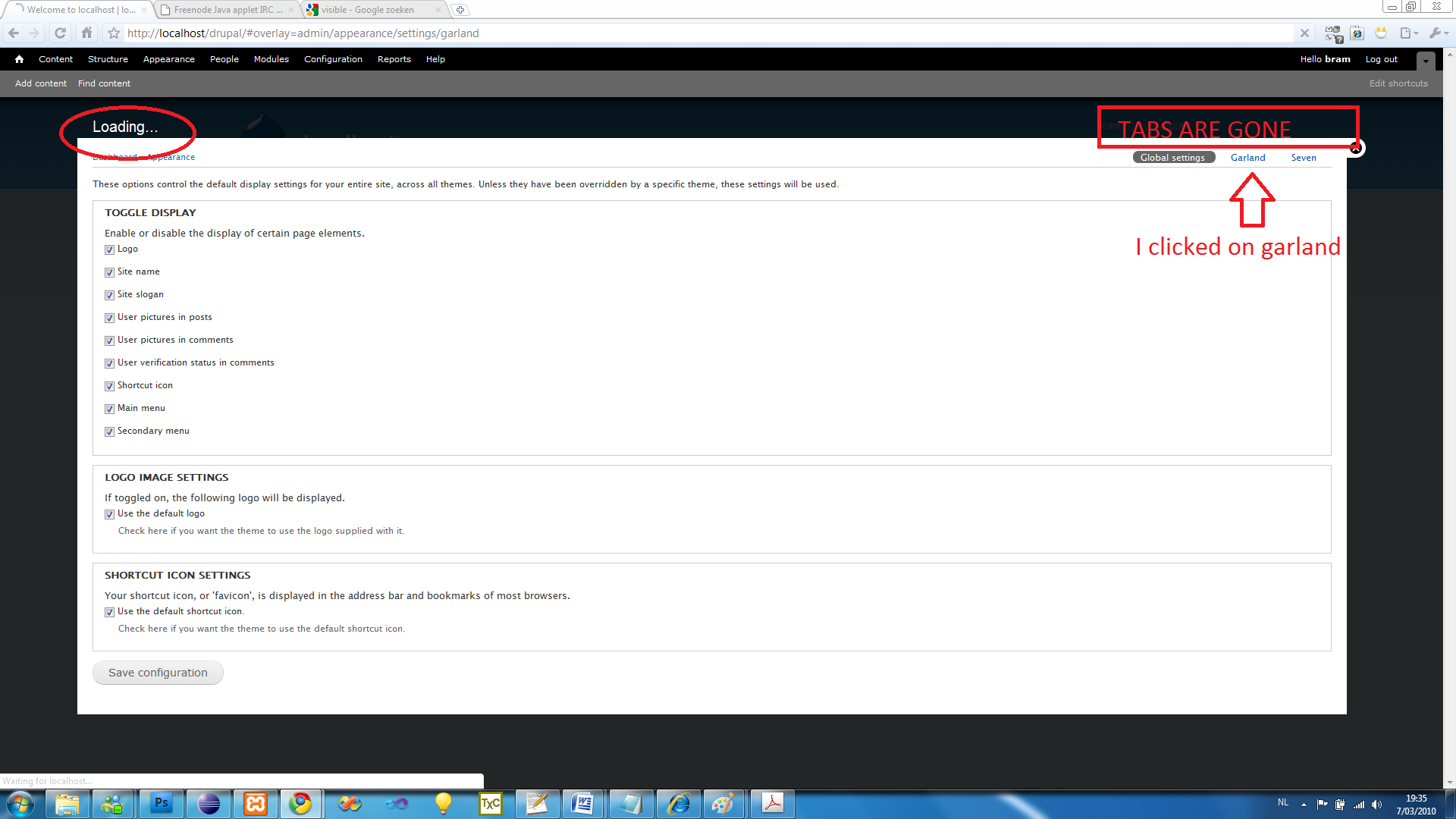
dries commentedI'm going to re-open this because it seems to introduce inconsistent behavior. If you click on a sub-tab, the tabs will disappear. In other words, we now have a situation where tabs can disappear but not always.
Comment #17
aspilicious commentedIm gonna help this issue with some proper test results.
I attached two screenshots, one is failing, one isn't.
I filtered the cause.
The tabs only stay with a secondary menu, when you click on the first menu item.
In case of my screenshot that is "Global settings"
Hopefully you can use this info!
Comment #18
aspilicious commentedEDITED: forget the past, look at next post
Comment #19
aspilicious commentedThis works on my localhost.
I need a code review as this is my first javascript/jquery patch!
Comment #20
aspilicious commentedWrong patch, damnit
Comment #21
aspilicious commentedMaybe this own is better.
In this one the active secondary tab switches faster.
Bad side: labels secondary tabs jumping a bit due to changing active style
Comment #22
casey commentedChanges mainly to prevent doing too much.
Comment #23
aspilicious commentedThnx casey for reviewing it and making it better...
Hmm are those secondary tabs also jumping a lot on your computer:
1) click on a secondary tab
2) the clicked tab becomes the active one
3) look at the padding before it gets reloaded (you have to be quick ;) )
4) After the page is loaded the right-padding in the active tab is larger.
But this isn't realy related to this issue,
Comment #24
seutje commentedseems to work as expected, don't even get the inconsistent padding mentioned in #23
Comment #25
aspilicious commentedOk marking this RTBC
Comment #26
casey commentedhttp://drupal.org/cvs?commit=339750