Community Documentation

How to add a list of feed items to the feed node

Last updated January 7, 2010. Created by Michelle on January 7, 2010.
Log in to edit this page.

  1. Make sure you are using the dev version of Feeds until alpha 10 or higher is released.
  2. Install Views Attach
  3. Add a view with an argument of "Feeds Item: Owner feed nid" like this:
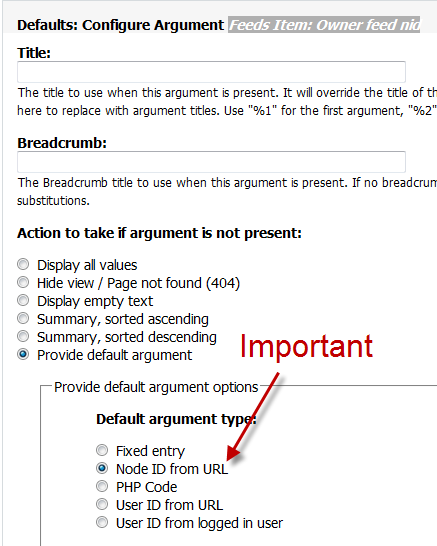
  4. Add a display type "Node content" and adjust the settings:

The view should look something like this:

If everything went correctly, you'll have a listing of feed items on the feed node like this:

Comments

Hi, Tried to get this to

Hi,

Tried to get this to work, but all I got was this:
Query No query was run

My current views display looks like this:
http://pici.se/pictures/YyZLzbOpB.png

And "Default argument type" is set to "Node ID from URL".
This is the first time I use Views, so I haven't gotten the hang of it yet..

I had this problem..

Got Pathauto installed? I have, and smacked my forhead when I realised what was wrong here. In the "Default argument type" the view is being told to look for a Node ID in the URL. The replacement patterns I'd set up had convinently removed the Node ID from the URL (which is fair enough - that's effectively what I'd asked it to do). So you simply need to put the Node ID back in there for your feed content type. Go to:

/admin/build/path/pathauto

Click "Node Path Settings"

Add [nid] to your feed items content type.

Rebuild your aliases if needed.

I also struggled a bit with the "No query was run" message in the view, but don't worry about that. Preview a node to see if it's working. The no query thing in the view preview can only be fixed by giving the view some sample data for it's argument.

Pathauto should not have an

Pathauto should not have an affect on the view. Pathauto isn't actually replacing the url. The node/# is the system path and it is always kept in the database.

I noticed that apparently if "Feeds Item: Item Link" is not created as a field, the [url] token is not available for the node:title field to be rewritten into a URL link (i.e the URL link associated with that feed item).

So to remedy just add "Feeds Item: Item Link" and hit "exclude from display". Thus double-ensuring it's available.

Feeds aggregator not worky

I get the same -- Query No query was run----

I am unable to get a simple feed's items onto a page that only allows feed-items for a particular feed.

I have scoured the internet and cannot find a tutorial or read-me that doesn't go off in some other direction than where I should.

Everything out there is about Feed Aggregator-the deprecated version. Can you please look carefully at the settings you have to determine if you are using a module that you didn't declare to us, or something.

Please redo the instructions for only a Feed, Feed-Items and a Page-node. It seems like it should be the simplest thing to do.. I am unable to figure it out.

I am unable to find quality tutorials or instructions.

It seems too much to have to go to 5 different modules separately and try to relate it to my specific needs, going through each modules documentation which doesn't seem to be consistent. I find that a lot of terms are no longer the same when I get to the same menus on my sites. It is as if things were renamed and no one cares enough to go back and change the documentation to reflect new menu names. In addition, it seems as if steps were left out that must seem obvious to the lecturer.

All I know is I have pulled out my hair for a week!

.

I just took some screen shots and wrote a few docs of what I did to help out others that may want to do the same thing. I haven't changed anything I did here and it's still working fine for me after several upgrades. I'm sorry it's not working for you but I really don't have time to go back and revisit old articles whenever a module gets updated to see if menu items have moved.

Michelle

-----
Shell Multimedia - My sporadically updated mostly Drupal blog.

Something similar without views attach

You can do something similar without using Views attach module. Just create normal page view like the one on the first screenshot(including the argument + add validator for nodes and set it up to validate only for node type you want to show this tab on). Then edit path and write node/%/your_page_name
Edit Menu settings and choose Menu tab. Fill title, description and set weight(2 is a good choice - your tab now should be displayed after view and edit tabs). Save your view and visit your feed node. Now you should be able to see a brand new tab beside view and edit(and probably some other ones) with the name you filled as a title in Menu tab setting of your view.

Page status

No known problems

Log in to edit this page

About this page

Drupal version
Drupal 6.x
Audience
Site administrators

Site Building Guide

Drupal’s online documentation is © 2000-2013 by the individual contributors and can be used in accordance with the Creative Commons License, Attribution-ShareAlike 2.0. PHP code is distributed under the GNU General Public License. Comments on documentation pages are used to improve content and then deleted.