Repeatable:
Every time
Expected results:
To add content!
Actual results:
An error pops up that claims to have an AJAX related problem and I cannot proceed further.
After upgrading CTools and Panels both to their dev version, the error persisted. I disabled the 'AJAX' module and cleared the caches as well...
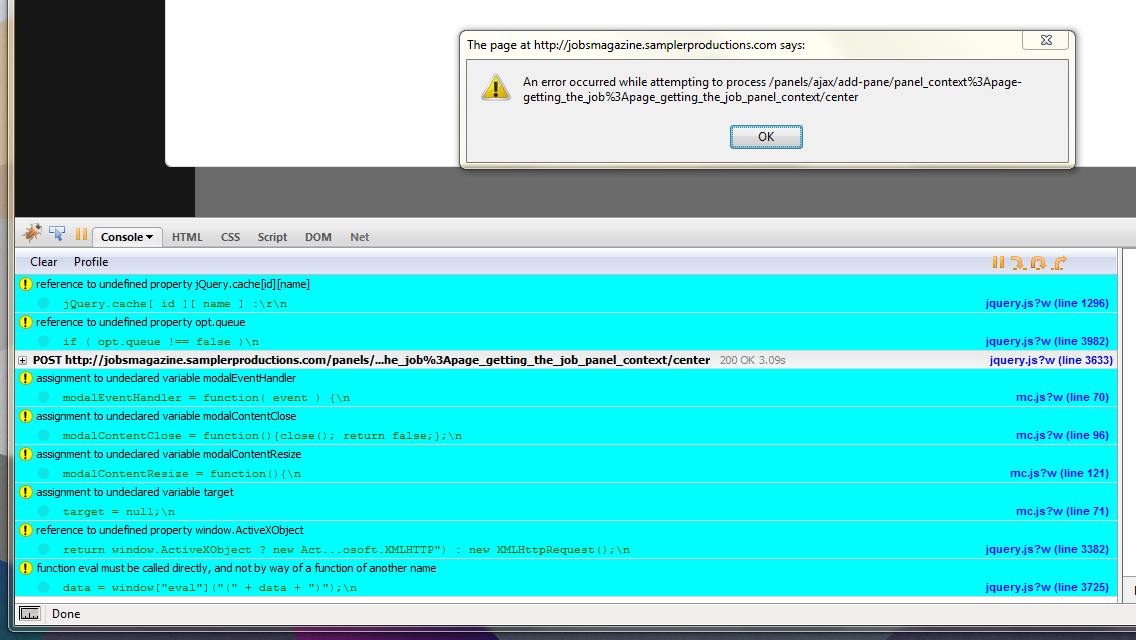
Here is an image that shows the error and the Firebug error console. Unfortuantely the Firefox JS console showed no errors.
This is a relatively clean install so I am a bit puzzled as to why this would be happening, but it is worth noting the popup on the 'Calendar' module doesn't work either - even after hours of applying patches and troubleshooting (and reinstalling Drupal). Maybe a server-side error (406) causing the issue?
Thanks for your time.


Comments
Comment #1
merlinofchaos commentedWhen you get an error like this, you should check your apache/php or watchdog log and see if there's an actual crash there.
Comment #2
bstrange commentedI am having a similar error and it is the result of the ajax module (assumption based on this error NOT occurring prior to ajax install). While mine is throwing no errors, when I try to change content, in IE, all theme formating goes out the window. In FF, it slaps everything on top of everything else, but holds *some* theme iformating. (see attached images)
This has only happened since installing AJAX mod and I have removed it completely but the problem persists. I can't check the apache logs as this is on a (semi) production site hosted elsewhere.
I am getting TONS of errors in log that I *think* pertain to this, one listed below:
Location: http://www.futuresite.villacollectionsdesign.com/admin/build/pages/nojs/...
Referrer: http://www.futuresite.villacollectionsdesign.com/admin/build/pages/edit/...
Message: Parsed JavaScript file misc/collapse.js.
While AJAX mod was not crutial to the site...this module is, and ANY help would be appreciated greatly!
Thanks in advance :)
Comment #3
bstrange commentedSo far, I have tried truncating all cache tables in DB as well as panels_display and panels_pane with no luck...
edit to add:
deleted the following from system table with no effect:
sites/all/modules/ajax/ajax.module
sites/all/modules/ajax/plugins/captcha/ajax_captch...
sites/all/modules/ajax/plugins/comment/ajax_commen.
sites/all/modules/ajax/plugins/disable_redirect/aj
sites/all/modules/ajax/plugins/fckeditor/ajax_fcke...
sites/all/modules/ajax/plugins/loggintoboggan/ajax...
sites/all/modules/ajax/plugins/quicktabs/ajax_quic...
sites/all/modules/ajax/plugins/thickbox/ajax_thick...
sites/all/modules/ajax/plugins/tinymce/ajax_tinymc...
sites/all/modules/ajax/ajax_ui/ajax_ui.module
sites/all/modules/ajax/plugins/webform/ajax_webfor...
sites/all/modules/ajax/plugins/wysiwyg/ajax_wysiwy...
Comment #4
merlinofchaos commented#2: Er, that says there is an error in a file but it doesn't really say what the javascript error is. That isn't enough information to even guess what might be wrong.
Comment #5
bstrange commentedMy apologies... from the javascript error log in firefox:
http://www.futuresite.villacollectionsdesign.com/sites/all/modules/ctool...
Line: 149
Warning: Error in parsing value for property 'vertical-align'. Declaration dropped.
Source File: http://www.futuresite.villacollectionsdesign.com/sites/all/modules/panel...
Line: 331
-Seems to be a recurring issue: http://drupal.org/node/595442
-Looks like this is possibly an issue with Chaos tool suite *not* Panels
-Only effects users unfortunate enough to have installed the ajax module (perhaps a warning is in order?)
Edit to add:
Enabling javascript in my FF browser resolved the issue on the FF panels content edit page.
Javascript is enabled in IE and it still throws me to http://www.futuresite.villacollectionsdesign.com/admin/build/pages/nojs/... where i suspace /nojs/operation/ is the problem.
Comment #6
Anonymous (not verified) commentedNew update.
So I disabled Javascript on my browser, disabled the 'AJAX' module and uninstalled it (for good measure anyways) and the popup error went away... only to be replaced with:
"http://jobsmagazine.samplerproductions.com/panels/ajax/add-pane/panel_co..."
which is the same error I had to begin with.
No favicon, no styles, just plain text. Interesting right? So I check my error log on my Drupal site... nothing of relevance to this... just a few bad paths for some stylesheets*.
Now I have already edited my php.ini file and made the appropriate changes to avoid the AJAX errors and you prescribed a few months back (and apparently fixed with this version anyways), but I recalled that Dreamhost strongly encourages you to enable "Extra Web Security" which is just a setting to enable mod_security. So I disable it... still the same error.
Okay so let me do one last check and look at my server logs...
"[Sat Jan 09 08:29:27 2010] [error] [client 199.xx.xxx.xxx] File does not exist: /home/user/mysite.com/favicon.ico"
I'm not sure what else to do really however, it seems to me like this is NOT in fact an AJAX issue... I could be wrong though.
*Ninja edit:
I am not compressing my stylesheets at the moment, which causes IE8 to poo itself without fail... so I'll try setting the caching/compression to normal and see how it works... probably won't help knowing my luck.
^^No.. no luck. No luck on Chrome, Safari, Opera, IE8 or Firefox. Welp...
Comment #7
merlinofchaos commentedWell. Panels pane-adding system does not work with javascript disabled (Panels does not degrade gracefully) so that error does not tell me very much. :/
Unfortunately, without being able to actually see this error, none of the information I'm getting is giving me any ideas what is going on.
Comment #8
Anonymous (not verified) commentedI wish I had a bit more to tell you so that it could be replicated, but unfortunately this is all I have. I did however make a discovery...
I made a clean install on a sub-domain and had the basics installed (CCK, Views, Panels, etc.) and things worked peachy. So I decided to ditch the old project and work on this clean install. Out of curiosity though, I decided to install the AJAX module and boom - the error came again... so bstrange may be on to something here.
The odd thing is that I have made a few other sites in Drupal over the past few months with no problems at all and now everything is just completely broken (I'm lost without panels).
Maybe it's just a crazy fluke due to a bad database upgrade?
Comment #9
merlinofchaos commentedI'll try installing the AJAX module on a test site and see.
Comment #10
Anonymous (not verified) commentedWell a funny thing occurred just now. It turns out that when I enable my custom them, the AJAX flips out and just won't work right because similar errors started popping up in Views as well. If I disable my theme and put it back on Zen (which is what I built my theme off of), everything works just fine.
Okay, so that blows my mind. I don't have anything in my head that seems too dangerous besides my Google RSS feed (which removing fixes nothing) and no rouge scripts laying around my code... it's merely a rebuilt Zen subtheme. However, I have good error logs now and this is what happens with one single query:
"in_array() [function.in-array]: Wrong datatype for second argument in /home/mwpopl09/newjobs.samplerproductions.com/modules/system/system.admin.inc on line 479."
This error - or a similar one that happens at line 412, 451 and 479.
Also I get this:
"Type page not found
Date Sunday, January 10, 2010 - 5:44pm
Location http://mysite.com/admin/build/views/edit/mjm_theme.css
Message admin/build/views/edit/mjm_theme.css
Severity warning"
For some reason Views nor Panels cannot find my CSS file for my theme...
One more thing to note... If I attempt to make a new View such as a block or a page, it freaks out and gives me the "An error occurred at /admin/build/views/ajax/add-display/videos" error. Click the warning and refresh the page and voila - you have a new block amidst all the errors.
Comment #11
Anonymous (not verified) commentedI'll go ahead and lower this priority too. I don't think anyone is dying.
Comment #12
braindrift commentedHi@all,
I have a similar error. The error pops up as soon as I use a context in a Panel and then try to add some content to a region. After deleting the context-settings the error goes away and I can add new content to a region.
I think that my issue is similar to this because the error-message is very similar.
I set the priority tho normal because I can't use the context-functionality of the panels module.
Thanks,
dendie
Comment #13
Anonymous (not verified) commentedI'll second the raise.
I discovered that if I disable my custom theme for the admin side (based very cleanly off Zen) and use Garland, things worked just as intended. However after about 30 minutes of actually getting stuff done, same error occurred.
So I disabled my custom theme entirely and Panels worked again. I just enabled my custom theme again and Panels still works, but probably not for long...
Hope that helps a bit.
Also @dendie:
Is your theme based off Zen? If so, awesome maybe that is a lead. If not, does switching themes (or switching admin themes) fix things?
Comment #14
braindrift commentedI just use garland theme
Comment #15
Anonymous (not verified) commentedOkay new discoveries.
So I have been working around my issue fairly well and actually getting real work done now, but styling is an issue. I am using Garland as my admin and content editing theme with my custom theme for the front end. If I go to Views and check the theme information on any pane, I get 'An error occurred at /admin/build/views/ajax/display/videos/default/analyze-theme'. So it seems the problem is with my theme!
Now what in my theme could do this? I used the Zenophile module to set up my paths, started from a clean CSS file and toyed with their supplied template files. That's honestly it. So I dive into the .info file and compare it to the Garland .info file. The Zen file was missing a PHP engine definition and a bit messy, but that was really it. After cleaning it up to look decent, I tried again to no success...
Are there some things that Views/Panels/CTools need in the template to function properly outside of the .info files?
For now, I am going to make my 4th fresh install for this site and set up my directories by hand rather than use Zenophile.
Comment #16
bstrange commentedSorry hadn't checked back in a while. I was using a slightly customized Garland theme for both admin and user... I have set up a clean install with no AJAX and will report back on my findings later today after I install CT and Pans
Comment #17
bstrange commentedOk so fresh install with no AJAX and same problem occurs. As soon as I installed Panels and Chaos I get the dreaded 'no theme' panel screen. It occurs when custom theme is enabled for users/admin as well as when stock Garland is set for users and admin so it seems (at least for me) unrelated to theme.
Edit to add: if I force my way through creation of a panel page or panel node w/o theming / formating, the node created only loads w/o theme / formating as well whether panel page or node. Leaving that page returns formating and theme.
The ONLY watchdog error following Pan/Chaos install was a Nodewords error:
Type nodewords
Date Friday, January 15, 2010 - 05:51
User admin
Location http://www.thenewvilla.villacollectionsdesign.com/node/add/panel/flexible
Referrer http://www.thenewvilla.villacollectionsdesign.com/node/add/panel/flexible
Message User admin changed the meta tags for type 5 (86).
Severity notice
Hostname 72.240.190.41
Operations
however, I uninstalled nodewords but the problem didn't change and doesn't appear to be related. Again, AJAX is not installed, nor is jquery update or jquery UI (those were my previous suspects)
Lastly, it appears to be working now in Firefox browser; however NOT in IE8 (didn't create a full page/node in FF but will tomorrow and will update) java script IS however working in the IE8 browser as the lightbox images work correctly and they are java based if I am not mistaken so I don't *think* it's a simple matter of a java permissions problem in IE8
Comment #18
bstrange commentedI too am having this problem when creating new views now, just as you are.
Edit to add: Interestingly, as with panels, the Views loss of format and (presumably) failure to load java script does not occur in Firefox.
Comment #19
merlinofchaos commentedWhat is the complete list of contrib modules you are using?
Comment #20
bstrange commentedCCK, Chaos, Image Cache, Location (only Location core functionality enabled atm), Nodequeue (installed after this issue), 404 Blocks, Advanced help, Diggthis, Global Redirect, Lightbox2, Menu Per Role. Mollom. Page Title, Path redirect, Pathauto, Persistent Login, Read More link, Scheduler, Search 404, SEO Checklist, Service links, Token, Trackback, Panels, Ubercart, Views, Yahoo YUI (installed after issue).
Comment #21
bstrange commentedOk this odd and somewhat unbelievable, but I installed Dynamic display block module and it fixed it...
oh, and in order to install DD Block I had to install JQuery Update module....
absolutely baffeled but pleased :)
Comment #22
Anonymous (not verified) commentedHmm didn't fix my problem. You're right, absolutely bizarre.
I swear the issue lies in the system not being able to locate the stylesheet but I have no hard evidence.
Comment #23
bstrange commentedHmmm you may be onto something there... one thing I changed for the DD Block config was I had to rename my theme from 'villa-custom-01122009' to 'VillaCustom2010'. This was a big issue with DD Block because template preprocess functions do not recognize dashes or spaces in theme names in .php calls. Aside from just changing the theme name on line #2 of the .info file, I also had to change the name of the actual info file to match.
Originally I had just changed the name inside the .info to VillaCustom2010, but left the .info file titled villa-custom-01122009.info and many functions would not work correctly, after changing the .info to VillaCustom2010.info to match the change I made on line #2 of the .info file, everything worked correctly.
A word of warning, the change broke my theme as I was using a colorized/customized version of Garland and most of the graphics and css, etc is saved in /sites/default/files/color/villa-custom-01122009-d19de82a and references the old villa-custom-01122009.info that no longer existed, so I had to rebuild it.
On a side note, in retrospect, I need to figure out a way to customize a Garland theme for color and css and have it save to sites/all/themes/mycustom themename rather than in /sites/default/files/color/referencetocustomtheme, but that is another issue for a different forum :)
Hope my input can potentially help with your problem!
Comment #24
Anonymous (not verified) commentedProblem solved! (maybe)
@bstrange
I see you made a custom theme in default like I did and got the same results. A clean install with the theme made in 'all' fixed my issue. I find it highly likely that somewhere deep in the jungle of Drupal code is a function that assumes custom themes do not and will not exist in 'default' and as a result breaks. I don't know the ins and outs like some do but this seems logical to me.
Comment #25
merlinofchaos commentedOh now THAT is interesting! Hmm. Can you tell if this is recreatable just by making basically a blank theme in sites/default? I'll have to try that.
Comment #26
Anonymous (not verified) commentedI'll try it tomorrow at work and report back. Honestly I noticed this last week but I was afraid to say anything because it seemed like a dumb mistake. Glad to see I wasn't alone haha.
Comment #27
Anonymous (not verified) commentedConfirmed in this instance. I'm sure it'll need to be examined a bit more when I have some free time but I'll do all I can to try and help fix it... at the very least help out with the testing.
Comment #28
bstrange commentedOk you are definitely onto something here; as I said I had installed DD Block and my problem had resolved itself... well I hadn't been into panels since repairing my theme as described in #23 and now it is broke again. Also of some interest, while working with the DD Block, I had deactivated the YUI Editor module. I turned it back on today and once I do, it makes my panels home page lose it's formating. If I turn it off, the homepage is fine... so bizzare and ambiguous.
While that may be the case, I am not sure how to customize garland's colors etc w/o allowing it to create in /sites/default/files/color/VillaCustom2010-d19de82a.
I tried putting all my custom graphics and css in the VillaCustom2010 custom theme I have in sites/all/themes but it doesn't apply itself correctly. I have highly customized the garland theme's graphics (see: http://www.thenewvilla.villacollectionsdesign.com ) and I can't get it to work unless I choose my custom theme in admin/themes, customize the colors, then go and replace it's graphics and css in sites/default/files/color/VillaCustom2010-xxxxxxx
We are definitely narrowing the problem down to "custom theme problem" though.
Comment #29
Anonymous (not verified) commentedWhy would you not just copy the Garland folder and just rename everything, then make a custom theme in 'sites/all'? Maybe I'm missing something you are doing though because I used Zen since day one but regardless, I think we are on to something. Unfortunately the only thing I have to show for it is a bunch of errors about CSS files not found.
Comment #30
bstrange commentedYou would think, but for some reason, Garland tends to push things off into a sub folder in defaults with your theme name and then a numberstring attached...I am planning to play around with it tonight.
Comment #31
merlinofchaos commentedOk, this may be old but I was going back through this issue looking for anything I can latch onto to try and reproduce this issue.
Note that the path on this thinks your custom theme is in views. That suggests to me that whatever is adding that file name is doing so incorrectly as a relative URL rather than a full URL. That could be a bug in your theme. It's possible that messages like that break the Views AJAX calls when they get sent as output and the javascript on the client side cannot interpret them.
That's because Garland uses color module. In order to create temporary files they *must* be in your 'files' directory. The webserver should not have write access to the actual themes directory, so it cannot create temporary files there. If you want to customize the graphics yourself, you should probably turn OFF the color module support and modify the default style.css to point to your images. But that's really not a good issue for this queue. That said, if improper color module support is causing errors which in turn cause the AJAX to fail, there's not a lot I can do about that.
I tried creating a blank theme in sites/default/themes and played around a bit with Page Manager and Panels. I ran into no AJAX errors, so I believe this to be a red herring.
There's one other thing you can do. Use Firefox and install Firebug. Turn on firebug for the site, and go to the console. Click on the add content item. In the console you should see something like this:
POST http://panels3.dev.logrus.com/panels/ajax/add-pane/panel_context%3Apage-membership%3Apage_membership_panel_context/center/view-panes 200 OK 792msIf you click on it, there should be 4 tabs. One of them will be 'Response'. That should be the tab that opens up. That will tell you exactly what the server sent back. When it's working it should look like this:
[ { "command": "modal_display", "title": "Add content to Center", "output":(That's just the first bit; it will be very long).
I am particularly interested in seeing this information when you get one of the failures.
Comment #32
merlinofchaos commentedI tried out the ajax module, and with it enabled I also did not get this behavior.
Comment #33
merlinofchaos commentedIf you can edit your php.ini file, go look for the setting 'display_errors'. If it is set to On, try setting it to Off (you'll need to restart the server).
Comment #34
merlinofchaos commentedOne other thing to check. The -dev version of CTools has some better error reporting during ajax operations. UPgrading to CTools and Panels -dev versions might get more information.
Comment #35
benklocek commentedUsing Panels 6.x-3.0
And also getting this problem. I'm however, getting a 404 error when I view the Firebug console.
It seems that some of the PHP content I'm trying to include is not making it past the URL encode. Perhaps that is the issue with some of these other errors?
Update: It seems that the execute() function trying to get Views data, is the culprit. If I only have:
It causes the page to return a 404? I've tried this with in a few other node types with input filter set to php, and it dies reliably with a 404 every time.
Looks like I need to update and look into some other bug.
Comment #36
merlinofchaos commented3.0 is 2 releases out of date. Upgrade before posting bug reports.
Comment #37
Anonymous (not verified) commentedJust wanting to update... been a bit busy lately now that Views and Panels work properly, but I'll answer what I can now.
Checking this off the list as I already thought of that when I saw these errors. Quite honestly after coming to that conclusion I was really excited but unfortunately, it wasn't that simple. I do think that somebody, somewhere has a URL with an improper type of path though.
Sometime next week I hope to get down and dirty with this bug and a few more elsewhere.
Comment #38
okday commentedHi, I have the same problem.
Someone have the solution since last post?
thanks
Comment #39
Anonymous (not verified) commentedSure. Clean install and drop your database into it. That's the only solution I have found that actually works. Granted it isn't a problem anymore for some reason (for me anyways), but that's all I can recommend. Sorry!
I spent an evening looking into it and found nothing of any interest but then again I'm not an expert at these things. Have you tried switching themes then trying?
--michael
Comment #40
okday commentedyes, I've tried to switch theme without any success
Comment #41
webdevbyjoss commentedHi, I have the same problem with clear install of latest Drupal + minimum number of modules
It just doesn't works if I add context for panel. If context is removed - it works smoothly.
Apache error log shows 503 error message for each ajax call with such error, but I can't find anything useful to investigate and resolve this.
Does anyone managed to investigate this?
Comment #42
merlinofchaos commented503 error? That's usually mod_security -- and the latest CTools should have fixed the issues with mod_security. If there is a 503 error, then the error log should show a little more detail about why.
Comment #43
webdevbyjoss commentedA 503 error is a PHP segmentation fault or in other words PHP crashed. We're using PHP 5.2.13
Errors occurs on both "CTools", the stable one and the latest development version available.
Is there any chance to investigate/fix this issue?
error occurs only if I create "Context" to add node creation form to my panel.
If context is removed then everything works smoothly.
I have a very likely the same JavaScript box with error message like on screenshot in the initial post of this thread.
Comment #44
webdevbyjoss commentedFound also the same error report here:
http://drupal.org/node/696402
Comment #45
webdevbyjoss commentedFinally managed to bypass that error manage using the patch proposed here http://drupal.org/node/696402, see post #14
Hope that will help someone.
Comment #46
DanielJohnston commentedSubscribing. This has started happening when adding content to any panel variant. Error message is along the lines of
An error occurred at /panels/ajax/add-pane/panel_context%3Anode_view%3A/top.
Error Description: 404: Not Found
Errors started occurring following an abortive upgrade from 6.3-3.3 to 6.x-3.x-dev, which replaced all of the existing variants in the panels editing area with the word 'variant' while losing all other information. Replacing with the old code led to this error popping up every time I attempt to add anything new. I'm going to remove the module completely and reinstall now, see if that helps.
Comment #47
DanielJohnston commentedOK, I may have hit errors caused by upgrading Panels without upgrading CTools in tandem. Sadly, drush didn't pick up or relay the error message that popped up when i tried it again through the front end. Problems solved now by putting latest dev of Panels and CTools in.
Comment #48
merlinofchaos commentedThe last few posters seem to have managed to get past this. Let's mark it fixed on that basies because the issue is so long and confused it's difficult to follow.