

 The 2026 Drupal Business Survey is open. Your response will help shape the future of the Drupal business ecosystem.
I assumed that the initial Shortcut UI was just a middle-step towards getting to a final User interface but its obvious that didn't happen. So to start off here are a couple violations :
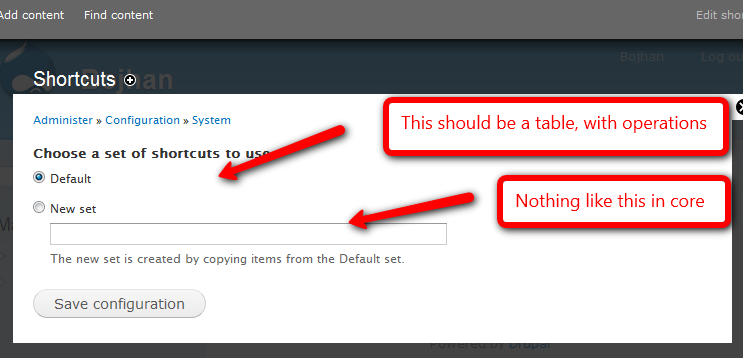
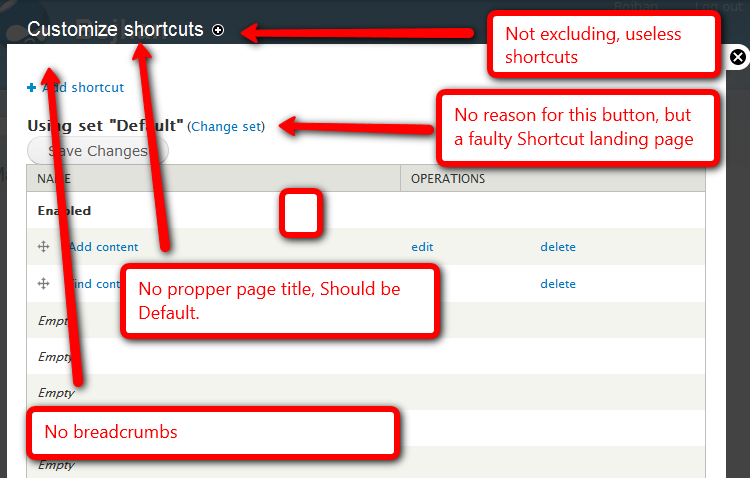
I know we are going into UI freeze and text freeze, but I cannot see why we wouldn't have usability issues with this, it seems to defy all standards we set on these kind of UI's and thereby make it harder to use. Putting this as a critical bug as it seems, for such critical functionality we should at least have a somewhat decent UI.
| Comment | File | Size | Author |
|---|---|---|---|
| #13 | 650800_delete_callback.patch | 2.79 KB | matt2000 |
| #12 | 650800_delete_callback.patch | 2.93 KB | matt2000 |
| #5 | customize_shortcuts_landpage.png | 21.56 KB | Bojhan |
| #5 | default-shortcuts.png | 20.68 KB | Bojhan |
| #1 | saveconfiguration_shortcuts.png | 28.9 KB | Bojhan |



Comments
Comment #1
Bojhan commentedComment #2
webchickSubscribing, although this looks like it will spiral to a 300+ reply nightmare issue. Is it possible to split these off into smaller things with concrete suggestions on how to fix, and use this one as a meta issue for tracking/discussion?
Comment #3
alpritt commentedCreated a spin off issue for the breadcrumbs: #681036: Some admin pages are missing breadcrumbs (edit: That was a duplicate of #576290: Breadcrumbs don't work for dynamic paths & local tasks)
Also, not only are we missing a means to get to the appropriate edit screen, but there is also no way of deleting shortcut sets once they have been created. The lack of edit links has already got an issue so that might be the place to create a patch for turning this into a table. #647084: Missing shortcut edit and delete operations on shortcuts admin
Bojhan also mentioned the need for an operation on that table to _enable_ a different set (i.e. the replacement for the radio buttons). I guess like on the theme config page. I'm not sure I like that operation being a link rather than a button on that page though. Still, consistency is good.
What do we want to do with the operation for creating a new set? I think the Drupal pattern is to put the form on a different page with an 'Add new set' action link.
For the record, the way we deal with the 7 shortcut limit by arbitrarily disabling the last shortcut and replacing it with a new one is a definite WTF. It is probably too late in the dev cycle to rethink that one though. A drupal_set_message() might be worthwhile in the meantime however.
Comment #4
mcrittenden commentedSub.
Comment #5
Bojhan commentedSo how do we solve this, lets make clear this is only about solving a couple of the issues mentioned - the save button, breadcrumbs appear to be related to other issues.
With that in mind instead of finding a new interface for this, lets just turn it into Drupal 7 standard screens. I believe that makes most sense and is committable in time
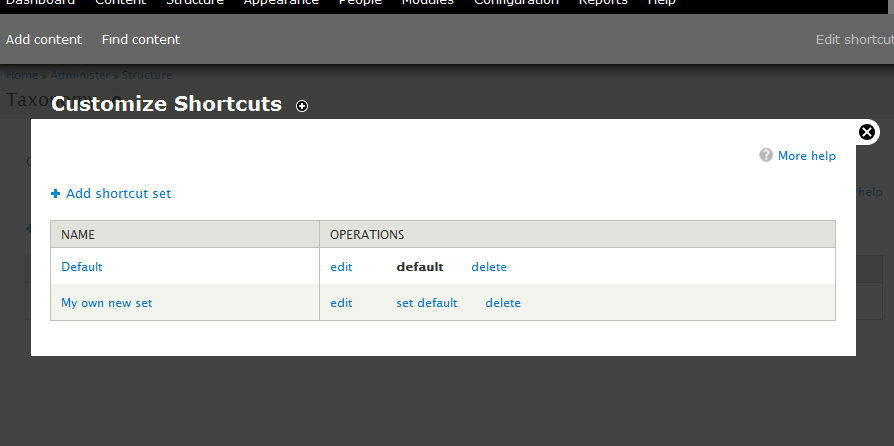
So, using a normal table - you can perform actions and put a set on default - we could work some more on the indicator of default but setting it default here makes more sense then on the actual shortcut (since one would be able to switch between shortcuts).
Again, propper title - removing the wierd location of save is another issue. But change set and h4 can be removed.
Comment #6
Shai commentedSub
Comment #7
David_Rothstein commentedAgreed there is work to be done here.
A bit frustrating to see this issue now, though, because we all literally talked for weeks at #511286: D7UX: Implement customizable shortcuts about possible alternatives to the UI, about making it look more like the menu module (or even reusing that code) rather than inventing a whole new thing which is inconsistent with the rest of Drupal -- and nothing really came of it so eventually there was a deadline and we just implemented it with the design and code that were already started, and that's how it stayed.
Anyway, water under the bridge. Since this is a meta-issue, it's useful to mention here that the shortcut module as it currently stands basically has three potential "audiences" (roughly corresponding to the three permissions it defines):
1. Site administrators, who can do whatever they want.
2. People who can just add bookmarks and rearrange stuff within their own shortcut set, but can't create or switch to new sets.
3. People who can choose between different "predefined" sets but cannot modify or add bookmarks to any of them.
I think it would be useful to think carefully about those three audiences and what kind of experience makes sense for each. For example, I am not totally sure how the proposed design (at least if it's envisioned as a replacement rather than as an extra screen for administrators) would address all three of those audiences.
Also, the "change set" button on the individual shortcut set page has a use case (perhaps it should be displayed differently, though). For example, a common pattern would probably be clicking the "edit shortcuts" link in the toolbar and then deciding once you get there that you want to replace the entire shortcut bar rather than edit a particular shortcut within it.
Comment #8
jhodgdonA point from Shai http://drupal.org/node/647084#comment-2464566 :
Just adding this here for completeness. I agree with the point...
Comment #9
David_Rothstein commentedAnother issue that might be relevant: #632210: Move shortcut settings from user/%user/shortcuts to user/%user/edit
That page on individual user accounts throws a bit of a wrinkle in here as well? :)
Comment #10
David_Rothstein commentedCompletely agreed.
(And said so many times before, such as at http://drupal.org/node/511286#comment-2038092, but eventually felt like not enough people thought so too so I gave up... Lesson learned: After 200-comment issues are done, make sure to create followup issues after, even if the issue appears to be dead :)
Anyway, I hope it isn't too late to at least do something about it. I've created #682000: Remove the default limit of 7 shortcuts per shortcut set for this purpose.
Comment #11
Shai commentedGang,
Given the imminent release of D7 Alpha, let's commit the very simple help-text addition I've proposed at: http://drupal.org/node/681814
That help-text will certainly need to be re-written after the shortcut module is fixed, but in the meantime it's likely to really help people actually use the module and play with shortcuts instead of leaving people thinking the module is totally broken.
Shai
Comment #12
matt2000 commentedLooks like #647084 is going to get fixed here. To that end, here's a delete callback ripped out of my patch from there. One small step toward implementing comment#5, which gets my +1.
Comment #13
matt2000 commentedOops, I mean this one.
Comment #14
aspilicious commentedneeds review
Comment #15
Shai commented@matt2000, I think your patch in #13 should have its own issue. This issue is focusing on a possible overhaul whereas your patch addresses one lack in the current module, the ability to delete a set.
I believe work on short term and longer term fixes can go on at the same time. But usually as different issues.
Shai
Comment #16
alpritt commentedOMG!
But it isn't their 'own' shortcut set in the sense that it belongs solely to them. A shortcut set may be shared by many users. Which means if you have permissions to edit the shortcuts for your own set, you mess up the shortcuts for anyone else using the same set. That's not how we've designed it.
We've designed it so that it is easy to add a new shortcut by clicking on the + symbol on each page. And there is an 'Edit shortcuts' link on the toolbar that also encourages that behaviour. So what's going to happen? Jimbo will log in. He'll have a lot of articles to write over the next couple of weeks so he'll use the handy + link and give himself a convenient shortcut. Then Charlie will log in, think "why is there a 'Create article' link there clogging up my shortcuts" and remove it. Jimbo will refresh the page and his shortcut will be gone. Gone!
We need to treat this like the administration task it is. Consider whether the 'Customize own shortcuts' permission makes sense at all. Get rid of the 'Edit shortcuts' link. I'm not sure about the + links on every page. And then administrators will customise it from the same configuration section where they configure everything else.
The radio buttons now make a lot more sense, but they should only appear as part of the user account tab exactly like choosing a per user theme.
Or we need to change the guts so it truly is per user. Which I doubt will happen considering we are a couple of days from alpha. But this is how I assumed it was supposed to work until I read the code.
Finally, there is no changeable default set so the designs in #5 don't make sense. The default is either that original set called Default (aka shortcut-set-1) or it can be altered through a hook by a contrib module. To be clear, Default is the set everybody sees unless that specific user overrides it and chooses another set. The reason this is so confusing is because we've mixed site-wide settings with per-user settings.
--
Additional after writing the above:
I just skimmed through the original issue and it looks like a lot of this was discussed. So the above is a completely fresh perspective from someone who didn't use shortcuts before Sunday and has taken until now to fully grok how it works; but I will read through the original issue more fully when it isn't so late.
--
Second additional:
To clarify what we can probably agree on pretty easily. (And this will be simple to code.)
* The radio buttons for selecting the per-user set should only appear on the user account page.
* The first image of comment #5 needs to be implemented but without the 'default' column.
* The 'Change set' link should probably just point to the user account page for the moment. We can always discuss whether we need it later.
If we get that committed quickly it will be an easy win.
Comment #17
David_Rothstein commentedWell, it all depends on how the site administrator sets it up. They can easily create a shortcut set for each user if they want to, and not assign that set to anyone else.
Obviously, that wouldn't be too feasible if you have tons of users as opposed to only a few of them, but the module is (hopefully?) extensible enough so that other modules could add an "auto-create-and-assign" feature on top of it.
This sounds like a pretty good plan.
The only tricky thing is that if you imagine a site with a single administrator, going to your user account page to switch shortcut sets (and taking you out of the admin workflow) might be a bit weird. I assume that's why it was made to be an admin page originally?
So maybe we can think a bit more about how to handle that, and whether there's a way to continue allowing sets to be switched from within the admin pages also. However, I agree that the fundamental confusion with that form is that it is not at all clear that you are always using it to switch your own personal shortcuts (vs performing a "site-wide" switch, which is what it tends to feel like).
Comment #18
alpritt commentedOkay, to that end I've posted a patch in #647084: Missing shortcut edit and delete operations on shortcuts admin which also rolls in #13 above.
Comment #19
Bojhan commentedOk continuing discussion at #647084: Missing shortcut edit and delete operations on shortcuts admin, this is a bit annoying - you should have posted the patch here - as was announced in that issue.