

 Come together with the global Drupal community in Rotterdam, 28 Sept – 1 Oct 2026. Sessions, contribution, connection, and Early Bird savings until 8 June.
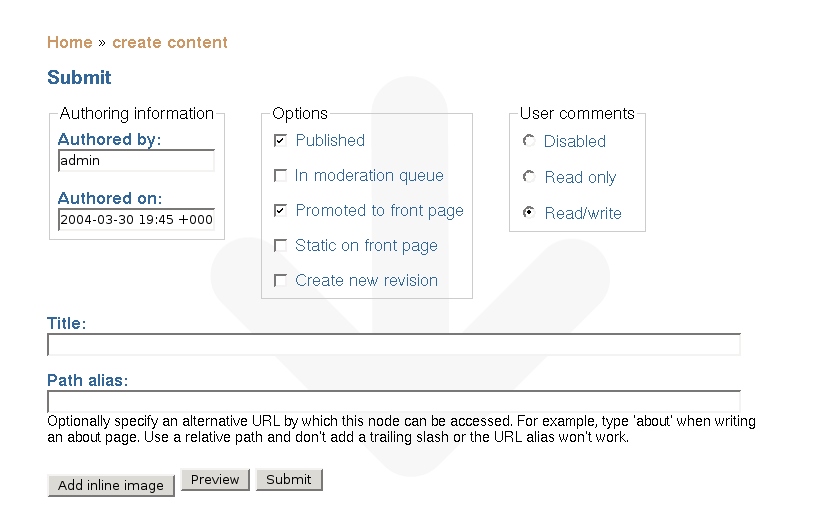
I have installed node_image 4.4.0 on Drupal 4.4.0rc1, and configured it according to the documentation. I have not applied the node.module patch.
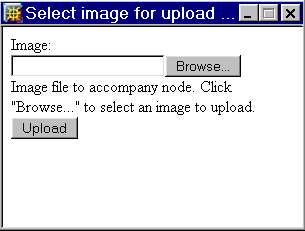
When creating new contents, there appears a Add Inline Image button, as expected. When I press it, a popup appears with using the node/add/node_image/popup_add path. So far so good. But I do not see how I can upload the image in the popup. I have attached a screenshot of the popup so you can see it for yourself.
| Comment | File | Size | Author |
|---|---|---|---|
| #8 | error page.JPG | 13.4 KB | Anonymous (not verified) |
| #2 | select_image.png | 3.96 KB | nedjo |
| #1 | Screenshot2.png | 5.94 KB | Frodo Looijaard |
| Screenshot.png | 17.6 KB | Frodo Looijaard |

Comments
Comment #1
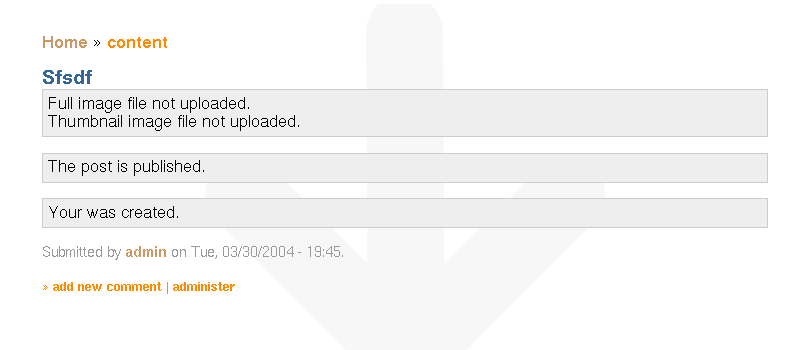
Frodo Looijaard commentedWhen I press Submit, I get to the attached screen.
So what is going wrong here?
Thanks for your help,
Frodo
Comment #2
nedjoThe image upload popup should have a file upload field and an "upload" button, see attached screenshot. Not sure why it's not working.... Possibilities that occur to me:
Suggested diagnostics:
?q=node_image/popup_add
what do you get? (Should be upload form without drupal framework, as in screenshot.)
?q=node_image
? (Should be upload form enclosed in the regular Drupal framework.)
Comment #3
mikeryanI'm also having trouble here... I am running with Clean URLs, and when I click "Add inline image" I get a small (non-resizable - user-unfriendly!) popup with the URI /admin/node/edit/node_image/popup_add, containing the error message
Warning: gmdate(): Windows does not support dates prior to midnight (00:00:00), January 1, 1970 in E:\Websites\drupal-44\includes\common.inc on line 870five times, before a regularly-themed "Edit post" page.Adding "?q=" before each node_image/ URI in the module partly fixes things (although I'm sure it breaks it if you have Clean URLs disabled) - the upload is successful, although nothing appears to happen when clicking "Transfer image". I can then edit my own IMG tags into the node body.
Comment #4
mikeryanOK, I've enabled the javascript embedding hack, now it all works fine for me (other than submitting the node displaying the message "Full image file not uploaded. Thumbnail image file not uploaded.").
Comment #5
trailerparkopera commentedI've had a similar issue, originally trying to post the image with Safari on OSXPanther. Switched to IE on Win2K and everything seems to work find. I'm wondering if it's not a java version issue or something browser specific?
Comment #6
trailerparkopera commentedI found that if I move the image up in my directory heirarchy, then the image uploads just fine. Suspect there's a limit as to how long the directory structure can be (or perhaps, the number of characters that can fit in that directory structure -- who knows). Move the files to be uploaded closer to the root level of my drive seems to solve the problem.
Comment #7
(not verified) commentedOn Internet Explorer, I found that the popup does not work as expected.
I am not a javascript whiz, but making the following change to the code convinces Internet Explorer to display the proper page.
FILE: node_image.module
search for "pop"
change
node_image_popitup('" . url("node_image/popup_add") . "');\">";
to
node_image_popitup('" . url("/node_image/popup_add") . "');\">";
The problem with this change is that it depends on drupal being install at the root of your web site. If you have drupal in a subdirectory of the root, then you would have to put that in there for it to work.
Basically IE doesn't seem to like the relative URL, but an absolute URL fixes it.
There is likely somebody far wiser than me that can straighten it out, my fix should be seen as a temporary quick-fix hack.
Best Regards,
Waitman Gobble
Comment #8
(not verified) commentedHi there
I install the Drupal without any problem (easyphp 1.7)
i installed the node_image module and i effectively can see the module that i enabled.
then, when searching to create a new page, i see the button Add Inline Image.
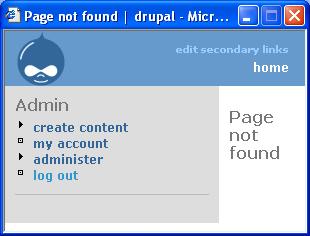
When i click on this button, i have a pop-up page coming but for which i have the following title "Page not found".
Anyone already had this pb?
i tried to modify (inside the file node_image.module) the part-line
from
node_image_popitup('" . url("node_image/popup_add") . "');\">";
to
node_image_popitup('" . url("/node_image/popup_add") . "');\">";
but nothing changed.
still the same problem.
thanks if anyone can help.
P.
Comment #9
Bèr Kessels commented1) are you sure you have all permissions set correctly?
2) do you have clean urls enabled?
3) are you running drupal in a subdir yoursite.com/drupal/
4) do not mark issues critical, unless you are sure they are critical for everyone, not only you.
Comment #10
jerdiggity commentedNo longer supported per maintainer -- closing.