Hi,
Closest I can find to this is an old D5 issue (for reference: #110308: Removing /feed) so I think this is actually a new bug.
Take a look at this feed:
http://www.drupaler.co.uk/blog/drupal/1
It's attached to this page:
http://www.drupaler.co.uk/blog/drupal/1/page
But it's link tag looks like this (points to itself, the actual RSS):
    <title>Drupal Blog by greg.harvey</title>
    <link>http://www.drupaler.co.uk/blog/drupal/1</link>
That's a bit annoying, because it means our feed links in Planet Drupal are broken. They link back to the feed itself, rather than to the page the feed is attached to! =(
Attachment works fine the other way around (RSS is attached to the page, no problem). It's just the RSS link back to the page that's broken.




Comments
Comment #1
dave reidAnd actually the links of each actual content items are fine, it's the 'home' link of the RSS feed that's the problem. I wonder if you enabled a Page display for this view if it would link back to that.
Comment #2
greg.harveyThat's exactly what I thought... so I tried it, but no - still links to itself. =(
Comment #3
merlinofchaos commentedIf you have a page display it can be configured to link to the page display, but you must attach the RSS feed to the page display.
Comment #4
greg.harveyHi, did that. RSS *is* attached to Page, but still didn't work. Cleared Views cache too, just in case. Here's the view itself:
Comment #5
dawehnerI'm not sure, whether this is a bug report or not. You just used it wrong.
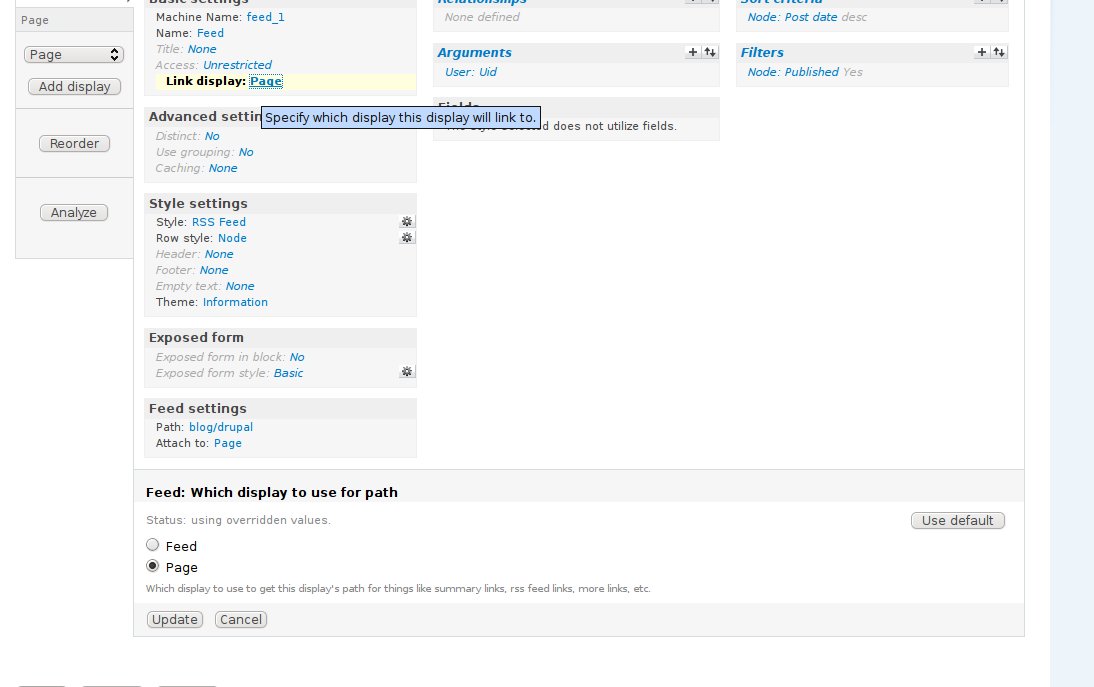
You have to link the display from feed to page and not from feed to feed.
I removed the filter, but the rest is the same
Comment #6
greg.harveyThanks dereine, will import your view shortly, but I'm totally bemused, because I've done *exactly* as you describe.
So before I over-write what I've done, and to convince me this really isn't a bug, please indulge me and take a look at the screenshot attached of the current UI, before importing your view. It shows the feed display with the attach settings opened. You can see it *is* attached to the page. Is this what you mean? If so, I've done it right and it's broken! If not, what *do* you mean? =/
Comment #7
greg.harveyAnd to complete the picture, here is the display called "Page", just to prove it really *is* a display of type page the feed is already linking to. (See attached.)
Comment #8
dawehnerSee this screenshot. You have to change the link to display option.
Comment #9
greg.harveyAhhh, then please accept my humblest apologies. I think I need to upgrade Views, because I don't have that option and I just noticed I'm on 6.x-2.6 - latest seems to be 6.x-2.8. Will upgrade and then I guess the link option will appear. =)
Comment #10
greg.harveyJust to follow-up, I didn't have this option because my Views was out of date. Sorry for the noise!
Comment #11
mr.j commentedI just found this issue as I was going to file the same bug.
Apart from the solution being very non-intuitive, it doesn't handle the use case when your feed does not map directly to a page provided by a view. For example we want our views feed to link to our home page which is a panels page, not a view. i.e. we have completely replaced the built-in Drupal feed because it is not suitable for our needs.
So for anyone else wondering how we fixed this, use the theme information for your feed view and create a template file to override the RSS output. In the template file just set the $link variable to whatever you want (i.e. our homepage in our case).