Hello Young, firstly thanks for the great module. I really like concepts introduced in the new 2.x branch it has greatly improved my workflow but I still find it slow to dig through the menus while developing a site.
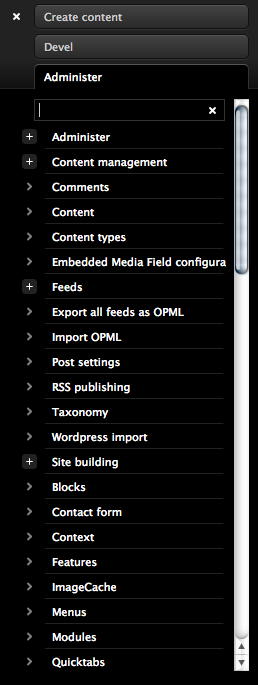
One idea to speed things up was to add dynamic filtering to the Administration menu so I could quickly find the page I'm after, the patch attached is my first stab at adding this functionality.
Currently it's crudely applied to the #block-admin-menu, I would like to create a filter object that's easily attached to any block within the toolbar but for now this works well as a prototype (any help would be greatly appreciated).
Functionality:
A new input box will be created above the admin menu, focus to activate the filter.
Use ESC to exit the filter mode & RETURN to navigate to the topmost result.
Hope you like the idea.
p.s. This is my first Drupal patch, so excuse me it's not up to standards.




Comments
Comment #1
cwaring commentedLooks like the files didn't attach for some reason. Here they are again:
Comment #2
cwaring commentedA couple of extra style tweaks that were missing from the first patch:
Comment #3
yhahn commentedGreat idea. I will definitely look at this at some point.
Comment #4
sinasalek commentedsubscribed