Closed (won't fix)
Project:
Simply Modern Theme
Version:
6.x-1.5
Component:
Code
Priority:
Normal
Category:
Bug report
Assigned:
Unassigned
Reporter:
Created:
16 Jan 2010 at 13:11 UTC
Updated:
26 Apr 2011 at 16:52 UTC


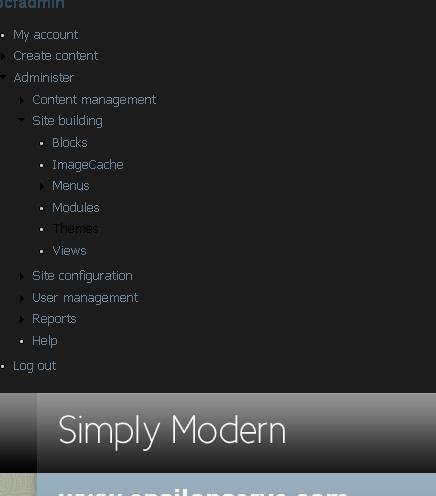
I am just new for drupal and simple modern theme, when I use this theme I got the strange page as in attached file.
Please help or advise where to get more knowledge.
| Comment | File | Size | Author |
|---|---|---|---|
| error3.jpg | 15.65 KB | asciiz |

Comments
Comment #1
Pete Harlan commentedDoes it fix things if you apply the patch from #686510: Left sidebar not on left if custom logo uploaded and no user sections?
Comment #2
linl commentedI'm getting the same error with a fresh download of the theme and no changes to any of the theme settings and no custom logo.
I tried adding
style="clear:both"in line 290 of page.tpl.php as suggested here: #686510: Left sidebar not on left if custom logo uploaded and no user sections, but it didn't make any difference.Comment #3
ensemble commentedI'm also having this problem - I installed the theme into a brand-new Drupal site with out any modifications yet. I checked the link to the patch you mentioned above, but I don't actually see a link to a patch there. Sorry if I'm just blind - I just see a description of the issue, no link to the patch.
Comment #4
Pete Harlan commented@LinL, could you attach the HTML of the page itself (i.e., not a picture but the HTML file)? I may be able to figure out what's happening then.
@ensemble, you're right, the patch disappeared (or maybe I'm also just not seeing it). It used to be there. I don't know why that happened, but I posted it again in a new comment in that report.
Comment #5
Pete Harlan commentedI have found that some things don't appear (like sidebars) until you save the theme settings at:
/admin/build/themes/settings/simply_modern
After doing that, check your blocks to make sure that your navigation is where you want it (e.g., left sidebar and not in the Banner Ad section) in:
/admin/build/block
I would guess that the need to save settings before things work correctly is due to the problem mentioned in #519666: Default Theme Settings Value not Correct about theme-settings.php not agreeing with template.php, but I haven't tested this.
Does this help?
Comment #6
raunsi commentedYes, this helps. All navigations were set to Banner Ad. Changing to "Left Sidebar" solved the problem.
Rainer
Comment #7
Corey Smith commented