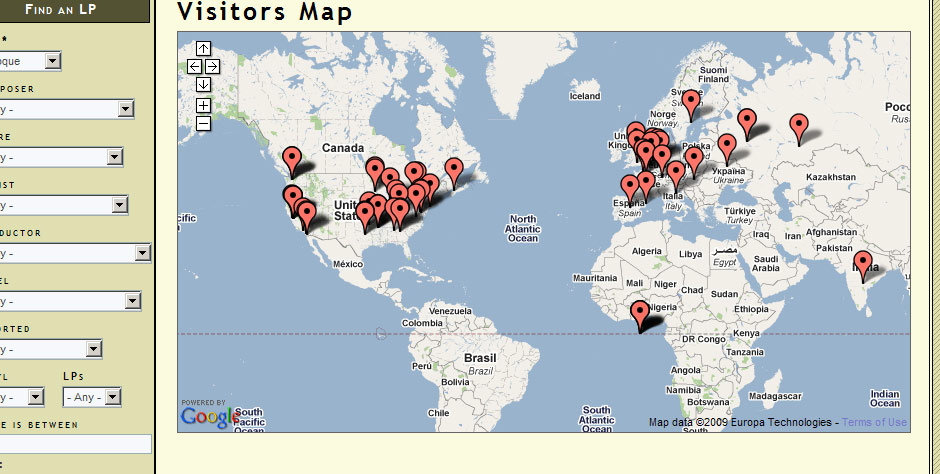
Thank you for this terrific module.

I have permissions set so that anonymous users can see the map and the markers displayed. Yet the markers do not appear to anonymous users:

http://classicvinyl.biz/visitorinfo-map

Only logged in users can see the markers. I have the permissions set correctly, have cleared the cache tables, am not sure what to do next.

Any thoughts greatly appreciated. david

CommentFileSizeAuthor
#4 Untitled-1.jpg115.98 KBbwv

Comments

twooten’s picture

Hi BWV,

It sounds like you have already checked the most obvious causes, permissions and cache. I did look at your page source and noticed that the Javascript visitors array is empty.

<script type="text/javascript">
<!--//--><![CDATA[//><!--
var visitors = [  ];
//--><!]]>
</script>

But you say that logged in users can see the locations? So there is definitely data in the db. Still sounds like a caching issue of some sort.

Tim

bwv’s picture

FYI, here is the source from the same page when I am logged in.

<script type="text/javascript">
<!--//--><![CDATA[//><!--
var visitors = { "65.55.216.54": { "ip": "65.55.216.54", "ccode": "", "cname": "", "state": "", "city": "", "zip": "0", "latitude": "0.000000", "longitude": "0.000000" }, "90.8.24.25": { "ip": "90.8.24.25", "ccode": "", "cname": "", "state": "", "city": "", "zip": "0", "latitude": "0.000000", "longitude": "0.000000" }, "65.55.207.132": { "ip": "65.55.207.132", "ccode": "", "cname": "", "state": "", "city": "", "zip": "0", "latitude": "0.000000", "longitude": "0.000000" }, "123.125.66.96": { "ip": "123.125.66.96", "ccode": "", "cname": "", "state": "", "city": "", "zip": "0", "latitude": "0.000000", "longitude": "0.000000" }, "65.55.207.48": { "ip": "65.55.207.48", "ccode": "", "cname": "", "state": "", "city": "", "zip": "0", "latitude": "0.000000", "longitude": "0.000000" }, "65.55.207.125": { "ip": "65.55.207.125", "ccode": "", "cname": "", "state": "", "city": "", "zip": "0", "latitude": "0.000000", "longitude": "0.000000" }, "220.181.7.96": { "ip": "220.181.7.96", "ccode": "CN", "cname": "China", "state": "Beijing", "city": "Beijing", "zip": "", "latitude": "39.928900", "longitude": "116.388000" }, "123.125.66.89": { "ip": "123.125.66.89", "ccode": "CN", "cname": "China", "state": "Beijing", "city": "Beijing", "zip": "", "latitude": "39.928900", "longitude": "116.388000" }, "193.203.68.106": { "ip": "193.203.68.106", "ccode": "GB", "cname": "United Kingdom", "state": "Derbyshire", "city": "Heath", "zip": "", "latitude": "53.200000", "longitude": "-1.333300" }, "119.83.178.177": { "ip": "119.83.178.177", "ccode": "JP", "cname": "Japan", "state": "Tokyo", "city": "Tokyo", "zip": "", "latitude": "35.685000", "longitude": "139.751000" }, "78.42.28.196": { "ip": "78.42.28.196", "ccode": "DE", "cname": "Germany", "state": "Baden-Wurttemberg", "city": "Freiburg", "zip": "", "latitude": "48.000000", "longitude": "7.850000" }, "66.0.61.152": { "ip": "66.0.61.152", "ccode": "US", "cname": "United States", "state": "Alabama", "city": "Cleveland", "zip": "35049", "latitude": "33.970700", "longitude": "-86.600000" }, "98.23.21.156": { "ip": "98.23.21.156", "ccode": "US", "cname": "United States", "state": "Kentucky", "city": "Versailles", "zip": "", "latitude": "37.996900", "longitude": "-84.746600" }, "220.181.7.119": { "ip": "220.181.7.119", "ccode": "CN", "cname": "China", "state": "Beijing", "city": "Beijing", "zip": "", "latitude": "39.928900", "longitude": "116.388000" }, "123.125.66.134": { "ip": "123.125.66.134", "ccode": "CN", "cname": "China", "state": "Beijing", "city": "Beijing", "zip": "", "latitude": "39.928900", "longitude": "116.388000" }, "83.241.209.178": { "ip": "83.241.209.178", "ccode": "SE", "cname": "Sweden", "state": "Stockholms Lan", "city": "Stockholm", "zip": "", "latitude": "59.333300", "longitude": "18.050000" }, 
//--><!]]></script>
bwv’s picture

Upon further investigation, it turns out that only admin can see the markers. I gave permission to anonymous and authenticated users, logged in as an an authenticated user, and was unable to see the markers.

Here is the page source:

<script type="text/javascript"> 
<!--//--><![CDATA[//><!--
var visitors = [  ];
//--><!]]>
</script> 

Is this phenomenon something that anyone is familiar with? I will gladly compensate the person who can help me figure this out.

PS: I have rebuilt all the post permissions under "post settings," but that did not produce the desired effect.

Thanks again, david

bwv’s picture

StatusFileSize
new115.98 KB

Image of page with markers visible is attached.

I'll pay someone $25 if they can help me figure this out, more if reasonable.

twooten’s picture

BWV,

I think dan.reimer has the right solution in this comment http://drupal.org/node/674686#comment-2491882. At line 44 of the visitorinfo.module file

Change:
'access arguments' => array('access content'),
to:
'access arguments' => array('access visitorinfo'),

I need to make a patch to fix this and will do so this weekend unless someone beats me to it, which would be just great.

Hope this helps.

Tim

bwv’s picture

Tim, thank you. I made the change per dan.reimer's suggestion, but the result is the same: only admin can see the markers. I unfortunately do not know where to begin to try to fix this. I regard this feature as important enough that I am willing to pay an expert to sort it out for me.

bwv’s picture

twooten’s picture

Status: Active » Fixed

Fixed in 6.x-1.4

Status: Fixed » Closed (fixed)

Automatically closed -- issue fixed for 2 weeks with no activity.