

Closed (won't fix)
Project:
Node Gallery
Version:
6.x-2.x-dev
Component:
Code
Priority:
Normal
Category:
Feature request
Assigned:
Unassigned
Reporter:
Created:
19 Jan 2010 at 17:50 UTC
Updated:
29 Nov 2010 at 02:55 UTC
Jump to comment: Most recent file


Comments
Comment #1
joecanti commentedHi Dirk,
Error message mentioned on the other post when trying to load drag n drop. I copied the unzipped imagex folder to the contrib folder under node gallery, then installed it as per usual. Then i went to one of my galleries (one without slideshow plug in - standard node gallery installation)
Java verified working by java.com
Have I put it in the wrong place??
cheers joe
Java Plug-in 1.6.0_17
Using JRE version 1.6.0_17-b04 Java HotSpot(TM) Client VM
User home directory = C:\Users\Joe
----------------------------------------------------
c: clear console window
f: finalize objects on finalization queue
g: garbage collect
h: display this help message
l: dump classloader list
m: print memory usage
o: trigger logging
q: hide console
r: reload policy configuration
s: dump system and deployment properties
t: dump thread list
v: dump thread stack
x: clear classloader cache
0-5: set trace level to
----------------------------------------------------
load: class Main.class not found.
java.lang.ClassNotFoundException: Main.class
at sun.plugin2.applet.Applet2ClassLoader.findClass(Unknown Source)
at java.lang.ClassLoader.loadClass(Unknown Source)
at java.lang.ClassLoader.loadClass(Unknown Source)
at sun.plugin2.applet.Plugin2ClassLoader.loadCode(Unknown Source)
at sun.plugin2.applet.Plugin2Manager.createApplet(Unknown Source)
at sun.plugin2.applet.Plugin2Manager$AppletExecutionRunnable.run(Unknown Source)
at java.lang.Thread.run(Unknown Source)
Caused by: java.io.IOException: open HTTP connection failed:http://www.avocet-designs.co.uk/isy/Main/class.class
at sun.plugin2.applet.Applet2ClassLoader.getBytes(Unknown Source)
at sun.plugin2.applet.Applet2ClassLoader.access$000(Unknown Source)
at sun.plugin2.applet.Applet2ClassLoader$1.run(Unknown Source)
at java.security.AccessController.doPrivileged(Native Method)
... 7 more
Exception: java.lang.ClassNotFoundException: Main.class
Comment #2
designwork commentedhi joe,
the folder should is called node_gallery_imagex and is not conrib module.
Please install it normal under sites/all/module/node_gallery_imagex
Please delete all fist before installing it again!
Dirk
Comment #3
joecanti commentedHi Dirk,
Had a quick go and no joy - I'll have another go at it tomorrow - think i'll have to delete all database entries before re-install - i will let you know the progress...
cheers, joe
Comment #4
svenarajala commentedDirk,
I gave the module a test run and was successful. One mod that would be nice is if I were able to view the images that I want to upload as thumbnails instead of just list or detail, but I guess thats what the drag and drop feature solves. The other problem is that when I upload photos it isn't saving them to the gallery directory for how I configured the pictures to be saved (%username/%gallery_name) the pictures are saved to mysite/files/. Other than that it is great to be able to bulk upload images now!!!!!!
Sven
Comment #5
designwork commentedHi svenarajala,
Your right you can see the images draging them.
I changed this please use the attached file. Rename it to node_gallery_imagex.module and use thisone istead of the old module file.
Comment #6
dbeall commentedIt's neat! Works very well. Nice work Dirk, you are a wizard......
observations:
* image storage directory issue #4
* drag n drop also uses list or details #4
* mouse scroll action on entire page is disabled, have to use scroll bar
feature request:
* possible to choose bulk or individual image upload from upload images page..
maybe ahah function choose option.?
or
maybe additional node_gallery tab.?
view | manage images | sort images | upload images | bulk upload | edit
EDIT: this test using file from post #1, OP
Comment #7
dbeall commented#5 images not uploaded
images show in list, but no image is uploaded.
notice after upload:
The following images have been uploaded to this gallery.
Manage your Images here
Does not show any thumbnails.. as the module from #1 does.
Comment #8
dbeall commentedthis is code from pages inc..
maybe the module can't find the function.. node_gallery_check_directory
Comment #9
dbeall commentedI added the code from #8 to the module file(changed return $dest), seems to work, images show up, but still the directory isn't right.. hmmm
EDIT: scratch all that,, not the right way to do it. someday I will learn this stuff
Comment #10
dbeall commentedwell, it seems to work now, all files still in /files
I don't know why it did work at first.. cleared caches, ran cron for fun.. maybe my firefox beta was messing up. I went back to FF3.5.6
The scrolling works now too..
Comment #11
designwork commentedHi dbeall,
this was a good one. I needed some time to figure out how to make it. But now at least for me it`s working. The module stores the files in the right places. Like you configured in the gallery settings.
Please rename the file. Uninstall the module. Delte the node_gallery_imagex.module file from your file system and copy the new one into it.
Cheers
Dirk
Comment #12
joecanti commentedHi Dirk,
Tested on different website on different server - installed in modules dir rather than contrib and all works fine - nice job!
One suggestion would be to include a link back to the old method of uploading in case of issues - I've noticed a few of the bigger sites seem to do this on their Javascript image upload features - eg facebook and ebay.
Thumbnails display sticks to 100 x 100? - I cant see this being a problem though...
Many thanks! its a very nice feature and well put together too!
cheers, joe
Comment #13
dbeall commentedthis may be a wamp issue.. it makes the %gallery_name, but it's not a directory, it's a file, all code:
short sample
ÿØÿàEDIT: I didn't delete the module, let me play a with it some more
Comment #14
designwork commentedyou are right I will check
Comment #15
dbeall commentedwell, it's not making a directory.
the files are raw code, but they do open with image viewer.
When I try to use %gallery_name, or any other gallery tokens, it give me error.. the error is not on upload page. The error shows on gallery list page..after upload is attempted..
When I use custom directory name 'galleries' nothing happens, images in /files/
weird stuff, but this is really neat function
Comment #16
dbeall commentedit's something with 'mime type' or 'extension'. If i rename a 'raw file' with .jpg ,, it shows in file system as normal
Comment #17
designwork commentedHi dbeall,
sorry for the delay I had to bring my kids to bed. But know it comes. It works realy for me, I checked all files in the files system. I just forgot to strip unwanted spaces etc from the path.
So please try again.
Comment #18
dbeall commentedNo rush. no problem. Your family and kids are far more important than Drupal
Woot, Woot, Yipee, It's awesome work Dude !!!
Ready for a release...
Your the man..
Thank you Dirk
Node Gallery is really rockin now buddy..
Comment #19
joecanti commentedHi,
Dont know if you saw the other post but there seems to be an IE8 issue with the Galleriffic slideshow of node display?
Drag n drop looking good!
Joe
Comment #20
dbeall commentedNote to self for readme:
document that you must choose a cover image on manage images page manually.
Comment #21
svenarajala commentedDirk,
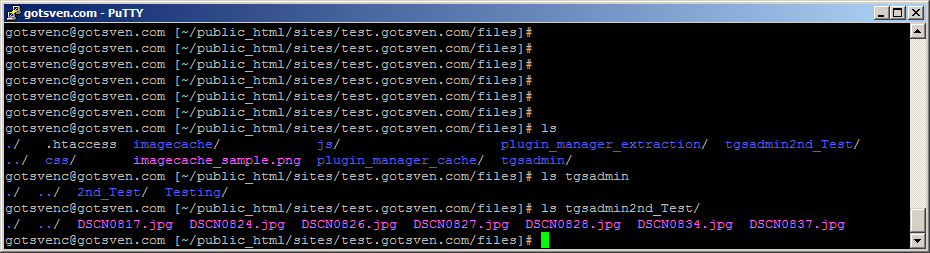
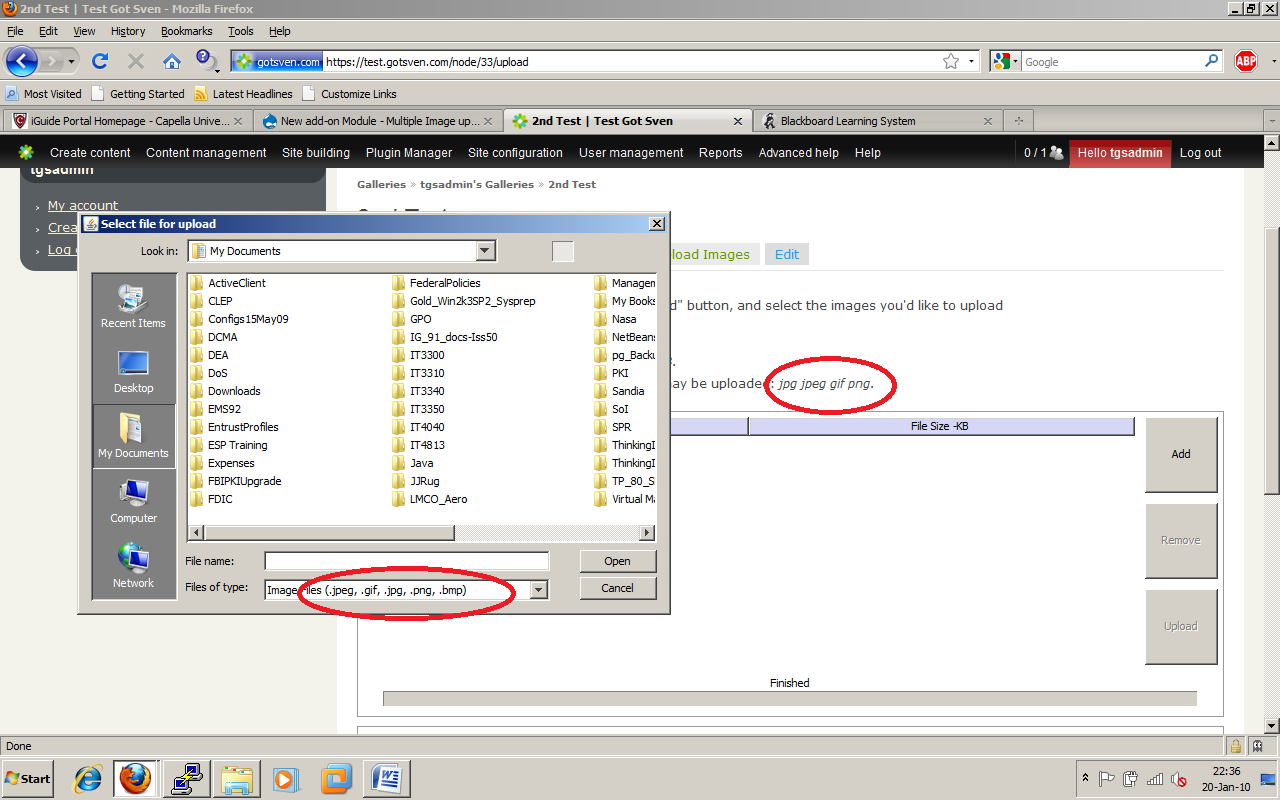
Just gave the latest update a test run, and it uploaded the pictures to the gallery under the user name, but it created a new gallery name. I have a gallery called 2nd Test. Before the bulk upload module node gallery created a directory called 2nd_Test where the original pictures were uploaded. With the bulk upload module the pictures were put in a directory called 2nd\ Test leaving the space in. Also when uploading files the extension types listed at the top differ from the ones in the window that pops up. The popup window add png and bmp. I attached a screen shot.
Thanks for this add on module!!!
Sven
Comment #22
dbeall commentedThe node gallery settings have a place for allowed file types.
node_gallery_imagex.module has to edited to match the setting you used in node gallery.
@@ 108
<param name = "fileextensions" value = "Image Files,jpg,gif,jpeg,bmp,png" />--------------
The issue is someplace here, but so many issues have multiple fixes, can't find it now.
peg_replace was updated in node_gallery.module
$validated_path = preg_replace('/[^a-zA-Z0-9._\/]/', '', str_replace(' ', '_', .................
imagex.module
@@ 248
$validated_path = preg_replace('/[^a-zA-Z0-9._]/', '', str_replace(' ', '_', $gallery_directory));
change to:
$validated_path = preg_replace('/[^a-zA-Z0-9._\/]/', '', str_replace(' ', '_', $gallery_directory));
Hope that helps...
Comment #23
dbeall commentedEDIT: June 23rd, 2010...The demo has been disabled, see last post in this thread
Here is demo
http://www.davebeall.com/node-gallery-imagex
Comment #24
designwork commentedHi dbeall, Hi sven,
ok here it comes the both issues from #21 should be solved.
The module will now automaticly respect all node_gallery file extensions settings. And the folders are done in the right way now USERNAME_GALLERY_NAME instead of USERNAME GALLERY NAME.
We have some feature request here. As soon as we have this stable I will take care for it.
Cheers
Dirk
Comment #25
dbeall commentednice work, tested, all is well that I can see.
Thank you Dirk
Comment #26
svenarajala commentedDirk,
Just finished another test, this time a directory was created as 2nd_Test/, where node gallery is configured to put pictures in /2nd_Test/.
Sven
Comment #27
dbeall commentedoh I forgot, in my copy I added the preg_replace update that Justintime added to the node gallery module.
preg_replace('/[^a-zA-Z0-9._\/]
it has the fore slash and back slash added \ /
maybe that's why it worked for me...
Comment #28
designwork commentedHi dbeall, sven,
it is the same like in #25
$validated_path = preg_replace('/[^a-zA-Z0-9._]/', '', str_replace(' ', '_', $gallery_directory));So I tested it with all kind of possibilities and its working for me.
Comment #29
osmanHey Dirk,
I wanted to thank you. #24 is working for me perfectly. It is a brilliant solution for a project I am working on. I am testing this module even I am so close to finish development and migrate to production for this project. I want to replace existing configuration with this.
When are you planning to move it its own project page? I'd like to contribute where I can.
Thanks,
Osman
Comment #30
designwork commentedHi osman,
I will make it a own module as soon as I have an answer from the maintainer of the imagex project and if we consider this tool as stable. I would like to ad a feature request to activate or disactivate the bulk upload via js.
Probaly this will be ready on monday, this is just a js_function to show and hide bulk upload and some css.
So mean while enjoy it and remember that this module may have some licens problems. Something I always respect, so please do not use it on a production site.
Thank also the developers of the node gallery and the testers here at this thread, they found somethings that I was not thinking of during my fast development.
Cheers Dirk
Comment #31
osmanSounds great Dirk.
I'll hold until licensing issues are cleared.
Cheers,
Osman
Comment #32
dbeall commented@Sevn, are you adding slashes in the gallery configuration..
no prefix slash and no suffix slash
it should be:
2nd_testwith a longer path it would be:
2nd_test/galleries/%username/%gallery_nameedit: sorry, got your name wrong Sven
Comment #33
svenarajala commenteddbeall & Dirk,
I had originally created two galleries with node gallery the first called Testing and the second one was called 2nd Test. I configured node gallery directory setting to be %username/%gallery_name. I uploaded some files with the node gallery upload b/c Dirk hadn't written this awesome module yet. The directories were successfully created and the images were put into the correct directories. Now I don't know if I should have created a new gallery to use the bulk upload tool with, but maybe that's what I need to do. I will try that out in a little bit. I also use Postgres for the DB not sure if that even has anything to do with this. I have attached two screen shots for review, one of the node gallery configuration and the other of the file structure. Did I possibly mess something while configuring?
Sven
Comment #34
dbeall commented@Sven, you got me on the Postgres, I have no idea on that.(never used it)
Your node_gallery path configuration looks to be correct.
as far as make a new gallery.. I used it with existing gallery with no issues.
Comment #35
svenarajala commentedCreated a new gallery called Corico which was a town I visited in Bolivia last year. I used the bulk upload module and it created a directory Corico. I attached a screen shot. Did I configure the the gallery directory wrong?
Comment #36
designwork commentedHi All,
I added a feature request of this thread to the module. Now a user can hide the bulk upload by simple clicking on a checkbox. Both forms normal upload and bulk upload will work.
Please uninstall the module. Delete all old files from the modules folder and install the module again.
Cheers
Dirk
Comment #37
svenarajala commentedDirk,
I updated to your latest code. I blew away my test site and rebuilt it today too. I still have the problem with the directory paths. I tried %uid/%gallery_name and %username/%gallery_name. Using the uid the directory created was 1, while the username was admin. Any ideas on why this is happening? If I don't use the bulk upload module the correct directory structure is created.
Comment #38
joecanti commentedGreat work Dirk,
Will try it out tomorrow and let you know how it goes,
cheers joe
Comment #39
designwork commentedHi Sven,
Did my code blew your website away?
If I use %uid/%gallery_name as settings I get this file path on my server sites/default/files/1/My_TEST. If I use %username/%gallery_name as settings I get sites/default/files/admin-photographer/Two_images.
So for me this all is right. May be you have me provide more information about your server/ database settings.
Cheers
Dirk
Comment #40
svenarajala commentedI also tried rebuilding my test site using MySQL ad the DB, but I still am getting the same directory problems. Just wanted to see if that would change anything, but it didn't.
Comment #41
millions commentedDirk, thanks for all your amazing (and quick!) work. Something in your imagex modules is causing the file directories to be incorrect. I mistakenly thought it was due to this: http://drupal.org/node/670544#comment-2512044
I just uploaded your new module from comment #36. I tried uploading a single file with the hide bulk upload and the directory was created successfully and correctly:
galleries/%username/%gallery_name resulted in galleries/XOSO/Final_test_hopefully
Then I tried uploading four files with the bulk upload. The files were not put in the same directory, but instead, a new directory was created:
galleriesXOSOFinal_test_hopefully
I'm not sure where the error is but I wanted to let you know. Thanks for the great work!
Comment #42
svenarajala commentedI have the exact same issue. Also something else that I notice is that when you upload a photo not using the bulk option node gallery will pick a photo to be the cover of the gallery automagically. Using the bulk upload this doesn't happen and you have to choose the photo through the manage photos tab.
Comment #43
dbeall commentedChoosing the cover image manually issue is known, the notice is on my demo, I thought it was in this thread, but I can't find it..
The directory is working fine here with default and imagex uploads,
I just upgraded node_gallery, node_gallery_access, node_gallery_display and node_gallery_imagex with the latest dev releases today.
side note, I am running transliteration
Comment #44
svenarajala commentedI updated node gallery to the one compiled on the 18th of Jan. Still having the directory problem though. If I don't use the bulk upload it works as I configured it. Then I installed the Transliteration module. THANK YOU DBEALL for mentioning this or anyone else who did and I failed to use this module. Installing the transliteration fixed the directory issue!!! Now I'm all set to bulk load, or that is until Dirk gets approval to go live with this module...
Comment #45
designwork commentedHi All,
I thought that Transliteration had to be installed to get node_gallery running. Here comes a new Version of the module. I puted it out of alpha into beta.
1. It depends now on Node Gallery and Transliteration.
2. It will create a cover image for the Gallery is there is no one.
So I hope this will fix most issues.
Dirk
Can please some one post if the hide checkbox is working or not on IE, or any other browser !!!!
Comment #46
svenarajala commentedDirk,
I will start testing your latest release ASAP. The hide check box works fine for me using IE8 and Firefox.
Sven
Comment #47
svenarajala commentedJust ran some testing and the module works excellent. One thing I noticed is that it doesn't say it depends on the transliteration module in the module list section. The hide bulk upload also worked fine too.
Comment #48
dbeall commentedThe module does not depend on transliteration, The "preg_replace" function is the fall back ' if ' transliteration does not exist.
We went through the preg_replace problem before, that is when Justintime added the \ / to the string.
I found the post..
http://drupal.org/node/670544#comment-2431938
cvs..
http://drupalcode.org/viewvc/drupal/contributions/modules/node_gallery/n...
I have been using transliteration by choice in every site that has uploads just to be sure file names do not have strange characters.
Comment #49
millions commentedForgive me for being redundant, but I don't have transliteration and would prefer not to have to install a module just to get a file directory named properly. I'm not a coder, but since it works with the single upload, is there nothing that can be changed to make the directory named correctly with the bulk uploader? I'm assuming it is otherwise you wouldn't say it's now dependent on the Transliteration module.
It would be great to not have to add another module just for this use. Dirk, is it even possible without Transliteration?
The hide bulk upload works with Safari too.
Thanks!
Comment #50
designwork commentedHi dbeall, Hi millions
as I see node_gallery by it self depends on that module.
6.x-2.x-dev An image gallery module.
Depends on: ImageCache (enabled), ImageAPI (enabled), Transliteration (enabled)
so you should have this module. I will see if I can refactor the file path creation.
Cheers
Comment #51
dbeall commentedI was looking at the ImageCache project page and it calls for transliteration as a requirement.. I must have missed that too.. hmmm, I may need some stronger coffee
I have updated the front page of the Node Gallery Handbook
Comment #52
justintime commented@Designwork, I don't know if it's possible or not, but you could just call node_gallery_validate_filesystem_path() from your module, and not have to worry about it. That way if we update that function in NG core, your module will get the benefit too.
Comment #53
designwork commentedHi justintime,
I`ve tryed it but I got no results so I did it programaticly, refering to the code in node_gallery.module. But I will have a look again to this, if we get to our 3.x branch.
Thanks
Dirk
Comment #54
millions commentedOk, thanks everyone. I'm not sure how, but I have ImageCache 6.x-2.0beta10 and on the admin/build/modules page it doesn't mention Transliteration, I've never had it, and it seems to work fine. Nothing on my admin/build/modules page mentions Transliteration at all. I also didn't see where it said it was required for Node Gallery. My mistake!
Comment #55
izarco commentedHi, good work.
I have a problem. I created a gallery "A" with photos 1.jpg and 2.jpg. After, i created other gallery "B" with other photos named like gallery "A" (1.jpg and 2.jpg). I can't see new photos on gallery "B". I see the photos like gallery "A".
Any idea?
Comment #56
izarco commentedmy solution:
replace this:
281 // Copy the file to the Drupal files directory
282 if(!file_copy($file,$dest)) {
for this:
281 // Copy the file to the Drupal files directory
282 if(!file_move($file,$dest)) {
Comment #57
newrooky commentedHey guys,
I seem to be having an issue with the action of multiple upload being completed as an Anonymous user. What I mean is that even though I am logged in as authenticated, it says that Anonymous is performing the action.
This makes it so I have to enable access to gallery uploads to Anonymous, which I don't want to. I also want to be able to view a log file that means something, so I want to find out why it is telling me things are being uploaded by Anonymous.
When I hide Multiple upload and just use the standard, this issue does not happen. It probably is something simple that I looked over, but any help would be wonderful.
Thanks in advance!,
Brandon
Comment #58
newrooky commentedwhoops.
Comment #59
designwork commentedHi izarco,
when you move your files to an other location (file_move...) do you have them in the main files folder as well? One Problem will be allways giving the same name to different files. We could rename the file to somthing like $user->name + some random var+ file->name.
Cheers
Dirk
Comment #60
designwork commentedHi Brandon
does your users have the "use multiple upload" permission ?
Dirk
Comment #61
justintime commented@izarco: You can use the gallery tokens in your directory paths to eliminate this problem. For example, if I have gallery A and gallery B, I can use the path [parent-gallery-title-raw]/ (I'm shooting from the hip here, that's likely incorrect but you get the idea) in the gallery relationship settings, and the file 123.jpg will get created in files/A/123.jpg and files/B/123.jpg.
However, I don't know 100% that Dirk's module uses this path - I would assume so, but haven't set it up yet personally. @DesignWork, can you confirm?
Comment #62
designwork commentedHi justin,
I confirm :)
dirk
Comment #63
dbeall commentedI suppose it could happen if the images with same name goto the same gallery..
thinking out loud,, If so maybe a
if file exists, then append with alpha or numeric character
EDIT,, it seems to me that I have uploaded the same image 2 times before by mistake and it worked with NG and then I had to delete one,, after seeing it..
Comment #64
H3x commentedDoes setting "Maximum resolution for uploaded images" in Image Gallery Relationship settings, affect this add-on module? I have a max resolution set, but when I use this add-on to upload images, only a handful of images get resized...
Also, postlet is giving me the following error randomly: "The selected file could not be copied, because no file by that name exists."
Comment #65
newrooky commentedDirk,
Yup, all users have multiple upload, and I am using user 1 to test it as well.
It gives me a page not found error from the postlet and I have no idea why.
Any suggestions?
Comment #66
jamesmcd commentedThis is working well and speeds up the upload process a great deal, thank you!
As a feature request/suggestion perhaps a cancel button would be useful (displayed during the upload progress)
Is this module going to be submitted as a new module, so it can benefit from it's own issue queue? or are you considering merging it with Node Gallery?
Comment #67
designwork commentedHi newrooky,
do you have locale installed? I found that there is a problem with the language prefix.... But I think I will solve this until 15 of March.
Comment #68
lonehorseend commentedOn line 101 of the version in #45
What do I need to set this to, so this module works with Drupal private file system?
I messed around with and the best I could get was a 404 error on
I have the module installed at /sites/all/modules/node_gallery/node_gallery_imagex
Usually I get: The selected file /tmp/php8YAWWG could not be uploaded, because the destination is not properly configured.
Comment #69
dbeall commented@lonehorseend, the module is installed like all contributed modules at sites/all/modules
it should be sites/all/modules/node_gallery_imagex
Comment #70
lonehorseend commentedIt didn't matter what location . . . .either /sites/all/modules/node_gallery/node_gallery_imagex or sites/all/modules/node_gallery_imagex, I still couldn't get this module to work when I had the file system set to private. I didn't try setting it to public because public is not an option for me as I store all my data files outside of public_html for security reasons.
I just need to know if it will work with private and if so how do I configure it to do so? Image_gallery works fine in private mode without the bulk uploader.
Comment #71
dmcmeans commentedUsing the Add button under FF 3.5.7 works great!
I noticed, afterwards, that all my gallery images were showing up on the front page. This hadn't occurred using the normal upload method for Node Gallery, but the Gallery Image content type was set to promote to front page. So, Node Gallery must be unchecking that on upload. Easy enough to fix, but this might be a tweak to consider -- that the imagex upload method demote images from the front page -- to keep things consistent.
Edit: On further thought, I believe the way imagex is currently working is correct regarding setting the promoted flag on the uploaded images. Node Gallery is incorrect. The flag should be set on the content type, not by the upload method. No change should be made to imagex.
Comment #72
dbeall commentedWhen using the bulk upload, you MUST manually choose a cover image after hitting the 'save' button.
If you do not, the gallery will show 0 images
Comment #73
Fohsap commentedI really don't understand. Is it possible to post a walk through, like this:
Install the module.
Browse to admin.
Click Create Gallery.
Fill in all fields.
Check bulk and select a zip file.
Select an album front image.
Press save?
Or the same, where you name one of the images 'album front'?
Or, do you create the gallery and upload one image, then do a bulk upload?
Comment #74
Fohsap commentedI kept getting .js scripting errors after I installed this, from my site.
A possible way to fix the 'must have an album cover' is to make it so that a folder is created for a gallery upon gallery creation rather than upon the first image's upload.
OOPS! I have another error to report, also. I'm so bad at sorting. Oh well. Tag it.
Here goes:
When you upload an image, then browse away from the uploaded image page without saving, then browse back..., your progress will be gone. So, you try to re-upload the images to create a new gallery item. Naturally, when you upload a duplicate to your server, like name.jpg twice, it names the second one name1.jpg and the third name2.jpg, and ... namen.jpg where n is the number of uploads of the same image. But node gallery tries to link to name.jpg, no matter how many times you upload that same file, and you end up with dead image links except for the thumbnail. So, if ten people want to upload pictures of their dalmation, and they all upload dalmation.jpg, you're going to have a bunch of pages with no full-screen image and only the first dalmation.jpg image name upload will work.
enjoi, I can't fix this, but I know that you can just go to the files/galleryid directory on your drupal site and delete the dupes and start over.
Comment #75
ptoly commentedUsing #45, this is what I get:
The selected images are not coming from the private directory!
When I deselect the bulk upload and use the standard upload it works just fine...
I've looked over this whole list and not seen anything like this, which makes me suspect a configuration issue with my own computer. I'm running a regular amp stack on OS X 10.6.3 with PHP 5.3.2.
Comment #76
LindsMWilliams commentedSimilar issue to #75 just without the private
# The selected file /var/tmp/phpVG6nyD could not be uploaded, because the destination is not properly configured.
# warning: stat() [function.stat]: stat failed for /var/tmp/IMG_0103.JPG in /home2/campshom/public_html/drupal/sites/all/modules/node_gallery_imagex/node_gallery_imagex.module on line 242.
# The selected file could not be copied, because no file by that name exists. Please check that you supplied the correct filename.
I'm wondering if there is a specific way to set the destination folder that would not create this error.
Comment #77
dbeall commentedI received a security announcement today about the imagex module.
This was not for node_gallery_imagex, but the node_gallery_imagex module hasn't been formally posted as a drupal module, therefor it doesn't get a security audit.
The security announcement did not specify exactly what the issue is other than it's vulnerable to access bypass.
I would say this means, use at your own risk.
Comment #78
sashken2 commentedI use module node_gallery_imagex with module transliteration 6.x-3.0-rc1
Filename don't transliterate.
Please help.
Comment #79
rkesiar commentedUsing #45, I ran into to two problems.
I set the Gallery Directory to 'gallery/%gallery_name' to organize the galleries to subfolders. Using the Imagex multiple uploads the subfolders were not created, but a 'gallery%gallery_name' directory was created for the uploaded images.
I managed to find and mend the issue by adding '/' to the permitted characters in the path:
Clean URLs are not available on the server I try to set this up and the link to the postlet.jar turned to be this which returned 404 error:
/?q=sites/localhost.dpzugweb/modules/node_gallery_imagex/postlet/postlet.jar
I found that it is the Drupal url function which adds the '?q=' to the URL when clean URL is turned off, but I don't know what would be the proper fix for this. I ended up hardcoding the path to get me going.
If you know a fix for this please share.
Comment #80
dbeall commentedclean URL's is required for the imagecache to work.
the preg replace was fixed in node_gallery, but needed the slashes in the imagex module..
Comment #81
ocamp commentedhey, is this stable yet?
Comment #82
justintime commentedI can't comment on whether or not it's stable, but I can tell you it's un-maintained. This feature is implemented in the core module in Node Gallery 3.x and it's integration with plupload. No new features will be introduced in the 2.x branch.