

 Come together with the global Drupal community in Rotterdam, 28 Sept – 1 Oct 2026. Sessions, contribution, connection, and Early Bird savings until 8 June.
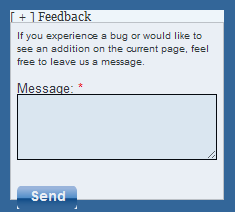
Good day! I am willing to submit a patch that would add a second option for the floating collapsible feedback icon.
Against which branch should that go? 6.x-2.x.-dev ?
Marking it critical cause I would like a fast answer. And since it is not a bug thus I do not harm the module's reputation.
| Comment | File | Size | Author |
|---|---|---|---|
| #24 | feedback-styling-693880-24.patch | 3.62 KB | dbassendine |
| #23 | feedback-styling-693880-23.patch | 3.64 KB | dbassendine |
| #21 | feedback-693880-21.patch | 14.01 KB | jody lynn |
| #20 | feedback-693880-20.patch | 7.69 KB | jody lynn |
| #19 | feedback-styling-693880-14.patch | 3.22 KB | dbassendine |


Comments
Comment #1
jcruz commentedYes. You want to patch against dev. See http://drupal.org/patch/submit for more info on submitting patches.
Comment #2
sunComment #3
cerup commentedrsvelko , have you worked on this at all?
Comment #4
antgiant commentedThe attached patch does two things.
First it provides rounded corners via CSS, to all browsers that currently implement that option.
Second it provides some whitespace to make our designer happy. :-)
However, it currently applies to the main (only) theme.
Code moved here from #478802: Rounded Corners and Some Spacing as requested by sun
Comment #5
idcm commentedHi AntGiant
Can you please clarify this statement? I ask because maybe I am misunderstanding. The patch shows feedback.css being changed. I inserted this patch as suggested and dont see a difference. Do you have a screenshot of what I should expect to see?
c
Comment #6
antgiant commentedAttached are two screenshots showing the difference. The original patch may have needed some slight tweaking. I have attached a tweaked version. Hope that helps.
P.S. Rounded corners don't work in IE (yet).
Comment #7
idcm commentedthanks antgiant, we will explore this more
Comment #8
jody lynnI don't think this belongs as a patch, it's simply a site-specific theming approach.
Comment #9
sunLet's leave this as postponed for now. Providing a clear infrastructure and code/API path for alternate UIs (including alternative behaviors) is one of the key challenges for Feedback module.
To state some kind of direction upfront, I'm envisioning an integration with Skinr.
Comment #10
R-H commentedFollowing
Comment #11
jody lynnThis is on hold right now waiting stability of skinr.
Comment #12
jody lynnComment #13
rkarajgi commentedI used the feedback module - it is great. I was struggling with having the feedback button show up on the right (or left) as a button with vertical letters as is done by 3rd party feedback providers.
I managed to get it done just using css. I am posting the css I used here - hopefully it may help someone trying to do same thing:
Add the following css to your local.css of your theme.
If you want the tab on the left, change first line to have "left:40px; right:inherit" instead and also change the "right:-50px" to "left:-50px".
Comment #14
Renee S commentedThanks __rajeev, exactly what I was looking for. It doesn't work in IE, unfortunately, so I added this in my ie_fixes.css file in addition to your CSS. The overrides are embarrassing, but anyway, if it helps somebody :)
Initial code stolen from the UserVoice feedback button code.
Comment #15
TribalMan commentedHelped me heaps
Comment #16
jody lynnI'm working on making the appearance of the form pluggable and including a left tab option.
I have the tab working but want to switch the form to a modal in this case as was done in #1291558: A nicer default UI (ala getsatisfaction.com).
Comment #17
jody lynnComment #18
muka commentedThe patch in #16 doesn't apply anymore.
This look promising, any updates?
Comment #19
dbassendine commentedI've adapted the styles provided in #13 and #14 for a right hand tab display in black (and somewhat smaller). Tested across IE7-11, Firefox 18-33, Chrome 38, Safari 5-8. Not perfect but provides a base for more modern styling.
This doesn't build on the pluggable approach in #16, though it would be great to revive that and provide these styles as an option there.
Comment #20
jody lynnThis is a reroll of #16
Comment #21
jody lynnBetter styling for left tab display.
Comment #22
jody lynnComment #23
dbassendine commentedUpdate to the alternative styling from #14, fixing: firefox positioning, flash of feedback form on page refresh, move up slightly, hide previously sent messages (they push the form off screen in this layout)
Comment #24
dbassendine commentedUpdate to #23 that allows the form to collapse properly after submit, and fixes some cross-browser issues.
Comment #25
mparker17The floating icon no longer exists in the 3.x branch.
The Drupal 7 version of Feedback is no longer available, and no longer maintained. (If you'd like to maintain the Drupal 7 version, please post an issue in the queue)
So I'm going to close this issue as outdated.
Thanks in advance for your patience and understanding as I try to clean up this project's issue queue!