

 Come together with the global Drupal community in Rotterdam, 28 Sept – 1 Oct 2026. Sessions, contribution, connection, and Early Bird savings until 8 June.
This is from a support mail:
We have established a new group to support Druapl Arabic developer community.
http://groups.drupal.org/arabic
The main issue we are facing is posting and viewing posts in Arabic. In most browsers I checked including Chrome and FireFox (expect IE) the Arabic words will be displayed as letters without proper letter linking (which is part of arabic typography) resulting in unreadable text.
I have inspected the issue in page html source and found that main font used by drupal.org is:
"Bitstream Vera Sans",Verdana,Helvetica
The Only font that support Arabic from the above three is "Verdana" ; and since priority is giving to "Bitstream Vera Sans" font "Verdana" will not be used on windows and mac as they both have "Bitstream Vera Sans" pre installed.
My suggestion to resolve this issue is to allow posting inline style property "font-family" in drupal post editor. Where we can override default font family for tag.
Please take time to look inot this issue as we have a large number of arabic usesr that are willing to particepate but have weak english and need to be able to use arabic.
We can't give the ability to use font-family in body tags, but we're certainly very interested in making the site usable for people who read/write Arabic.
| Comment | File | Size | Author |
|---|---|---|---|
| #8 | arabic_on_chrome_osx.png | 12.08 KB | dman |
| #4 | sourour-alkhatib.png | 9.45 KB | Sourour Al-khatib |
| #5 | Voila_Capture_45.png | 24.66 KB | avpaderno |


Comments
Comment #1
Sourour Al-khatib commentedComment #2
Sourour Al-khatib commentedHi,
I'm the one that contacted support for the above issue.
Since my suggestion of allowing the use of inline "font-family" style was refused. Another solution I have came up is the following:
I have tested inclusion of the following tags attributes in Drupal posts editor and found them to be accepted in final HTML output, the tags are :
"lang" and "dir".
Setting both for the Arabic language, for example :
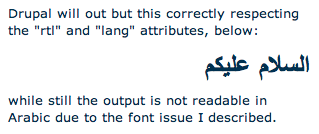
<h1 lang="ar" dir="rtl">السلام عليكم</h1>Drupal will out but this correctly respecting the "rtl" and "lang" attributes, below:
السلام عليكمwhile still the output is not readable in Arabic due to the font issue I described.
The approach I'm suggestion is to code a detection method in php that will go through the post string and check if it contains the "lang" attribute with it's value set to "ar", upon returning true, the function will automatically insert an inline style string
(of the form style="font-family: 'Verdana', Arial, Tahoma,;" )
to override "font-family" style already set for
<body>which does not support Arabic.OF course this approach will require Arabic users to make sure they use lang="ar" in their posts in order for Drupal to display them correctly.
Hope this approach will be acceptable by drupal.org team.
Comment #3
gregglesIn the redesign the font family will be: lucida Grande,Helvetica,Arial,sans-serif. Will that work for Arabic?
Maybe the solution is just to roll out the new theme on g.d.o
Comment #4
Sourour Al-khatib commentedHi Greggles
I have done testing for the font-family "lucida Grande,Helvetica,Arial,sans-serif" and it failed.
From the one you mentioned ONLY "Arial" and "sans-serif" will correctly display Arabic, and again as default is "lucida Grande" that will not solve the issue.
I have attached image for those how don't have Arabic support on their systems ( and I know most of you don't) to better understand the issue:

Comment #5
avpadernoIt seems I can correctly see the text, though I have Lucida Grande on my Mac.
It could be that changing the font could resolve the problem to somebody, but create problems to somebody else.
Comment #6
theroyal commentedMaybe I didn't understand this issue very well but :
I can see that in arabic correctly too
I am using
system : Macbook pro leopard
browser : safari 4.0 & firefox 3.5 both are working correctly.
and on my windows XP and Vista PCs I never faced problem with arabic fonts for 2 years until this moment
I hope this will help
Comment #7
Sourour Al-khatib commentedHi kiamlaluno,
It is a browser oriented issue, IE on windows will show Arabic correctly even if the font does not support Arabic but other browser I tested on windows (firefox and chrome) will not display Arabic correctly if the font used in HTML does not support Arabic natively .
Some of the users using Mac also reported the issue. Are you using Safari ???, since Safari might be able to replace the font if it does not support the languages smiler to IE in windows, that I haven't tested.
Comment #8
dman commentedFWIW, I see the following on chrome, OSX.
It looks a lot like the one from kiamlaluno, but to my eye is probably a different font and also seems to match what you are looking for.
(adding your example image here)

In Firefox 3.5.7 on OSX, I got just symbol blocks, total failure.
To narrow it down - the repeatable problem situations are ? :
Firefox 3.5.7 on OSX (total fail)
Firefox (version?) on Windows (flow rendering issue)
Chrome (version?) on Windows (flow rendering issue)
Which others?
Comment #9
Sourour Al-khatib commentedThanks for the input guys
I think the only way to insure Arabic is supported regardless of browser ability to replace nonsupporting font with supporting fonts is to use a font that natively can support Arabic font face.
Comment #10
bonobo commentedWhat are some of the better fonts for supporting Arabic (and other rtl languages)?
I suspect that if we're having issues in Arabic, we might also be having issues with other rtl languages.
Comment #11
Sourour Al-khatib commentedThe most suitable fonts for displaying Arabic I have used and are commonly used on Arabic website are by order : Tahoma, Arial, sans-serif. There are several other fonts but these are most common where they come pre installed on Linux, Mac and windows so you can assure they will be displayed correctly on all major browsers and cross platforms.
For other languages written RTL like Persian (which uses same Arabic letters), Urdu and other Chinese languages. I think the problem persists. Fonts not supporting these languages on browsers-OS combination will result in display issues.
For a comprehensive solution Drupal must be able to detect input language and enforce font replacements accordingly.If drupal does this it will be the first browser based solution offering this unique ability.
A simple straightforward solution might be through introducing a language selection drop-down menu in the post editor UI. Users writing in mix mode (RTL and LTR in the same string) will be required to select (highlight) the text written in RTL languages and then select language name from the drop list. This will tell drupal to process the selected text by adding appropriate language font styling to the output formatted html. I think a module could be built for this functionality to allow sites with multilingual input to over come font limitations set by themes or modules templates.
Comment #12
gábor hojtsyWe can just switch to provide the body font face as a little inline style depending on language IMHO if that solves the language issue here. Or just override the body font face if we need to for a language (from the theme).
Comment #13
sinasalek commentedWe've created a Persian group and we have the same issues. http://groups.drupal.org/persian
I changed the title to cover both languages since they both have almost identical issues.
We're currently using Firefox's "Switch Page Direction" as workaround, it's works but even assuming that everyone has Firefox applying it to each page is really frustrating.
According to the previous comments here and also the issues we have, we need several changes for getting Arabic/Persian to work properly (Sorted by priority) :
Also note that currently Drupal users from several different countries also have these issues if they want to use their languages. http://wiki.answers.com/Q/What_languages_are_read_from_right_to_left
We (Persian Group) are willing to help Drupal infrastructure team for fixing these issues.
Comment #14
gregglesHi Sinasalek,
If you can help point me to the po files that are applicable for the modules used on g.d.o I will happily import them. I'm greggles on irc and would need a little help setting it up.
I don't think there is a module to choose direction for whole page or key elements.
Similarly, I don't think there is a module to choose font based on the current language, but I'd be very interested in that.
I think it's an XSS problem to allow users to set a style="direction" element, so we can't do that.
I'm not sure what you mean by translation.
Comment #15
yhager commented> I don't think there is a module to choose direction for whole page or key elements.
Not exactly what you want, but there is http://drupal.org/project/pdir
Comment #16
sinasalek commentedHi, @greggles
Sure, Which modules are used on groups?
My mistake , it's already possible. perhaps a syntax error caused input format to ignore it.
I meant translating the interface (Generic Menus, Helps, Buttons, etc)
Comment #17
sinasalek commentedGood one , thanks
Comment #18
gregglesYou can see most (if not all) of the modules used on groups with http://groups.drupal.org/about
Comment #19
sinasalek commentedThanks @greggles
Others : I created a wiki page and assigned it to all related groups to join forces and also simplify things. You're welcome to modify this page.
http://groups.drupal.org/node/49798
Comment #20
avpadernoComment #21
gregglesGiven the new bluecheese them (what is on drupal.org) is about to be released on groups.drupal.org is this still relevant?
My hope is that it will be fixed by that so marking fixed (I guess duplicate would also be appropriate)