

Closed (fixed)
Project:
Views (for Drupal 7)
Version:
6.x-3.x-dev
Component:
Code
Priority:
Normal
Category:
Bug report
Assigned:
Unassigned
Reporter:
Anonymous (not verified)
Created:
28 Jan 2010 at 12:48 UTC
Updated:
11 Jul 2015 at 02:47 UTC
Jump to comment: Most recent, Most recent file

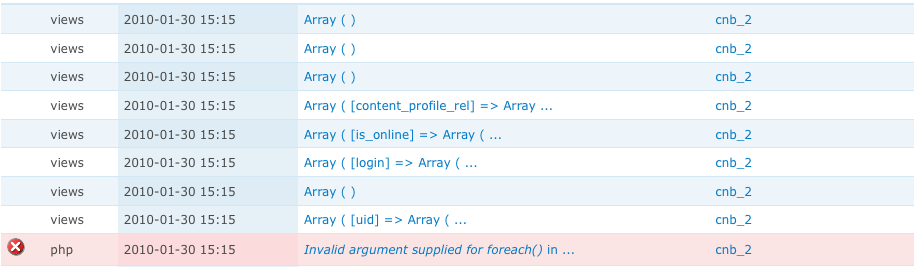
Comments
Comment #1
dawehnerCan you specify when this error exists?
Comment #2
dagmarAlso, did you clear your cache? Views 3 alpha 2 needs a rebuild of the cache if you upgrade from views 2.
Comment #3
Anonymous (not verified) commentedsure, I've updated from 6.x-3.0-alpha1 to 6.x-3.0-alpha2, cleared the chace and got the error in the frontpage
Comment #4
dawehnerAlso the views cache? You can do this at admin/build/views/tools
Comment #5
dagmarCould you export your view?. I'm pretty sure that there is a problem with the new pluggable areas system.
Comment #6
tomsm commentedI am having the same issue.
I get the error message on every page, including the frontpage which is still the default that comes with drupal 6 (= without a view).
I cleared all caches and executed update.php.
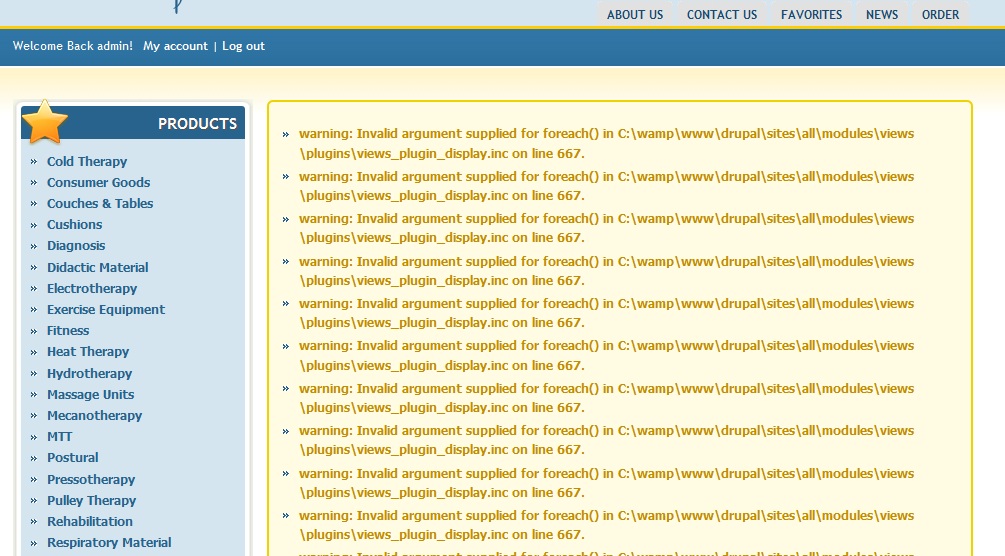
I have included a screenshot of my frontpage and also the export code of my view.
Comment #7
silkyD commentedI was running into this same exact problem. The following fix seemed to work for me: Before the upgrade to alpha2, one of my views was spec'd to display text if there was an empty result set. I noticed that after the upgrade, that empty text had been lost. I went in to the view, re-entered the text that was supposed to display into the Empty Text area, and the warning has disappeared.
Comment #8
dagmarWell, this shouldn't happen :)
Thanks for the info, I will see what can I do.
Comment #9
dzigman commentedsubscribe
Comment #10
rjbrown99 commentedI dropped this in above line 667:
I'm seeing a bunch of empty stuff showing up. Screenshot attached.
Comment #11
pthompsen commentedsubscribe
Comment #12
dagmarMmm, I tried to replicate this issue but I can't.
#6: @tomsm Frontpage is a view if you enable it from views/build/views.
I would like to be sure that this is a bug in views and not a bad upgrade or a cache problem. I have coded the instructions to convert old view into the new pluggable area system and it seems to be working fine, at leasts in my tests. This code is available in views/plugins/views_plugin_display.inc in the init() function.
Here is the code, maybe your cases make this conversion fail:
@tomsm could you paste an screen shot for the views UI for a view?
@rjbrown99 thanks, but this is not complete useful, if you provide a views_var_export($this) for this position I will appreciate.
Comment #13
rjbrown99 commentedThanks Dagmar. Stupid question - is there any way to get a nicely formatted views_var_export output? Every time I drop it in right above line 667 it takes over all screen output for the site. I.E. it's all white pages with unformatted views dump. That's true even when I try to save it to a variable -
I also tried redirecting its output to drupal_set_message and watchdog and neither one of those worked either.
I have the unformatted screen dump of the output but it's not terribly helpful. Thanks.
Comment #14
merlinofchaos commenteddevel.module's dsm() is nice for this.
Comment #15
rjbrown99 commentedThanks Merlin. Maybe I am just thick in the head with this one. I tried:
and it had the same effect. As soon as views_var_export is enabled at all in any way, all screen output goes away and I get a white page with a giant unformatted dump of the variables. I'm poking this code into views_plugin_display.inc, right above the foreach statement that causes the problem. I am assuming that is the best place to determine which specific variable might be causing the error.
Comment #16
merlinofchaos commentedJust dsm($this);
Comment #17
srandolph commentedI am only getting one of these messages on each page after upgrading
Comment #18
srandolph commentedI am only getting one of these messages on each page after upgrading until I remove a blocked view from publish.
Deleted and rebuilt that view and problem went away.
Comment #19
rjbrown99 commentedThanks Merlin, that worked. Now I'm facing 40 objects, some of which come from views_plugin_display_page, some from views_plugin_display_default, and some from views_plugin_display_block. The particular page I am looking is a page view of nodes, and there are three side blocks that are block views of nodes. This page consistently throws three watchdog errors with invalid arguments on that line 667.
I posted the output on a private link and PM'd dagmar and dereine with it. The saved HTML output is about 25 megs but it's on a fast link. If you want to have a look drop me a message as well and I'll send you the link. Thanks.
Comment #20
lemartialou commentedI had the same errors, only with some of my block views.
It appeared to be related to the header and footer parameters of the views.
I created and deleted dummy headers and footers for my views, and then all went back to normal :)
Don't know if it helps...
Comment #21
hchall commentedOnly some views, or pages with block views, display one to many repetitions of the error message:
sites/all/modules/views/plugins/views_plugin_display.inc on line 667
Couldn't resolve views issues with solution from lemartialou (#20) and clearing views cache did not resolve the issue.
I am also seeing the following error on the edit pages of views that display errors:
modules/views/includes/admin.inc on line 1284
Interestingly, the number of repeating warning messages after saving the pages is reduced when the pages is refreshed.
thanks to developers for looking into this. Let me know if you need more info, such as which views-related modules are running.
Comment #22
rjbrown99 commentedInteresting. I was going to follow the advice of #20 to create/delete/recreate the header/footer/empty for one of the views on the page I was having an issue with. I did not have a header or footer but I do have empty text. I opened that up, removed it, and saved the view. When I go back to add empty text back to it, I get an HTTP 500 error on the page, and this in the log:
Line 1924 is this:
So I decided maybe the pager was at fault. I also get the same error when trying to manipulate the pager settings. I can't actually change the pager settings - at all. I dropped the dsm($this) on line 1924 to see what it looked like and I get a views_plugin_display_default object. Beyond that I'm not sure exactly what to look at. I have handlers, options, and definition in the dsm output
I finally got the pager to save using "All items", and went back in to edit the view. I switched back to full pager, re-added the empty text, and saved even though it complained about that has_more_records() issue. The net result is I have 4 log entries for "Invalid argument supplied for foreach" instead of 3.
Comment #23
likewhoa commentedsame issue here but only on my group pages. I verified that any blocks on there did not have any footer or header text since that's what some are reporting. Seeing that that's not the case it must be something else. I have cleared all views cache and should be on latest -dev modules. I can only try to remove some of the blocks on that page to see if it's one of them doing it. I will report later.
Comment #24
dawehner@likewhoa, could you please export some of this views, without saving them?
This would be cool, because than the conversion code could be tested.
I hope you don't use the alpha on a production site.
Comment #25
likewhoa commented@dereine I use views-6.x-3.x-dev on the site. below is an export of the views since the page with the bug in question has multiple blocks.
I really don't know what could be the cause here and I don't have time to troubleshoot this issue until the weekend.
Comment #26
bwynants commentedseems like #20 fixed my problem with this as well
Comment #27
dagmarOk, I did this:
Installed a new Drupal site.
Installed Views 3 - Alpha 1.
Enabled Frontpage.
Changed the empty text.
Upgraded to Views 3 alpha 2.
I didn't cleared the cache.
I edited the view and saw a: Global area: Warning Handler not found.
I created a new block. And did change some filter to produce a empty view.
Saved the view.
The empty text worked fine.
And in none of this steps I can reproduce the bug.
So, If none of you can provide an step to step to reproduce this bug I have to think that it is not only related to views. Please, again, provide a more detailed explanation of what you did and what did you do to fix the problem solve.
Explain if you only are getting this warning in blocks, or pages are problematic too.
Comment #28
lemartialou commented@ likewhoa : I didn't have any footer or header set on the views I fixed, I had to create them and then delete them. Don't know why but it worked.
Comment #29
likewhoa commentedthat's not a solution for me as I have already tried it. I also have over 7 blocks on the page in question and exporting them all will only happen if someone request it, otherwise I am just going to remove blocks until I can rule out the one that's triggering this bug.
@dagmar the site that is experiencing this is managed by multiple developers and we all take care of updates every week so the best I can do is probably go back and reload a backup that's bug free and send you a difference on the modules directory.
I tried what others here say is the "fix" which is adding and removing footers and headers on the views, but that didn't work for me. Anyways, I will check some backups until I find one that is bug free and return with a difference this week.
Comment #30
Victor Safronov commentedGot the same problem after upgrading Views-2.6 to 3.0-alpha2
All caches cleared.
Warning is shown on every page (instead of front one, but there are no $content output on my front page).
I have declared two views, both of them are displayed as blocks. When I'm trying to edit one of them I see one more warning: "Invalid argument supplied for foreach() in /var/www/html/sites/all/modules/views/includes/admin.inc on line 1284." I suppose this warning could be useful to find the bug.
Oh, and I don't use headers and footers in my Views..
Comment #31
Victor Safronov commentedJust exported and re-imported that view with problem. Now everything's fine. No more warnings...
Comment #32
Hagay commentedI'm facing the same:
I've tried exporting / re-importing the view, no success.
I've also noticed, that the date_field I'm using, is not listed in the 'arguments' and the 'filters' dropdowns.
I can use, only for the filter, the Date(Node date), but then I can't complete the definition/configuration:
It seems like one is conflicting the other.
In any case, the date filter is not added to the query!!
And again I can't have Date fields as arguments!
Another related issue: the calendar (out of the box) view, is affected this way as well, but it still runs properly. If I try to edit it, or clone and edit, it breaks
Modules:
CCK - 6.x-3.x-dev
Date - 6.x-2.4
Views - 6.x-3.0-alpha2
Comment #33
thompson commented#20 solved my problem too.
Comment #34
Hagay commentedDowngrading to Views 2.8 seems to solve the problem.
Comment #35
dagmarI'm going to try to explain why this is happening, maybe it help us to find the raise of the problem.
In Views 3.x-Alpha-1 footers, headers, and empty text were uniques. User can define only one header, one filter and one empty text.
With Alpha-2 an new approach was implemented to this areas. Now, users can define multiple areas for each one of this sections, i.e. you can define 3 areas to display in the header, two for empty text, and one for footer. And use in each area a different input format or even a custom PHP script.
To take care to those old views, this new feature introduces a converter from one area to multiple areas. In my test this works fine, and the patch was committed as is in the alpha-2 of views.
All this reports seems to be produced for a kind of configuration that was not contemplated in the conversion script (which doesn't needs to run update.php)
#34: This is not a valid solution in this case. We have to fix this in views 3 because views 2 doesn't use multiple areas.
#33: related to #20: it seems to be a cache problem. When you saved again your view, views update the cache and loaded the new multiple handlers.
#32: Your issue is not totally related to this problem: See this patch to work with Date and Views 3: #698522: Make date compatible with both views 2 and views 3
#31: Same to 33.
#30: please export in your view a attached file. Your case is interesting to found the cause of this problem.
Comment #36
obisun commented#20 worked for me also....
Hope this helps someone else too.
Comment #37
YK85 commentedi was able to remove the "on line 667" warning but still getting warning "views/includes/admin.inc on line 1284"
Comment #38
likewhoa commented@dagmar How can I help you troubleshoot this issue? I have two pages with this error, one is when viewing a group's page and the other is the user's profile page. I am not getting this error on any other pages and I have already tried what others here say fixes it, which is creating and deleting dummy footers and headers.
Comment #39
Scott Reynolds commentedI have been able to reproduce with the latest dev
Steps
Comment #40
Scott Reynolds commentedThe View can actually be Imported via the tab and this still happens. Which leads me to believe that its in the Export where the bug resides.
Comment #41
Scott Reynolds commentedThe issue has to be that 'header', 'footer', and 'empty' don't actually have a different 'plural' property. This screws up the export and it doesn't export an array().
edit: For instance, the 'plural' for handler type 'header' is 'header'. Its always singular.
Comment #42
aegnor commented#20 rulzzz
Comment #43
dagmar20# is not the solution for this issue.
Thanks @Scott Reynolds now I can replicate this issue and I'm working in a patch to solve this problem.
Comment #44
jrabeemer commentedI have the same issue upgrading from Views 3 Alpha 1 to Alpha 2. Will test once patch is submitted.
Comment #45
syka commentedI had the same problem. #28 helped. Interesting :)
Comment #46
Scott Reynolds commentedMade some more progress on this. So I have discovered that this is probably the issue and its not just related to 'area' handlers.
The problem is when you set up the default display with a set of handlers for any type (filters, arguments, relationships, header, footer, empty text) and then in another display override that type and remove all the handlers.
Export and Import that View back in, and you will get this error. And it has to do with handling the export like this:
where 'filters' is the type.
Comment #47
Scott Reynolds commentedok here is a patch. So the problem was:
display plugin::get_options() doesn't handle the case where the $option is not defaulted and it is not $this->options array.
So this patch cleans that ups and fixes it up around the two places where it caused problems display_plugin::get_handlers() and in the admin ui.
Not sure I like this as a fix though, seems that the import failed to initialize $handler->display->options[$plural] = array().
Comment #48
likewhoa commentedThanks @Scott Reynolds, patch applies cleanly but now the pages in question produce these errors.
Not sure if related but at least the bug in question is gone. I haven't updated calendar and currently there are not updates to it.
Comment #49
Scott Reynolds commentedprobably related, but *not* on point on this issue. Again this isn't really a fix but a work around.
Comment #50
blup commentedsubscribing
Comment #51
digi24 commentedThanks Scott, #47 seems to work for me.
Comment #52
jwaxman commentedsubscribing
Comment #53
mvc#47 works for me, thx
Comment #54
likewhoa commentedI am sure #47 works for most that are not using calendar.module maybe but I will need someone else to confirm this.
Comment #55
rjbrown99 commentedI know a bunch of others have chimed in but I'll add that #47 works for me as well. I do not have the calendar module.
Comment #56
blasthaus commentedsame error line 667, tried everything, including the patch but got this error on a Mac using Terminal
File to patch: includes/admin.inc
patching file includes/admin.inc
Hunk #1 succeeded at 442 with fuzz 2 (offset -143 lines).
Hunk #2 FAILED at 523.
1 out of 2 hunks FAILED -- saving rejects to file includes/admin.inc.rej
Comment #57
dagmarPlease, don't change the title of this issue.
If the patch doesn't apply to the last dev of views 3.x please change the status of this issue to needs work. Also, provide the content of admin.inc.rej would be useful.
Comment #58
anawillem commenteddid anything ever get solved for you about this? i applied the patch for the date module that is recommended on:
http://drupal.org/node/698522
and it got rid of the issues on every single page EXCEPT where calendar views are displayed...trying to find a pattern, but am not able to.
Comment #59
anawillem commentedthe above comment was in reference to likewhoa in #48:
likewhoa - February 16, 2010 - 22:59
Thanks @Scott Reynolds, patch applies cleanly but now the pages in question produce these errors.
warning: array_key_exists() [function.array-key-exists]: The first argument should be either a string or an integer in modules/calendar/includes/calendar_plugin_display_attachment.inc on line 42.
warning: array_key_exists() [function.array-key-exists]: The first argument should be either a string or an integer in modules/calendar/includes/calendar_plugin_display_attachment.inc on line 42.
warning: array_key_exists() [function.array-key-exists]: The first argument should be either a string or an integer in modules/calendar/includes/calendar_plugin_display_attachment.inc on line 42.
warning: array_key_exists() [function.array-key-exists]: The first argument should be either a string or an integer in modules/calendar/includes/calendar_plugin_display_attachment.inc on line 42.
warning: array_key_exists() [function.array-key-exists]: The first argument should be either a string or an integer in modules/calendar/includes/calendar_plugin_display_attachment.inc on line 42.
Comment #60
dkane commentedI reverted to 6-1.x-2.8 (from 6.x-3.0-alpha2) and my issue went away.
Curious to know what the issue actually is.
Subscribing.
Comment #61
blasthaus commentedmy bad, i mistakenly tried the patch against the alpha2 version, not latest dev. all seems ok now. thx
Comment #62
gilcpd commentedThis is crucial for me to theme the search with Solr :'( images are not showing now.
Correction the lightbox2 images don't show.
I'm using Drupal 6.16, upgraded Views from 6.x.2.8 -> 6.x.3.alpha
CCK 3 Dev with GROUP BY patch and Date module patch applied.
Also when editing that view with lightbox2 this error comes up:
warning: Invalid argument supplied for foreach() in C:\xampp\htdocs\mysite\sites\all\modules\views\includes\admin.inc on line 1284.
Comment #63
likewhoa commented@glicpd you should file a separate bug report for your issue as it's not related to this one.
Comment #64
spelcheck commentedlikewhoa and anawillem, I have calendar installed and was running into the same issue as both of you.
line 42: if (!array_key_exists($default, $types)) $default = 'month';
function calendar_type() {
$types = calendar_display_types();
$default = $this->get_option('calendar_type');
+ $default = trim($default);
if (!array_key_exists($default, $types)) $default = 'month';
return $default;
}
This solved it for me (with the addition of the date patch mentioned above and the views patch)
Comment #65
dagmarOk, patch for #47 seems to be oriented in the right direction.
But, I don't like too much the fact to modify so many code for a simple foreach warning.
Instead of #47 I'm providing a new patch that returns the 'default' value defined in the option_definition() function for views_plugin_display(). Since all keys define their own default values, even headers, footers and empty texts, this patch fix the problem.
In my opinion there is probably another issue here. As @Scot Reynolds said in #47
However, if a alpha 3 will be released soon, maybe this small patch is a good change of avoid this ugly warning.
BTW, I only can replicate this issue when a view is imported, for this reason, probably, this is not so critical.
Comment #66
craig_ commentedWas having the same problem as described, and have found a way to fix on my system without patching.
Problem originated when exporting a View (v3) and placing into mytype.views_default.inc
the exported code included the following line under Display: Page, which I commented out and the warning was gone. (related to same issue as patched by @Scott Reynolds)
Comment #67
craig_ commentedfound a way to fix my problem from the views UI.
http://mysite.com/?q=admin/build/views/edit/myviewname
Click on Page
if Arguments has the value of "None defined", but it's *not* greyed/italicized, then Default is overridden, but no values are present.
Hence, "invalid argument foreach()"
Comment #68
likewhoa commentedyour #66 and #67 are not a fix for users using calendar.module.
Comment #69
likewhoa commentedyour patch causes my nginx+php-fpm to crash.
Comment #70
dagmar@likewhoa are you talking about patch in #65?, if yes, please mark this issue as 'needs work'
Comment #71
dagmarOk, I think I got it. The problem was that before pluggable areas, header, empty and footer can be FALSE, but now they need to be at least an empty array. This patch complete the upgrade version from views 2.x to views 3.x, please review.
Comment #72
likewhoa commentedyea i meant your patch, but now your new one fixes the issue. thanks for the quick response. We just need others to confirm it so we can set it to RTBC.
thanks again, sorry for the confusion before as I should have set 'needs work'
Comment #73
dagmarThanks for the review. As you suggested, lets wait to mark this issue as RBTC after a few more people confirm that works.
Comment #74
Scott Reynolds commentedAs I mentioned in #46 I believe it applies to all handlers not just header, empty and footer
Comment #75
likewhoa commenteddagmar I always defined RTBC as Ready to be Committed :D
Comment #76
dawehnerCouldn't we define a simpletest to test this? I think it would be doable
Comment #77
oskar_calvo commentedThe patch works great for me
Thanks dagmar.
Oskar Calvo
Comment #78
Ole Martin commentedWere do I put these codes in plugins/views_plugin_display.inc ?
Even better, could someone posted a pre patched file for us who do not have knowledge about this? I would be very happy
Comment #79
dawehnerRead at http://drupal.org/patch/apply how to apply patches.
Its important that this is a patched file of the latest dev version of views... Its not for a patched alpha2, this might brake something if you use this file with it.
Comment #80
Ole Martin commentedThank you so much for the file and link. I'll take my time to figure out how to do this. Looks like there are many different patches you have to use.
Comment #81
Scott Reynolds commentedhttp://skitch.com/supermanscott/nhaxd/filters-bug
Its not just area handlers.
Comment #82
dawehnerSorry but this is a total different issue, it would be cool if you could create a new issue.
I created the new issue with a patch, please test it :)
Comment #83
dawehnerupdate status
And added the link: http://drupal.org/node/759082
Comment #84
bsorrells commentedHi Everyone. We're using Views 6.x-3.0-alpha2. We were getting the line 667 error. We were able to eliminate the error by adding in a blank Empty Text field.
Comment #85
rooby commented#551700: Invalid argument supplied for foreach() in /.../modules/views/plugins/views_plugin_display.inc on line 568 seems to be the same as this problem but in 6.x-2.x
Comment #86
merlinofchaos commenteddagmar's patch committed to 6.x and 7.x
Comment #88
liliplanet commentedHi,
I'm still having serious problems with:
Fatal error: Call to a member function has_more_records() on a non-object in /home/public_html/sites/all/modules/views/plugins/views_plugin_display.inc on line 1992even after adding dagmar's patch ..
Originally updated to 6.x-3.0-alpha3 from 6.x-2.8 when the error started, then overwrote views with views 6.x-3.x-dev of May 20, 2009 - 05:04
Error is happening very often, even when users try to register.
Is there any way that I could go back to 6.x-2.8 or dev without from a backup please? as have had many new entries since then.
Look most forward to any reply as this is an urgent issue ..
Lilian
Comment #89
dagmarThis is a different issue. Please, don't hijack issues.
Also, Why did you post this issue again, if you filled a similar bug report a week ago? #773036: function has_more_records() on a non-object
Comment #91
kumaryadav.anil commentedI have same issue when view the webform type node.
warning: Invalid argument supplied for foreach() in sites/all/modules/views/plugins/views_plugin_display.inc on line 574.