We had it working and were very pleased. We initially enabled all the content types for a group (our first group on the site). We unchecked CTs and watched how the authenticated user could no longer see a link in the details block to create those CTs. Very cool. THEN, we disabled all the CT in group 1 for its members. Now we can't make them come back. We added two other groups and they are in the same situation.
I am guessing this is a block issue because my authenticated user can still gain access to the create content screen for that CT. In a test, I entered the "/node/add/ct-name?gids[]=2" path in a browser where authenticated is logged in and authenticated can access the create content form for that CT.
I have tried to clear cache, rebuild permissions, and uncheck and recheck "create" permissions. I have double checked both the CTA admin screens and the group CT admin tab to make sure they are consistent. I tried creating a group that had not been added to the CTA admin list, still no good.
I swear it was working but now it is not. HELP! Please! Is it something I did? I can't imagine.




Comments
Comment #1
idcm commentedHere are some screen shots I didnt have before.
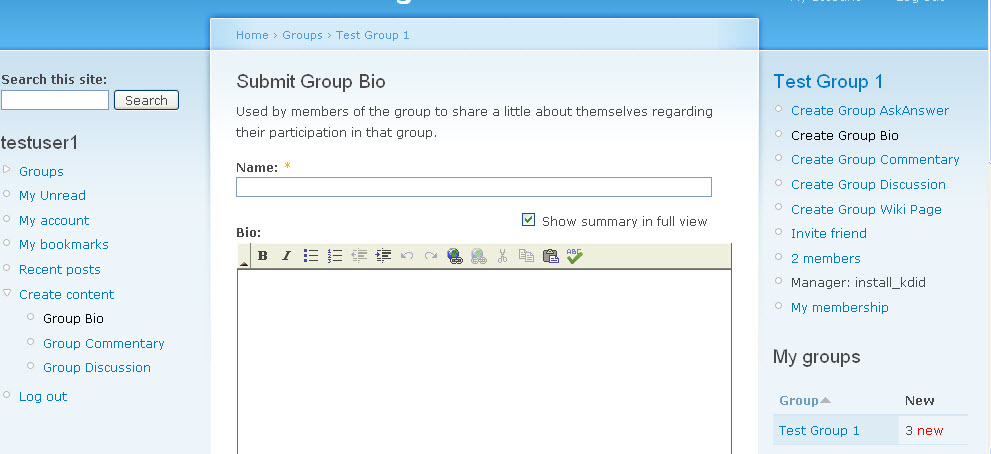
createcontentscreen.jpg - this one shows an authenticated user (testuser1) logged in and on path node/add/group-bio?gids[]=2. You will see the og details block on the right. It shows 5 content types that authenticated can supposedly create.
thisiswhatshouldshow.jpg - this shows the CTs I have selected for authenticated user. You can see that only 3 of the six should be available to the authenticated user. Authenticated user does not have permission to create the sixth CT (the admin content ct) at all so that works because of Drupal's permissions.
fromgrouphomepage.jpg - this shows what the og detail block looks like to authenticated member in this group. It shows authenticated can't create anything.
To sum things up, the og details block is not behaving consistently. When we first installed this module, I didn't even see the CTA og details block. Then suddenly it appeared when we switch themes. Don't know if that helps any.
We really need someone's help.
Comment #2
Anonymous (not verified) commentedWould you advise what modules you have installed.
Best, Paul
Comment #3
idcm commentedJust for grins, I changed theme to Garland - which is what I was using for the admin theme. The authenticated user gets the og details block that shows 5 CTs versus the three they should see. So ... in one theme, I dont see any options to create, in another (Drupal's core theme), I see all of them when I should only see three.
hope this helps with the diagnosis. I am available to skype and GTM this if you need to see it. contact me via my Drupal contact form. thanks
Comment #4
idcm commentedokay, after a lot of scenario testing, I am able to identify the issue. I share it here until Paul or someone can get it resolved.
First, note that there are two tabs in the OGCTA config screen: overview and assign content types. They both do essentially the same thing. However, if you use the tab assign content types to uncheck any of the sitewide content types, you cause a chain reaction where specific values get deleted from the database. Specifically, you loose the values for the group CT (the CT that creates the group). Without that available in the group, you loose that ability to make your group content types available to group members.
Here is are the results of my investigation:
Long story short - here is the problem. If you go to /admin/og/og_content_types/admin/-1 and uncheck CTs from this site wide list, all is fine, nothing breaks int he groups. If you go to /admin/og/og_content_types/admin and click on the site wide ajax link and uncheck some CTs, the database gets messed up.
Below are db record comparisons for sitewide, default, and test group 1 before I used /admin/og/og_content_types/admin and after.
SITEWIDE - All seems okay here.
fresh install
(-1, 'Site Wide', 'a:6:{s:5:"group";i:1;s:19:"group_admin_content";i:1;s:10:"group_post";i:1;s:10:"group_wiki";i:1;s:4:"page";i:1;s:5:"story";i:1;}', 'a:6:{s:5:"group";i:2;s:19:"group_admin_content";i:2;s:10:"group_post";i:2;s:10:"group_wiki";i:2;s:4:"page";i:2;s:5:"story";i:2;}');After changes the site wide setting with /admin/og/og_content_types/admin
(-1, 'Site Wide', 'a:6:{s:5:"group";i:1;s:19:"group_admin_content";i:1;s:10:"group_post";i:1;s:10:"group_wiki";i:1;s:4:"page";i:1;s:5:"story";i:1;}', 'a:6:{s:5:"group";i:2;s:19:"group_admin_content";i:2;s:10:"group_post";i:2;s:10:"group_wiki";i:2;s:4:"page";i:0;s:5:"story";i:0;}');DEFAULT - all is not well. Notice how s:5:"group";i:1; disappears. Notice how s:4:"page";i:1;s:5:"story";i:1; disappear as well. A test shows that if you use /admin/og/og_content_types/admin/-1, these values do not get deleted.
fresh install
(0, 'Default', 'a:6:{s:5:"group";i:1;s:19:"group_admin_content";i:1;s:10:"group_post";i:1;s:10:"group_wiki";i:1;s:4:"page";i:1;s:5:"story";i:1;}', 'a:6:{s:5:"group";i:1;s:19:"group_admin_content";i:1;s:10:"group_post";i:1;s:10:"group_wiki";i:1;s:4:"page";i:1;s:5:"story";i:1;}');After changes the site wide setting with /admin/og/og_content_types/admin
(0, 'Default', 'a:3:{s:19:"group_admin_content";i:1;s:10:"group_post";i:1;s:10:"group_wiki";i:1;}', 'a:3:{s:19:"group_admin_content";i:1;s:10:"group_post";i:1;s:10:"group_wiki";i:1;}');TEST GROUP 1 - same issue as default. Without the the s:5:"group";i:1; value, it doesnt work.
first time saving test group 1
(1, 'test group 1', 'a:6:{s:5:"group";i:1;s:19:"group_admin_content";i:1;s:10:"group_post";i:1;s:10:"group_wiki";i:1;s:4:"page";i:1;s:5:"story";i:1;}', 'a:6:{s:5:"group";i:1;s:19:"group_admin_content";i:0;s:10:"group_post";i:0;s:10:"group_wiki";i:1;s:4:"page";i:0;s:5:"story";i:0;}');After changes the site wide setting with /admin/og/og_content_types/admin
(1, 'test group 1', 'a:3:{s:19:"group_admin_content";i:1;s:10:"group_post";i:1;s:10:"group_wiki";i:1;}', 'a:3:{s:19:"group_admin_content";i:0;s:10:"group_post";i:0;s:10:"group_wiki";i:1;}');I have sent all these db details to Paul but if rconstantine needs this info, or anyone else, I thought I would share it here. If I could code, I would provide a patch but I can't, sorry.
For now, just dont use the assign content types tab to uncheck or recheck your sitewide CTs.
Comment #5
idcm commentedDocumentation for this module can also be found at http://groups.idcminnovations.com/articles/using-og-content-type-admin-m...
Comment #6
Anonymous (not verified) commentedI can't reproduce this at all. Everything seems to work perfectly.
Would somebody else mind taking a quick look ?
Best, Paul
Comment #7
jcmiller09 commentedI must have fouled up the database values for content types already in the system with the bug described above, but I have had success with all new content types. Links to create content for the new content types appears correctly in the 'Group details override' block but I can't seem to reset the older content. Does anyone know a way to get content types to start appearing correctly after they've been messed up by the 'assign content types' tab bug?
I have tried going into the og_content_type_admin admin page and unchecking everything in the 'overview' tab, then clearing cache and re-checking. I also tried disabling then uninstalling, and re-enabling the og_content_type_admin module, but nothing seems to help get those old CT's to show up as links in the Group details override block.
thanks!
Comment #8
idcm commentedI can now reproduce the issue using both "assign content types" links. I haven't changed a thing on the site where the testing was originally done (see comment #4). It has stopped working on a client site as well.
For some reason, when we save the default, s:5:"group"; gets stripped out of default and subsequent group records. Without s:5:"group"; in the database record for default and the sites, this module doesn't work.
help! please!
Comment #9
idcm commentedthe only way I could find to fix existing groups with this issue is to uninstall (not just disable) the module and re-enable. But now I am not having any luck getting it to work.
Comment #10
schnippy commentedI have been working on this with idcm and was able to replicate and resolve this error. In the end it appears to have been a combination of the "Group Group" error reported in http://drupal.org/node/724454 and the issue with how the module is trying to test for matches in http://drupal.org/node/734506.
For our project, we have a number of group-only content types, which are similar to sitewide content types so we identified these by calling them "Group " so we might have:
In the function og_content_type_admin_block_details function, it was creating a test condition to walk through the array and test to see if that existed in the group links and if so unset it from the array. However, it does this using the strstr() function which is testing if the $needle is contained within the $haystack:
The problem here is that as it iterates through the types, it will match on "Create Group" before it gets to "Create Group Foo" and because there is no array entry for $activated_types[group] the second condition is always going to be true and all the links are cleared from the menu. I addressed this in the following patch file by rewriting the test condition to match the full text of the Create link. To do this, I first have to strip tags then recreate the test condition as an equivalence:
(no idea why I need to create the $tmp variable first instead of just using $type->name in the t() function, but that was the only way I got it to work -- something I'm missing here?)
Comment #11
schnippy commentedCorrecting status of this patch to -> needs review.
Comment #12
baff commented#10 worked for me - links are showing
Comment #13
mstef commentedPatch from #10 does not work for me.
Comment #14
micnap commented#10 did work for me. Thank you!
Comment #15
ronaldmulero commented#10 works for me. Nice to have those links back. Thank you.